Qwen Code Weekly: Automated Workflows, Better Extension & MCP Management, VS Code Sidebar
This week we released v0.12.0 major version and 2 bugfix releases, bringing Hooks automation system, MCP management enhancements, VS Code sidebar, and more exciting updates.
✨ New Features
Hooks System: Let Qwen Code Automatically Execute Your Scripts
Now you can have Qwen Code automatically execute your scripts at specific moments. For example, automatically run tests before committing code, or auto-format after generating code—fully customize your workflow.
The Hooks system allows you to trigger custom commands at key lifecycle events in Qwen Code, such as:
- Auto-inject project context: Automatically inject key project information every time a user asks a question
- Auto-generate work summary logs when AI ends: Automatically save a summary of the conversation to a log file when the AI finishes
Use Cases:
- Automatically run tests before committing code to avoid pushing problematic code
- Auto-format after generating code, no need to manually run prettier
- Automatically save work summary at the end of each conversation for easy review
See PR #1988
AI Proactive Questions: When in Doubt, Ask You
Introduced a new ask_user_question tool that enables AI agents to ask interactive questions during task execution. This makes workflows more dynamic, allowing agents to collect user preferences in real-time, clarify requirements, and make decisions on implementation approaches.
Use Cases:
- AI asks for confirmation before dangerous operations to prevent accidental file deletion
- When requirements are unclear, AI proactively asks follow-up questions to get it right the first time
- Gradually clarify requirements like a conversation, without needing to think through all details at once
See PR #1828
Extension Management Interactive TUI: Install Extensions Like Browsing an App Store
Installing extensions is as easy as installing apps. Open the visual interface, browse, install, configure, and uninstall with one click—no need to memorize commands.
Extension management integrates list, update, disable, enable, uninstall, and details operations into a unified multi-step interface, supporting keyboard navigation (↑↓), selection (Enter), and back/close (Esc).
Use Cases:
- Discover and install new extensions like browsing an app store
- One-click uninstall unused extensions to clean up your environment
- Visually configure extension parameters without digging through documentation
See PR #2008
MCP Management TUI Enhancement: Toggle On/Off Anytime, No Restart Needed
Managing MCP servers is now more convenient. No need to restart Qwen Code—you can enable, disable, or configure MCP tools in the visual interface anytime and see which tools are available in real-time.
Enhanced MCP (Model Context Protocol) management TUI with runtime dynamic enable/disable, visual status indicators, scope selection configuration, health monitoring, and auto-reconnect functionality.
Use Cases:
- Toggle MCP tools on/off anytime without restarting the program
- See all MCP server status at a glance, know immediately if there’s an issue
- Quickly add new MCP servers, like connecting your own internal tools
See PR #1831
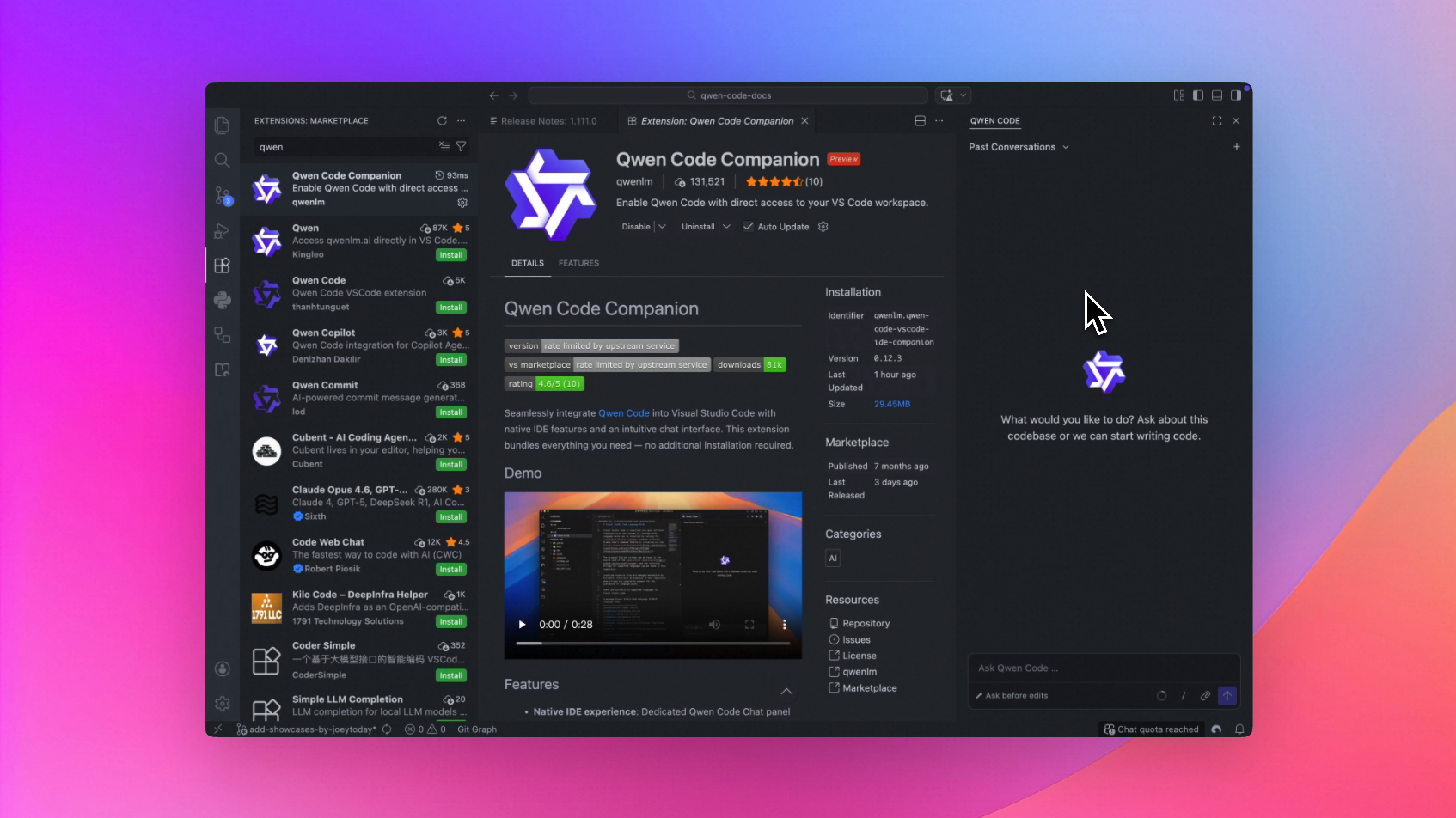
VS Code Companion Sidebar: Always in Your Workspace
Qwen Code can now stay in the VS Code sidebar. View conversation history while coding, more comfortable for dual-screen work, and more flexible layout.
Use Cases:
- View previous conversations in the sidebar anytime without switching windows
- Dual-screen work with code on one side and Qwen Code on the other—double your efficiency
- Freely adjust layout to put the conversation in the most convenient position
See PR #2188
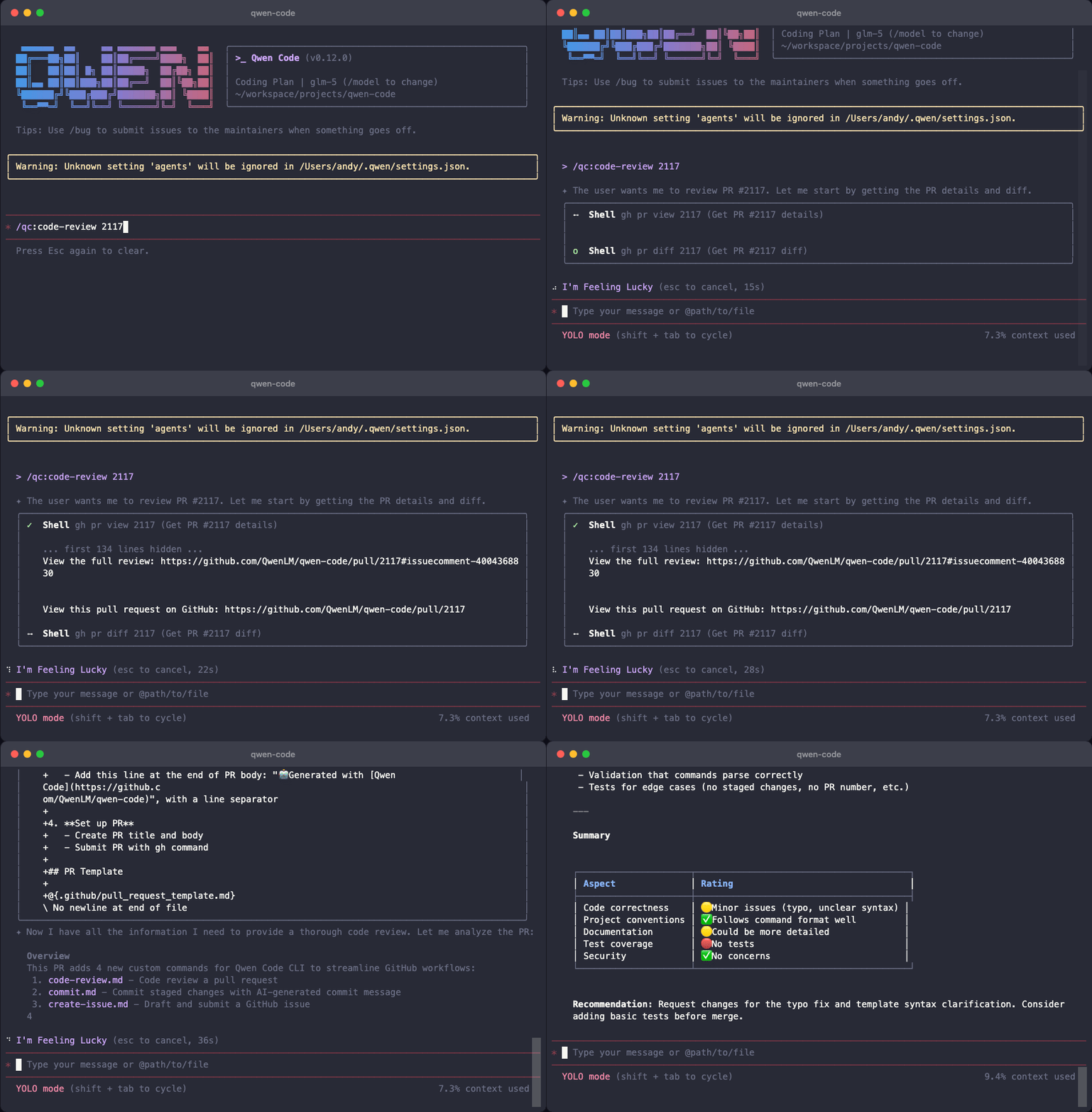
GitHub Workflow Custom QC Commands: Run Directly in CI/CD
Run Qwen Code commands directly in CI/CD. Automatically check and fix code when committing—ensuring code quality.
Use Cases:
- Automatically run code checks when submitting PRs, flagging issues directly
- Automatically fix simple issues like formatting and typos
- Let AI review first during code review to reduce manual review time
See PR #2117
LS Tool Truncation Support: No More Screen Flooding from Large Directories
Large directories are automatically collapsed when viewing—no more being overwhelmed by screens of file lists. AI responds faster, context is more focused.
Use Cases:
- When viewing large directories like node_modules, no more being flooded by thousands of files
- Save tokens, let AI focus on important files
- Faster response, no need to wait for AI to process lengthy file lists
See PR #2324
Example truncated output
Listed 150 item(s) in /path/to/dir:
---
[DIR] folder1
file1.txt
file2.txt
...
---
[50 items truncated] ...
📊 Improvements
- Smoother OAuth Authentication: Clear feedback after successful authentication, multi-language support, and one-click authorization clearing (#2327 )
- Clearer Context Compression Explanation: Tells you why compression happened and what was compressed—no more confusion (#2224 )
- Auto-start After Installation: No need to manually enter commands, ready to use right after installation (#2290 )
- More Recognizable Temp Files: Prefix changed to
qwen-edit-, instantly recognizable as Qwen Code generated (#2045 ) - Code Highlighting Supports Tab Width: Display indentation according to your preference for more comfortable code viewing (#2077 )
🔧 Important Fixes
| PR | Version | Fix | Impact |
|---|---|---|---|
| #2268 | v0.12.2 | export command now exports current session | No more exporting wrong session when exporting history |
| #2320 | v0.12.2 | Adapted to DeepSeek API format | No more errors when using DeepSeek models |
| #2298 | v0.12.2 | Clearer file operation error messages | Know the specific reason when file operations fail |
| #2289 | v0.12.1 | Fixed Windows terminal crash | Windows users no longer crash when resizing window |
| #2221 | v0.12.0 | YOLO mode no longer unexpectedly opens editor | No more interruptions when using YOLO mode |
| #2212 | v0.12.1 | Fixed MCP OAuth authentication | More stable MCP server authorization |
Windows Platform Specific Fixes
| PR | Fix | Impact |
|---|---|---|
| #2289 | Fixed terminal resize crash | No more crashes when dragging window |
| #2291 | Correct prompt when file doesn’t exist | Know it’s a path issue when file can’t be found |
| #2078 | Support Windows line endings | Markdown files created on Windows can now be parsed correctly |
| #1890 | Fixed silent failures caused by CRLF | Certain operations no longer fail inexplicably |
🎈 Other Improvements
- Added 8 new contributors: @zy6p , @lgzzzz , @huww98 , @Aayushyaash , @kkhomej33-netizen , @Deng-Xian-Sheng , @xieyonn , @qqqys , @ossaidqadri
- Added JSON Schema validation for VS Code settings
- Refactored settings migration to sequential framework with atomic file write support
- Migrated ACP integration to @agentclientprotocol/sdk
How to Upgrade: Run npm i @qwen-code/qwen-code@latest -g to upgrade to the latest version.
If you have questions or suggestions, feel free to provide feedback on GitHub Issues !