Qwen Code Weekly: AI Code Review, Ask Questions Without Losing Context, Custom Workflow Automation
This week we released v0.13.0 stable version and v0.13.1 preview version.
Since v0.12.x launched, many users have requested that Qwen Code be more “programmable”—not just for conversations, but to embed into their workflows. This week’s v0.13.0 focuses on this direction: Hooks system lets you insert custom scripts at key points, Skills directory allows team sharing of custom skills, /btw solves the awkward situation of “doing A and suddenly wanting to ask B”. Additionally, /review lets AI help you review code, and Agent collaboration arena lets you run multiple models simultaneously and automatically select the best result.
Thanks to our new contributors @simon100500 and @Br1an67 🎉
✨ New Features
/review: Let AI Help You Review Code
Always want someone to take a look at your code before committing, but colleagues are too busy? Now just use /review, and AI will help you check code quality, discover potential issues, and suggest improvements. Not just simple lint checks, but reviewing your logic, naming, and edge case handling like an experienced colleague.
What You Can Do With It:
- Let AI go through your code before committing to find and fix issues early, instead of being pointed out during Code Review
- Act as your “second pair of eyes” during independent development, reducing silly mistakes
- Learn code best practices—AI will explain why this way is better, not just tell you “there’s a problem here”
See PR #2348
/btw Side Question: Ask Quick Questions While Coding Without Losing Context
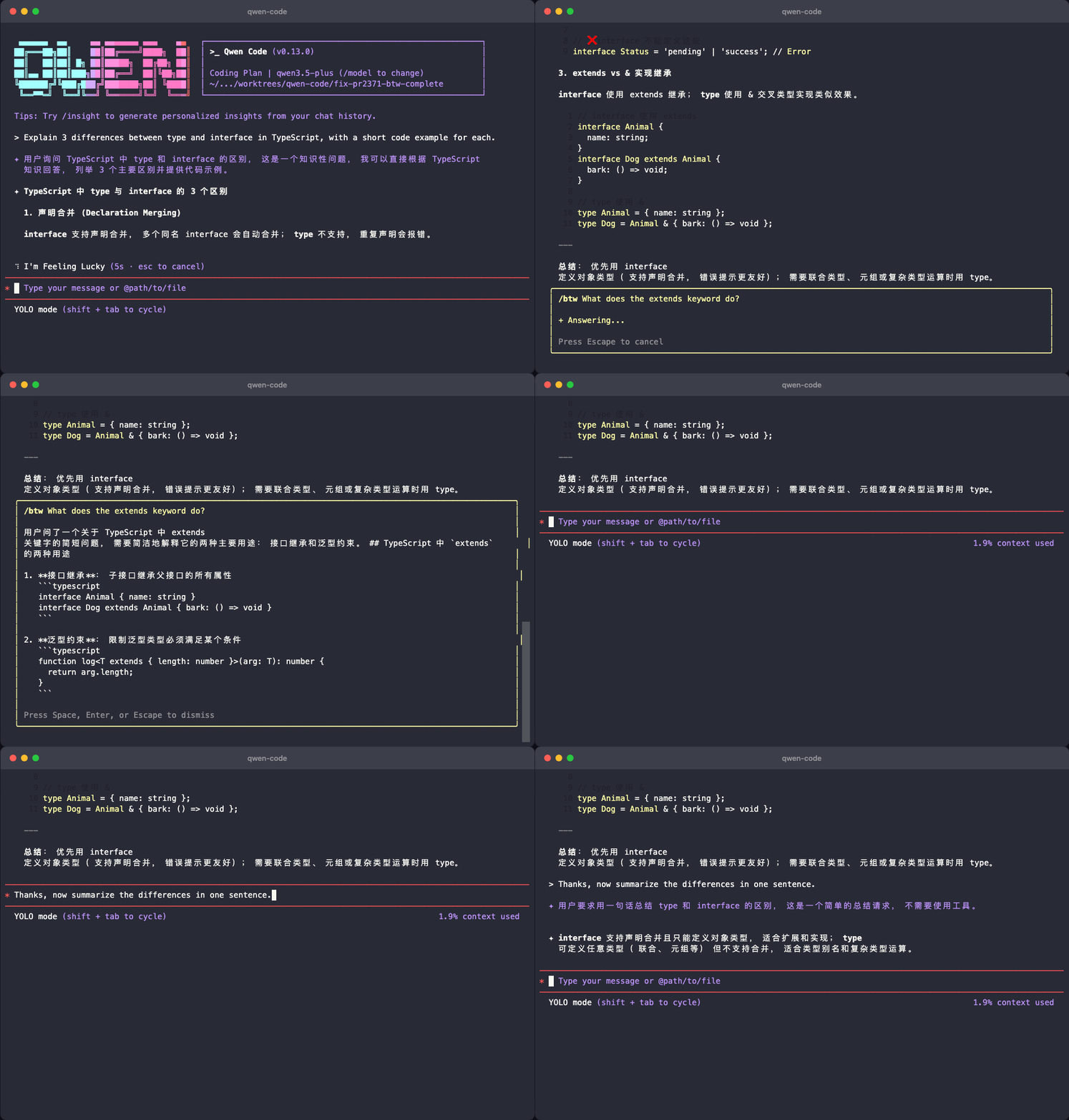
Halfway through coding, suddenly can’t remember the parameter order of an API. Before, you had to open a new conversation to check, then switch back, losing all context.
Now type /btw to insert a side question directly in the current conversation. Qwen Code automatically returns to the previous context after answering, as if nothing happened. Your main conversation won’t be polluted, and AI won’t treat your side question as part of the ongoing task.
What You Can Do With It:
- While writing React components, quickly check a Hook’s usage, then continue writing
- While debugging, temporarily confirm the meaning of a config item without opening a new window
- Think of an unrelated question, ask it and forget it, without affecting your current work
See PR #2371
Hooks Extension Mechanism: Make Qwen Code Follow Your Rules
Have you ever encountered this—AI generated code, but the format is wrong, and you have to manually run prettier every time? Or forgot to run tests before committing, causing CI to fail? The Hooks system solves these problems. You can attach your own scripts to 10 key points in Qwen Code, making them execute automatically at specific moments.
What You Can Do With It:
- Automatically run tests before committing—avoid pushing code that won’t pass, CI won’t turn red because of you anymore
- Automatically format after code generation—AI writes code, prettier/eslint automatically runs once, saving you manual work
- Automatically save conversation logs when session ends—have evidence when tracing back issues
- Check permissions before tool execution—extra layer of protection for sensitive operations
Configuration is simple—just put script files in .agents/hooks in the project root. See PR #2352 , #2203
Agent Collaboration Arena: Multiple Models Solve Problems Simultaneously, Select Best Result
For important code you’d ask colleagues to review, now you can also let multiple AI models handle the same task simultaneously. To compare model capabilities, directly use the /arena command to select models and input tasks.
What You Can Do With It:
- When refactoring core modules, let multiple models provide solutions simultaneously, pick the best one
- When solving algorithm problems, compare different models’ solutions, learn different approaches
- Evaluate how new models perform on your project, let actual tasks do the talking
See PR #1912
VS Code Image Paste: Send Screenshots Directly to AI
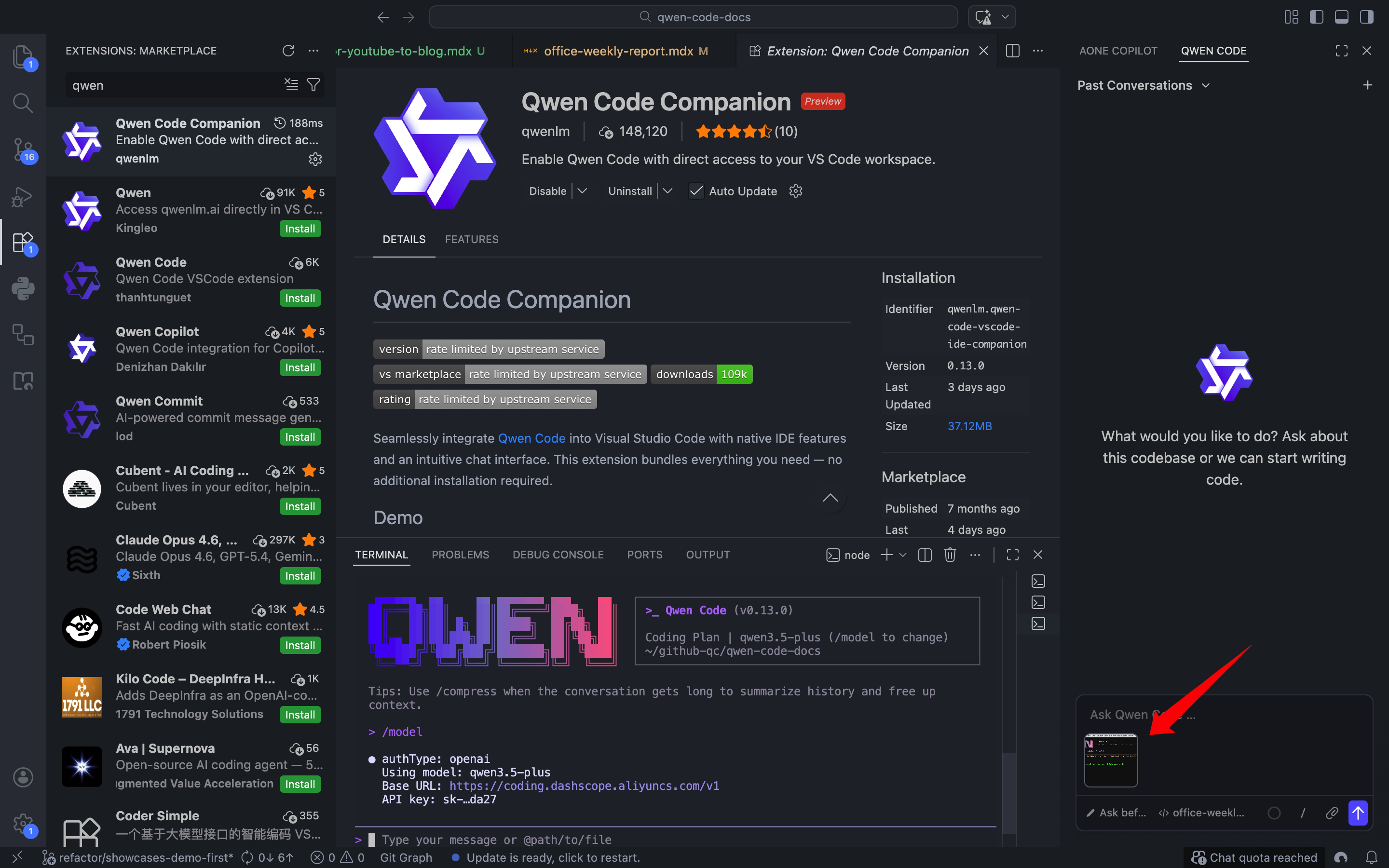
In VS Code, just Ctrl+V to paste screenshots and send them to AI. See a UI bug? Screenshot it and let AI analyze. Want to recreate a design? Screenshot it and let AI write code. No need to save images, find paths, or manually upload anymore.
What You Can Do With It:
- Screenshot a UI bug, let AI help you locate the problem
- Paste a design screenshot, let AI directly write the corresponding component code
- Error message too long and don’t want to type? Screenshot and send it
See PR #1978
System Prompt Customization: Make AI Respond in Your Style
Configure custom system prompts through SDK and CLI to control AI’s response style and behavior. For example, make it always respond in Chinese, use English for code comments, follow your team’s naming conventions. No need to repeat “please respond in Chinese” in every conversation.
See PR #2400
Explore Agent: Let AI Research First Before Acting
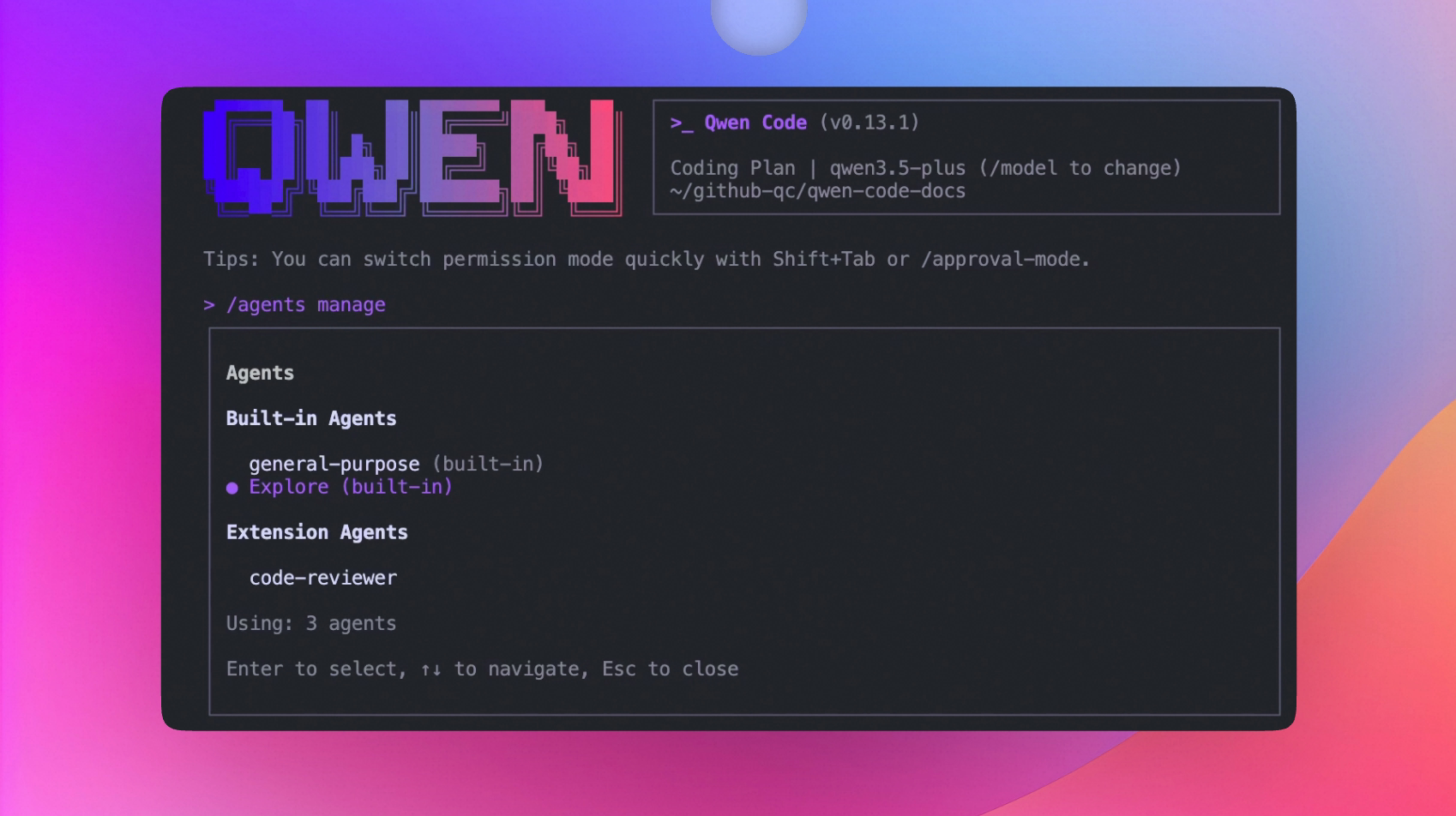
Added Explore Agent,专门用于代码调研。Before making changes to code, let Explore Agent first help you understand the code structure, dependencies, and find key entry points. After research, let the main Agent do the work for more accurate direction.
See PR #2489
📊 Improvements
- Real-time Token Usage Display: Directly show current Token consumption during AI thinking, no need to wait for response to end to know how much was used (#2445 )
- Sub Agent Concurrent Execution: Previously multiple subtasks ran in queue, now they run simultaneously. Complex task processing speed significantly improved, wait time shorter (#2434 )
- Clearer Permission Prompts: Permission dialogs now use plain language to tell you “about to read xxx file” instead of technical parameters, and when rejecting operations, tells you why it was rejected (#2637 , #2283 )
- Smarter VS Code File Completion: Use fuzzy search when entering filenames, type
compto findsrc/components/Button.tsx, no need to remember full path (#2437 ) - More Intuitive Tab Key Behavior: In VS Code, pressing Tab only fills completion content, no longer accidentally triggers indentation or other operations (#2431 )
- MCP Tool Output Auto-truncation: When MCP tools return extremely long content, automatically truncate to avoid exploding context and degrading subsequent conversation quality (#2446 )
- Ctrl+R History Search: Search results sorted by most recent first, your most recently used commands appear at the top (#2425 )
- Error Handling and Quota Detection Optimization: When encountering API rate limits or quota exhaustion, prompts are clearer, no longer just showing a vague error code (#2458 )
🔧 Important Fixes
| PR | Version | Fix | Impact |
|---|---|---|---|
| #2403 | v0.13.0 | Fixed OpenRouter duplicate finish_reason parsing error | Conversations no longer mysteriously interrupt when using OpenRouter |
| #2457 | v0.13.0 | Fixed Windows path URI handling | Windows users can now navigate file links normally |
| #2501 | v0.13.0 | VS Code proxy configuration passed to CLI | No more connection failures in corporate intranet environments |
| #2472 | v0.13.0 | Clean up ACP connection state when subprocess exits | No zombie connections remain after abnormal exit and restart |
| #2611 | v0.13.1 | Fixed Shell PTY race condition | No more errors and crashes when executing commands rapidly in succession |
| #2547 | v0.13.1 | Improved C++/Java/Python language server support | Code navigation and completion for these three languages are more accurate |
| #2631 | v0.13.1 | Clean up expired Sub Agent diff confirmation status | No confirmation dialogs remain after accepting code in IDE |
| #2591 | v0.13.1 | Preserve model metadata when switching models | Configuration no longer lost after switching models |
| #2546 | v0.13.1 | Improved ACP error handling | VS Code no longer freezes without prompts during loading |
| #2080 | v0.13.1 | Preserve selected authentication method on startup auth failure | No need to reselect login method after network fluctuations |
Windows Platform Specific Fixes
| PR | Fix | Impact |
|---|---|---|
| #2645 | Support Git Bash/MSYS2 Shell detection | Qwen Code can now correctly identify when using Git Bash terminal |
| #2457 | Fixed path URI handling | Works normally when file paths contain Chinese or spaces |
🎈 Other Improvements
- Export feature added metadata and statistics, exported files include conversation rounds, Token usage, and other information (#2328 )
- Fixed MiniMax-M2.5 and GLM model Token limit configuration, context space more accurate when using these models (#2470 )
- Support configurable runtime output directory, logs and temporary files can be placed in your specified location (#2127 )
/memory show --projectand--globalnow correctly display all configured context files, no longer missing any (#2368 )- Extension installation supports non-GitHub Git URLs, extensions hosted on GitLab, Gitee can also be installed directly (#2539 )
- QWEN.md renamed to AGENTS.md, consistent with community standards (#2527 )
👋 Welcome New Contributors
- @simon100500 — First contribution, fixed OpenRouter parsing issue (#2403 )
- @Br1an67 — First contribution, updated VS Code extension terms of service link, and supported .agents/skills directory (#2495 , #2476 )
How to Upgrade: Run npm i @qwen-code/qwen-code@latest -g to upgrade to the latest version.
If you have questions or suggestions, feel free to provide feedback on GitHub Issues !