Token Caching and Cost Optimization
Qwen Code automatically optimizes API costs through token caching when using API key authentication. This feature stores frequently used content like system instructions and conversation history to reduce the number of tokens processed in subsequent requests.
How It Benefits You
- Cost reduction: Less tokens mean lower API costs
- Faster responses: Cached content is retrieved more quickly
- Automatic optimization: No configuration needed - it works behind the scenes
Token caching is available for
- API key users (Qwen API key, OpenAI-compatible providers)
Monitoring Your Savings
Use the /stats command to see your cached token savings:
- When active, the stats display shows how many tokens were served from cache
- You’ll see both the absolute number and percentage of cached tokens
- Example: “10,500 (90.4%) of input tokens were served from the cache, reducing costs.”
This information is only displayed when cached tokens are being used, which occurs with API key authentication but not with OAuth authentication.
Example Stats Display
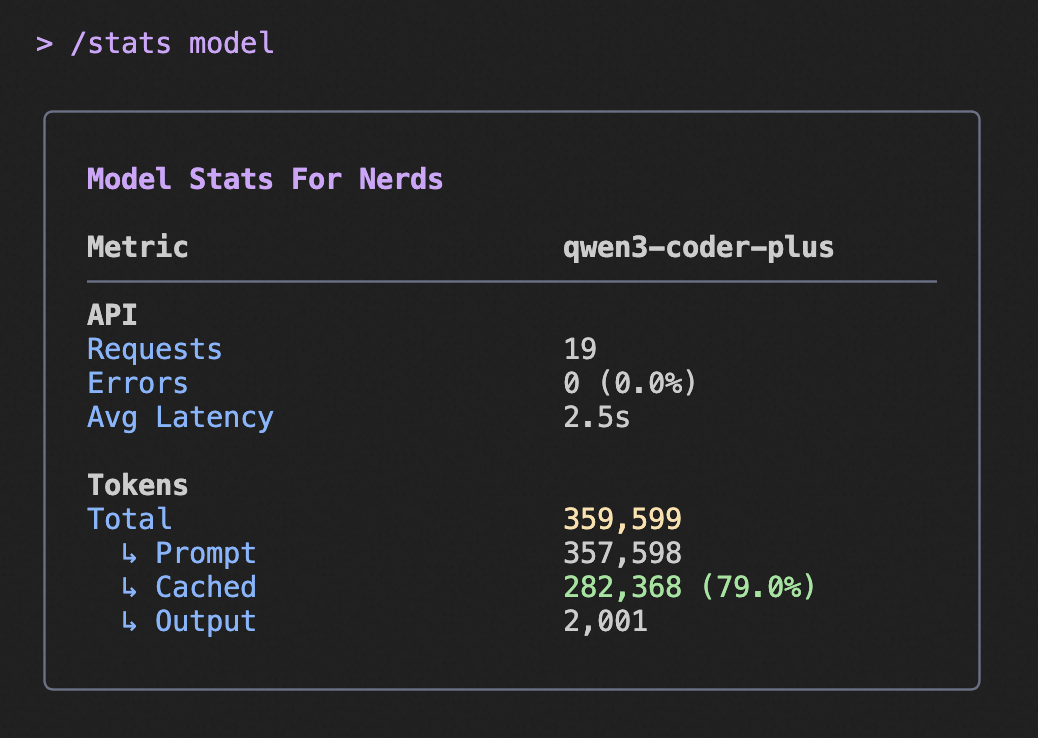
The above image shows an example of the /stats command output, highlighting the cached token savings information.
Last updated on