Qwen Code Weekly: AI Remembers Across Sessions, Auto Chat Titles, Batch Multi-File Operations
v0.15.0 is here.
This release focuses on making Qwen Code smarter about context and workflow: it now remembers what you’ve told it across sessions and cleans up stale memories; chat sessions get auto-generated titles you can rename or delete; /batch lets you modify multiple files in one go; and Hook expansion plus subagent background execution make automation and enterprise integrations more flexible.
✨ New Features
AI Remembers Across Sessions
Memory used to require manual upkeep. Now Qwen Code has auto-memory and auto-dream: the AI extracts important details from your conversations into memory, then periodically reorganizes and prunes it — like tidying a bookshelf — so context flows naturally between sessions.
What you can do with it:
- No more repeating yourself: tech stack, coding style, project structure — the AI remembers it next time
- Auto-organize and merge: background scanning merges duplicates, updates stale entries, and keeps the index lean
- Less manual maintenance: things you used to write into
QWEN.mdor rule files are now handled automatically
See PR #3087
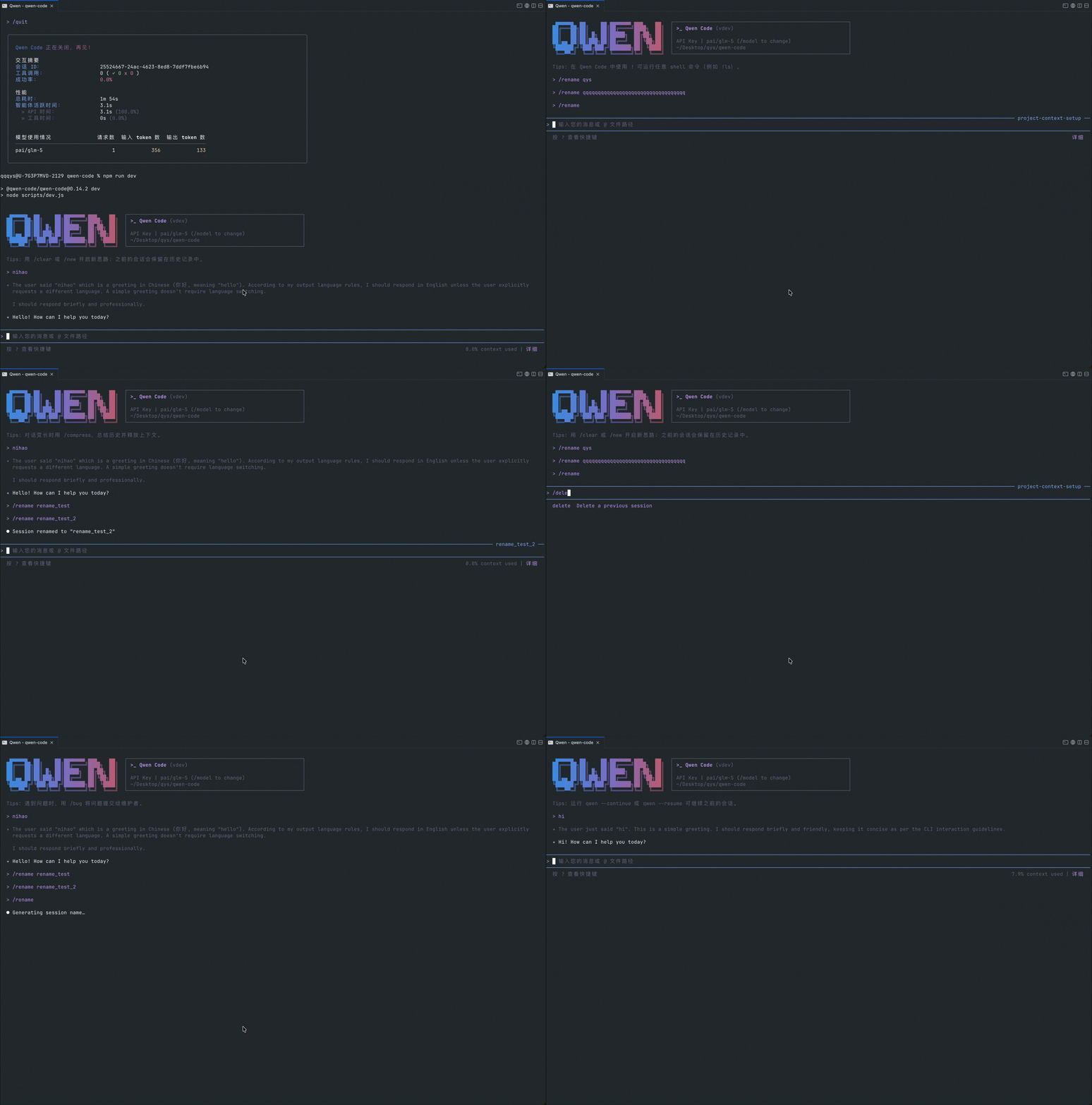
Auto Chat Titles, with Rename and Delete
Session titles used to be your first message — long and hard to browse. Now the AI generates meaningful titles automatically, and you can rename or delete sessions at any time.
What you can do with it:
- AI auto-generates titles: no need to name sessions manually
- Rename by project: tweak AI-generated titles to match your workflow
- Clean up: delete throwaway or test sessions, keep what matters
See PR #3093
/batch — Process Multiple Files in One Command
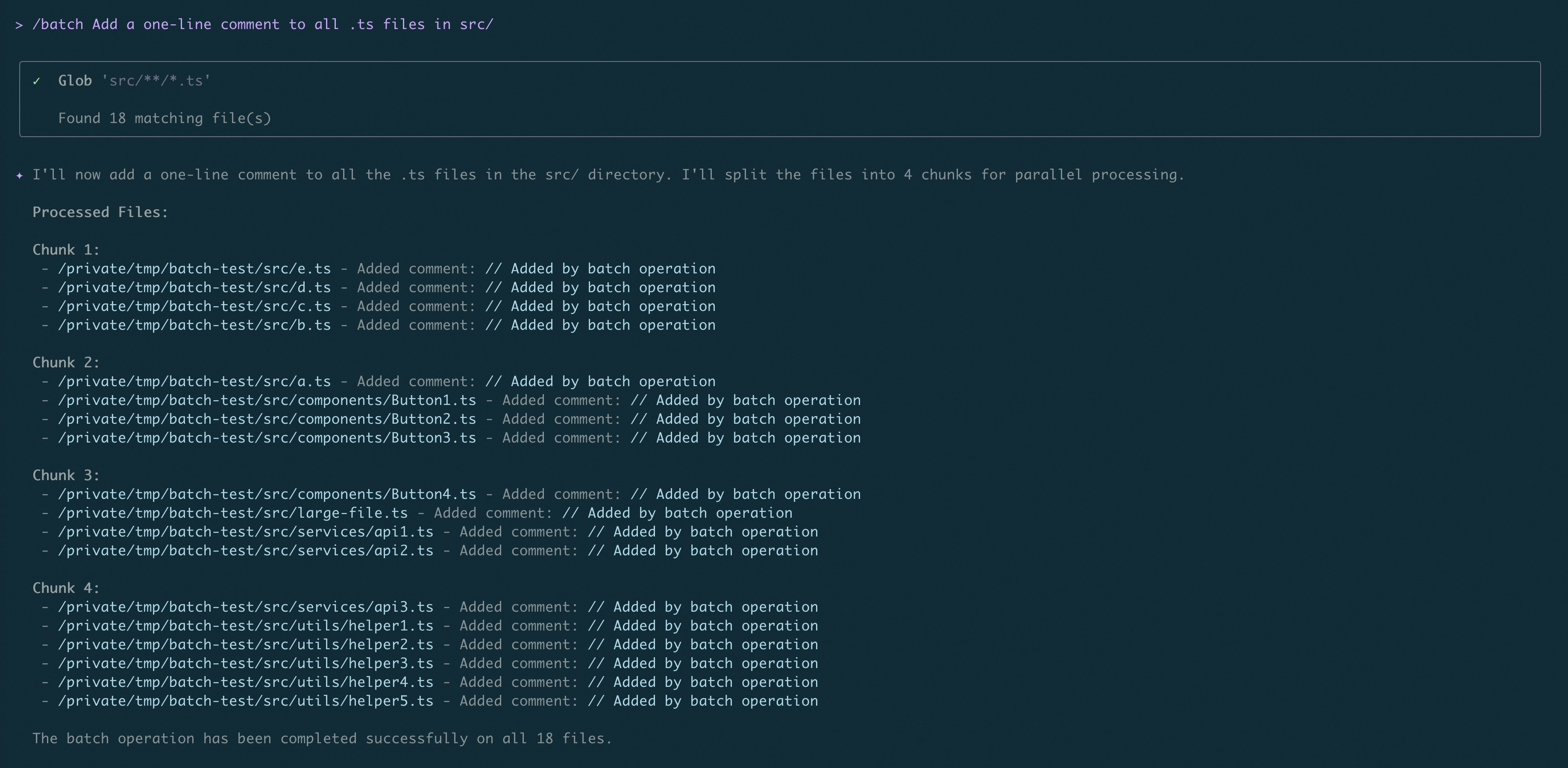
Editing multiple files used to mean running tasks one by one. Now a single /batch command processes them all in parallel — great for bulk lint fixes, multi-document updates, or refactoring.
What you can do with it:
- Bulk lint fixes: fix the same error across many files at once
- Multi-document sync: add the same section or bump version numbers across files in one command
- Batch refactoring: rename variables or extract functions across multiple files simultaneously
See PR #3079
Hook Expansion: Auto-Trigger Actions During AI Execution
Previously Qwen Code could only run single tasks on demand. Now you can set up “auto-trigger” actions via Hooks. Three new Hook types: HTTP Hooks send notifications to external services (like Feishu or DingTalk); Function Hooks execute your own code; Async Hooks run long tasks in the background without blocking your current conversation. VSCode extension supports Hooks too.
What you can do with it:
- Team notifications: AI automatically pings Feishu or DingTalk when it modifies key files
- Compliance auditing: every AI action is logged to your company’s audit system automatically
- Deep toolchain integration: register your own code via SDK — it runs automatically when events fire
Subagent Background Execution
Subagents previously had to run in the foreground, blocking the interface. Now they support headless background execution, and the SDK has full support — perfect for CI/CD pipelines and automation scripts.
What you can do with it:
- Background parallelism: launch multiple subagents for different tasks without blocking the main UI
- SDK integration: call subagent capabilities through the SDK API, embedding them into your own toolchain
- CI/CD code review: trigger subagent-based code review in PR pipelines without opening a terminal
See PR #3076
Directory-Specific Rules
Previously all directories shared the same rules. Now context rules are automatically injected based on file path, read from .qwen/rules/, making AI behavior more precise per directory.
What you can do with it:
- Module-specific conventions: React rules for frontend, Node.js rules for backend — auto-applied
- Project-level customization: drop special style rules into
.qwen/rules/and they take effect automatically - Less manual config: no need to specify rules in every conversation — path matching handles it
See PR #3339
/doctor — One-Click Environment Diagnostics
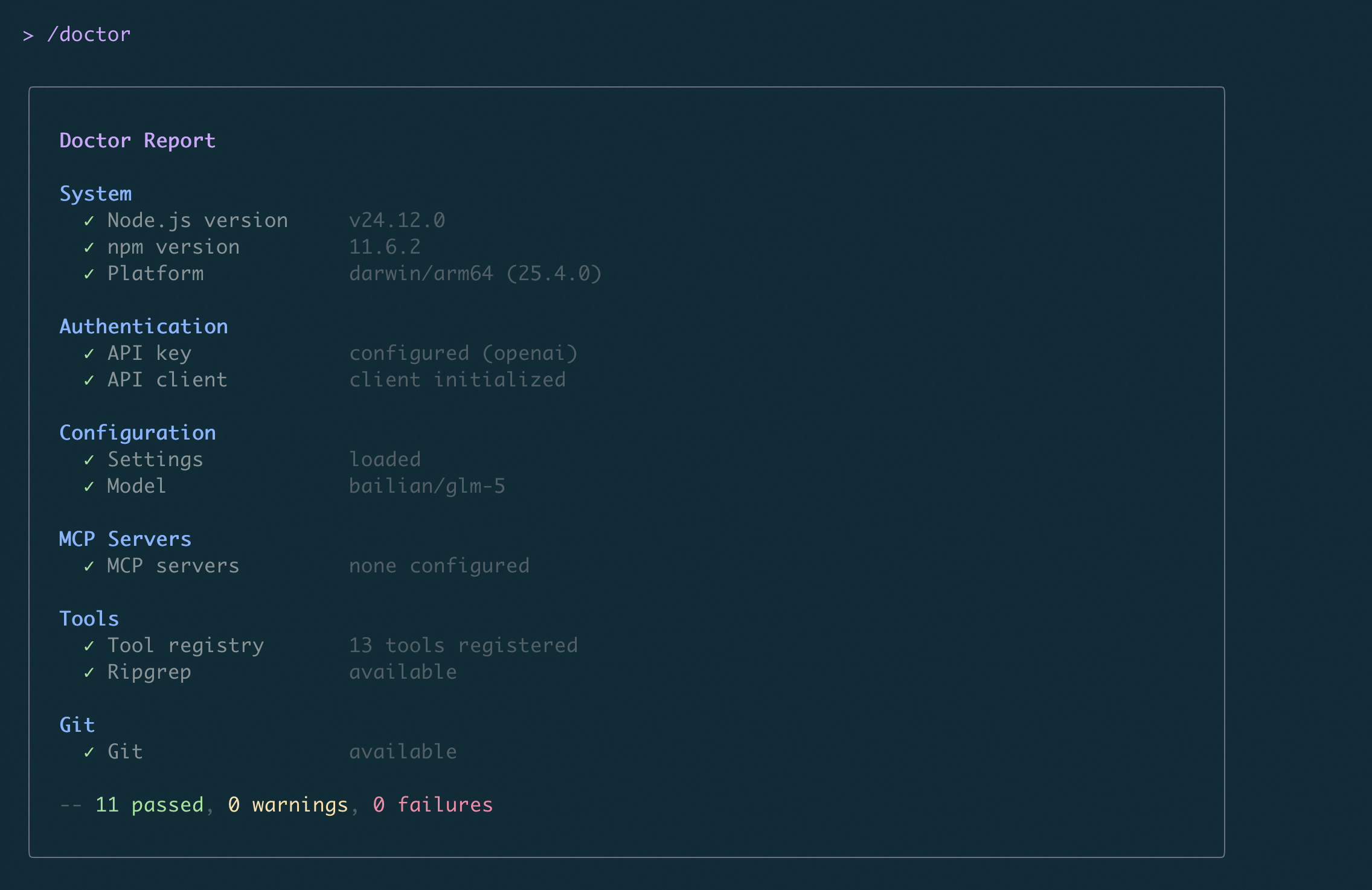
Troubleshooting used to mean manually checking configs and connections. Now /doctor automatically detects environment issues, config problems, network errors, and more — with fix suggestions.
What you can do with it:
- Quick diagnostics: MCP server down? Model won’t load? One command checks everything
- Config validation: automatically verifies config file syntax and API Key validity
- Automation-friendly: non-interactive JSON output for scripts and CI/CD pipelines
See PR #3404
Read PDFs and Analyze Jupyter Notebooks Directly
Text models previously errored on PDFs. Now system tools extract plain text automatically, with page-range support. Jupyter Notebooks no longer return raw JSON — code and outputs are displayed cell by cell.
What you can do with it:
- Analyze PDFs: let AI read PDF reports, papers, or tech docs directly — no manual conversion
- Page-range reading: load specific page ranges without loading the entire file
- Review Notebooks: AI analyzes
.ipynbfiles with code and outputs clearly laid out
See PR #3160
📊 Improvements
- Real-time Token usage: Token consumption shown during input and output phases, so you always know your session usage (#3329 , #2742 )
- Session recap /recap: returning to a session shows a summary automatically, or run
/recapmanually for a quick review (#3434 ) - Tool execution progress: progress info shown during tool execution — no more staring at a blinking cursor (#3155 )
- Loop detection enhanced: retry-loop and stall detection prevent the AI from spinning in ineffective loops (#3178 , #3236 )
- Context >100% display: shows “>100%” when context window is exceeded instead of hiding it (#2766 )
- /btw uses live conversation context:
/btwnow works with current context — no need to re-explain background (#3429 ) - Compact Mode UX: keyboard shortcuts, settings sync, and safety guards for smoother compact mode operation (#3100 )
- Shell output width constraint: output box width limited to prevent long lines from breaking the UI (#2857 )
- Inline shell output limits: configurable line cap for shell output to prevent flooding (#3508 )
- Terminal theme auto-detection: UI colors adapt to your terminal theme automatically (#3460 )
- Multi-line status line: status line supports multi-line display for more information (#3311 )
- Periodic status line refresh:
refreshIntervalconfig for auto-refreshing status line display (#3383 ) - M-d key binding:
M-dshortcut (Emacs-style) deletes the next word in the input box (#3358 ) - Early input capture: keystrokes captured at startup to prevent missed input during launch (#3319 )
- Clickable MCP OAuth URL: OAuth authorization URLs are now clickable — no manual copy needed (#3489 )
- OSC 52 copy shortcut: OAuth URLs support OSC 52 copy shortcut (#3393 )
- VSCode long conversation input lag fixed: typing no longer stutters during long conversations (#2550 )
- VSCode Plan Mode toggle and approval UI: VSCode Companion supports Plan Mode switching and approval UI (#2551 )
- VSCode /insight command:
/insightnow available in VSCode (#2593 ) - VSCode agent execution display: agent execution status now visible in VSCode (#2590 )
- WebUI markdown rendering: tool output and WebFetch results render as markdown in WebUI (#3469 )
- Dual-output sidecar mode: TUI supports dual-output sidecar mode for viewing two output streams simultaneously (#3352 )
- /stats lines attributed to subagent:
/statsnow correctly shows lines consumed by each subagent (#3229 ) - WebFetch supports Markdown for Agents: web content fetching is better optimized for Agent scenarios (#2734 )
- ACP message rewrite timeout configurable: customize ACP message rewrite timeout to avoid long waits (#3475 )
- slashCommands.disabled setting: disable specific slash commands via configuration (#3445 )
- Slash Command multi-mode expansion (Phase 2): ACP fixes and UX improvements for slash commands (#3377 )
- OAuth flags supported by mcp add:
mcp addnow accepts OAuth configuration parameters (#3442 ) - SDK API exposes /context usage data:
/contextusage data accessible via SDK (#2916 ) - Bare startup mode: new bare startup mode skips default config loading for lightweight scenarios (#3448 )
- CLI startup profiler: new startup profiling to diagnose slow launch times (#3232 )
🔧 Key Fixes
| PR | Version | What was fixed | Impact on you |
|---|---|---|---|
| #3310 | v0.15.0 | Fixed statusline spawn EBADF crash | CLI no longer crashes from status line errors |
| #3295 | v0.15.0 | Fixed ProcessTransport leaking process exit listeners | Long-running sessions no longer degrade from listener buildup |
| #3321 | v0.15.0 | Update notifications delayed until model response completes | No more mid-answer update popups interrupting your flow |
| #3320 | v0.15.0 | Skill watcher depth limit prevents file descriptor exhaustion | Large projects no longer drain system resources from too many watched files |
| #3315 | v0.15.0 | Thinking blocks removed from history when switching models | History no longer shows abnormal thinking process after model switch |
| #3327 | v0.15.0 | Shell parameter quoting guidance for special characters | Special characters in shell commands less likely to cause errors |
| #3431 | v0.15.0 | /clear dismisses /btw dialog | /btw dialogs close properly after /clear |
| #3436 | v0.15.0 | Support for older Git versions during init | Project init no longer fails on older Git versions |
| #3450 | v0.15.0 | VSCode IDE split-stream message ordering fix | Messages no longer appear out of order in VSCode |
| #3313 | v0.15.0 | Auto-recovery for truncated tool calls (multi-turn resume) | AI can continue automatically from truncated output |
| #3505 | v0.15.0 | Rejects truncated subagent write_file calls | Prevents data corruption from incomplete subagent writes |
Windows Platform Fixes
| PR | What was fixed | Impact on you |
|---|---|---|
| #3451 | MCP stdio server Windows PATH normalization | Windows users no longer fail to connect to MCP servers due to path format issues |
🎈 Other Improvements
- Fixed Windows install command for CMD and PowerShell compatibility (#3252 )
- Updated auth method docs to reflect OAuth deprecation (#3325 )
- New CI stale policy: PRs with 60 days of inactivity marked stale, closed after 30 more days (#3375 )
- Build script optimized to call tsx directly instead of via npx (#3237 )
- Tool registration lazy factory supports inflight concurrency deduplication (#3297 )
- DingTalk channel fixes: continuation message suffix, empty @mention text preservation, reaction context leak (#2977 , #2978 , #2979 )
- Sandbox image tag fallback to latest (#2962 )
- Integration test stdinDoesNotEnd option fix (#2966 )
- JSON schema generation fix: no more “undefined Options” when enum settings lack descriptions (#2963 )
- AskUserQuestionDialog auto-submits on numeric key press (#3407 )
- /recap pinned above input box, aligned with fastModel default (#3478 )
- plan/subagent/arena system reminders injected into ACP (#3479 )
- Graceful handling when xdg-open is missing to prevent crashes (#1675 )
- reasoning-only assistant content uses empty string instead of null (#3499 )
👋 Welcome New Contributors
- @Skyline-9 — Fixed Windows install command compatibility (#3252 )
- @pedrormjunior — M-d key binding (#3358 )
- @szepeviktor — Fixed class name typo (#2189 )
- @sharziki — Fixed /clear dismissing /btw dialog (#3431 )
- @gin-lsl — WebFetch supports Markdown for Agents (#2734 )
- @ihubanov — Added slashCommands.disabled setting (#3445 )
- @gy1016 — Zed.app detection on macOS (#3303 )
- @yeelam-gordon — Fixed OpenAI samplingParams passing (#3458 )
- @Ojhaharsh — Graceful handling for missing xdg-open (#1675 )
Upgrade: Run npm i @qwen-code/qwen-code@latest -g to upgrade to the latest version.
Questions or suggestions? Feel free to open an issue on GitHub !