Qwen Code Weekly: DeepSeek V4 gets a 1M context window, plus background tasks and conversation rewind
This week we released v0.15.7 as the main feature release, along with six follow-up releases (v0.15.1-v0.15.6).
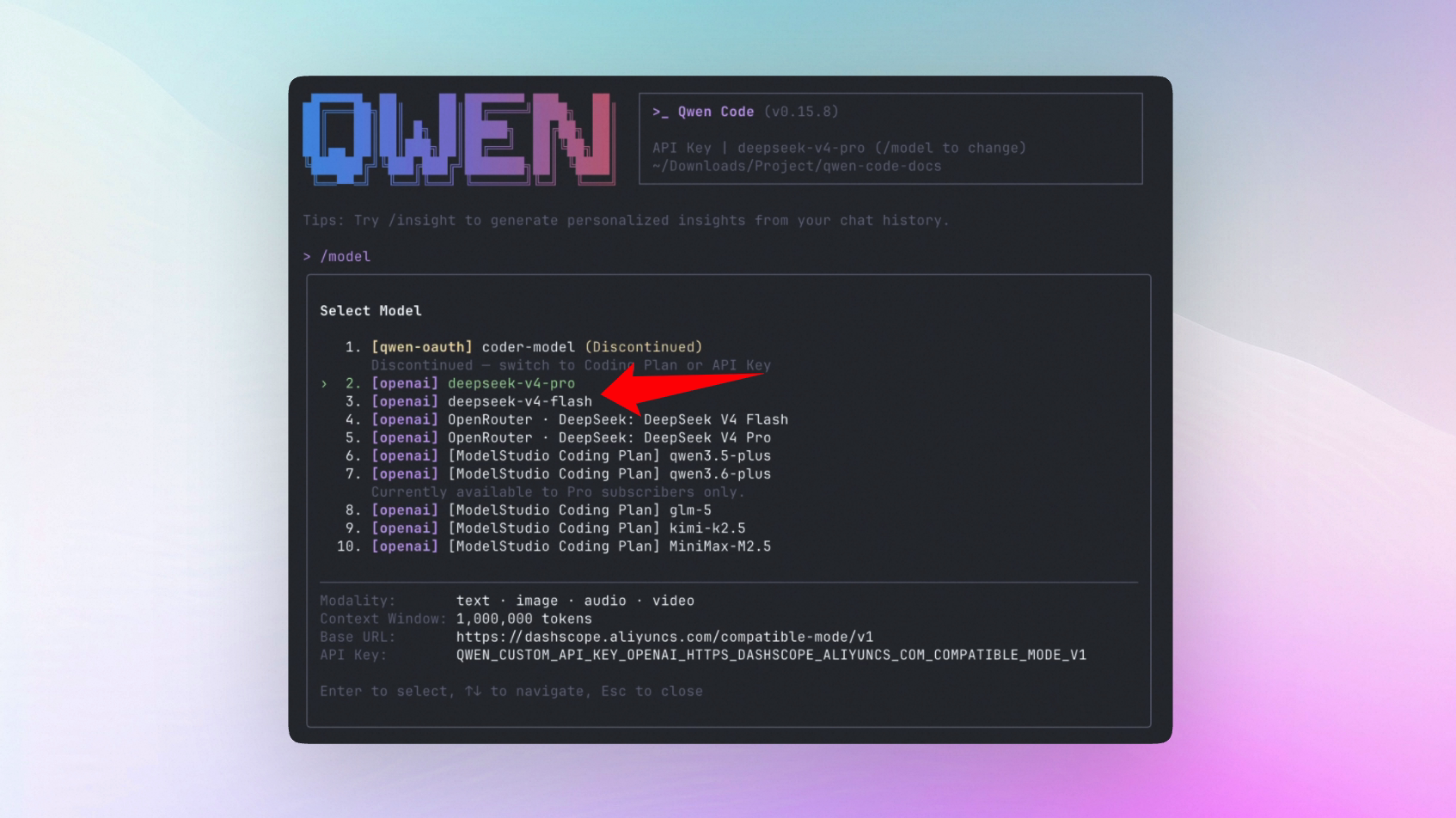
DeepSeek V4 was one of the biggest AI stories of the week. As the community experimented with antirez’s local inference engine on HN and providers raced to add support, Qwen Code added support for the full set of capabilities we needed: a 1M context window, a 384K output limit, reasoning effort “max”, and fixes for thinking blocks compatibility.
Agent multitasking is becoming a clear product direction across developer tools, including OpenAI Codex and Google AlphaEvolve. This week we turned Qwen Code’s background Agent infrastructure into a real task panel: you can see background tasks in one place, cancel them when needed, and resume them after interruptions. GitHub also recently published guidance for agent-based PR reviews, and qwen review now has more subcommands and agents so the whole review flow can run from the terminal.
We also tightened up everyday interaction and small workflow steps. If a conversation goes off track, press Esc twice to rewind to an earlier turn. When a long task finishes or needs approval, Terminal and VS Code can notify you. /stats can estimate model cost once pricing is configured, and switching models now takes a single command.
✨ New Features
DeepSeek V4 support
After DeepSeek V4 launched, Qwen Code added full support right away. The context window is set to 1M and the output limit to 384K, which means an Agent can read large codebases and produce long outputs in a single run. Qwen Code also supports reasoning effort “max”, so DeepSeek can spend more compute on complex reasoning tasks. Several thinking blocks compatibility issues have been fixed as well, keeping DeepSeek’s reasoning visible across common workflows.
What you can do with it:
- Work with huge files and full repositories using DeepSeek V4, with far less risk of hitting context limits
- Set reasoning effort to “max” for architecture design, long-chain reasoning, and other complex work
- Keep DeepSeek reasoning content intact after session restore, conversation rewind, and context compaction
- Use anthropic-compatible mode with thinking blocks injected correctly, including third-party deployments such as sglang and vllm
See PR #3693 , #3800 , #3788 , #3747 , #3729
View, cancel, and resume background tasks in one place
Previously, background shell commands were simply moved out of the main conversation. It was hard to tell whether they were still running, where their output went, or how to stop them. Now background agents and background shell commands both appear in one task view, with status, output, and details. If a background task is interrupted, it pauses automatically and can be resumed or cancelled.
What you can do with it:
- Run long tasks without blocking the conversation:
npm run dev, tests, file watchers, and similar commands can run in the background while the current conversation continues - Check and control task status at any time: use
/tasksor the task panel to view background shell and background agent status, output paths, and cancel tasks that are no longer needed - Recover safely after interruption: interrupted background tasks are not lost; you can resume them or abandon them
Rewind a conversation and start again from an earlier point
Previously, when a conversation drifted in the wrong direction, you usually had to keep correcting it or start a new session. Now you can press Esc twice or run /rewind, choose an earlier user turn, and roll the conversation history back to that point.
What you can do with it:
- Undo a wrong direction: return to the key question after the AI goes off track, then rerun with a different requirement
- Try again without losing context: no need to start a new session or copy and paste earlier background information
- Explore more naturally: when testing multiple implementation options, return to the branch point and continue from there
See PR #3441
Upgraded /review code review flow
/review received a full upgrade. The flow now uses 9 agents instead of 5, moves the review steps that used to be spread across the prompt into 6 cross-platform CLI subcommands, and returns structured JSON. Enter /review <PR link or number>, and the AI handles the full flow: fetching code, loading project rules, running lint, reviewing in parallel, deduplicating findings, checking CI status, and posting inline comments.
What you can do with it:
- Review a PR with one command: enter
/review https://github.com/xxx/pull/123and let the flow run from fetching code to posting comments - Review from 9 roles at once: beyond correctness and security, it adds “attacker”, “3am-oncall”, and “maintainer” perspectives to cover more blind spots
- Avoid approving red CI: CI status and self-PR checks are detected automatically; approvals are downgraded to comments when needed
- Keep uncertain suggestions out of PR comments: low-confidence findings stay in the terminal and are not posted to the PR
- Avoid duplicate comments: existing Qwen comments are recognized so the same suggestion is not posted twice
See PR #3754

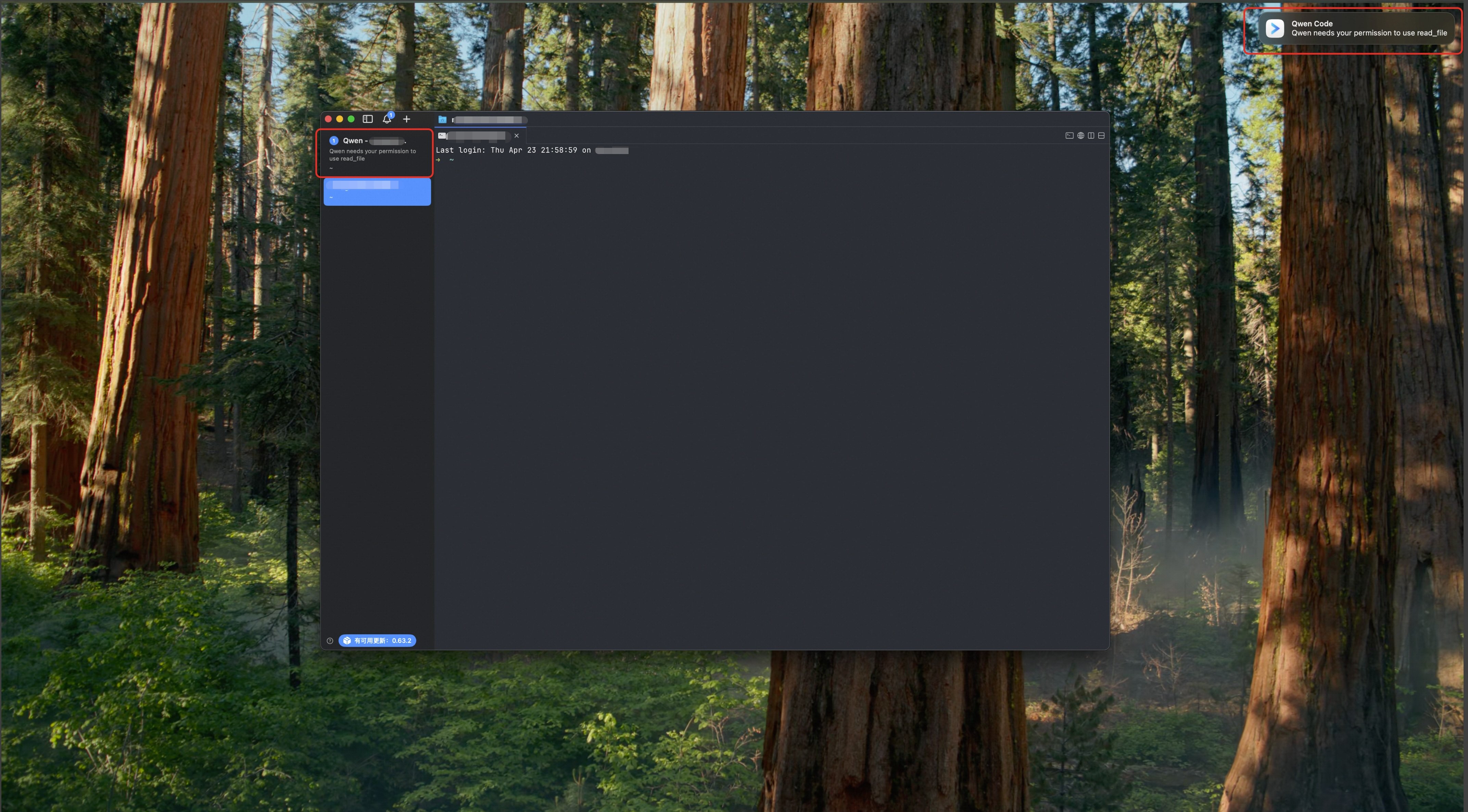
Get notified when a task finishes or needs your confirmation
Previously, terminal reminders mostly relied on a subtle terminal bell, and the VS Code extension did not make status changes visible enough. Now iTerm2, Kitty, and Ghostty can show desktop notifications when a task completes. VS Code also uses tab dots, notification bubbles, and sound to get your attention.
What you can do with it:
- Stop staring at the terminal during long tasks: move on to something else and get notified when the task finishes
- Notice permission prompts in time: when the AI needs tool approval or an answer from you, it is easier to spot
- Avoid missing messages in VS Code: when you switch to another file, the chat tab shows status indicators
/stats now shows estimated model cost
The /stats command now supports cost estimates. Configure modelPricing in settings.json with each model’s input and output price per million tokens, and /stats will estimate cost from token usage automatically. If pricing is not configured, it behaves as before and only shows token counts.
What you can do with it:
- Configure prices for common models once, then let
/statsestimate cost automatically - Compare model cost after switching models and find the best fit for your workload
- Track long-running automation cost and avoid surprises
See PR #3780
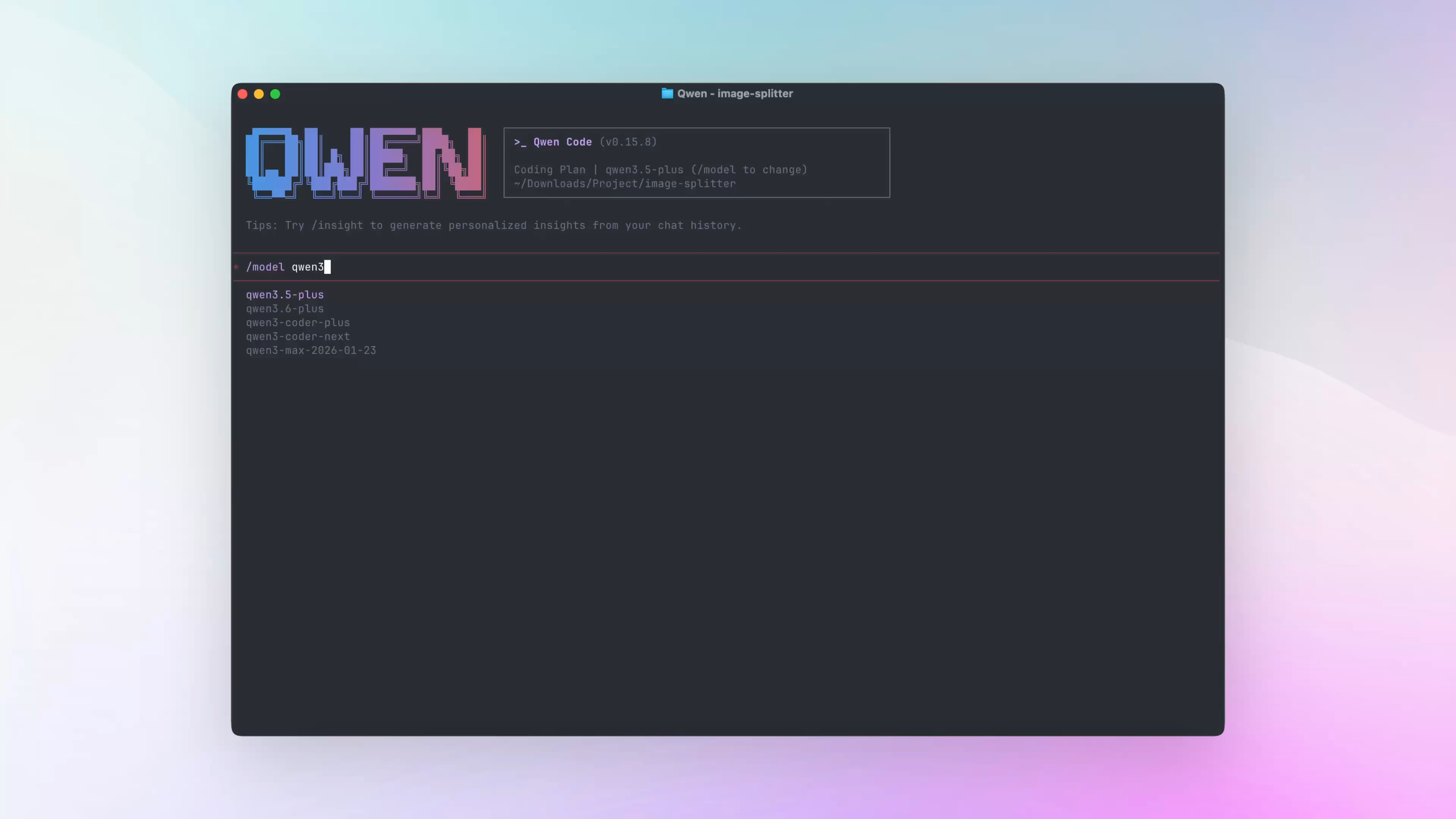
Switch models faster with /model
Previously, switching models meant opening the /model selector and searching through the list. Now you can type /model model-name directly.
What you can do with it:
- Skip the selector: enter a model name such as
/model qwen3.6-plusand switch immediately - Compare models quickly: ask once with
/model A, then switch to/model Band ask again - Use upstream models right away: once the base URL is configured, models that are not registered locally can still be switched to directly
See PR #3783
📊 Improvements
- OpenRouter now uses browser-based authorization: instead of copying API keys and maintaining model lists by hand, run
/authto authorize in the browser. Qwen Code saves the key and pulls the model catalog automatically;/manage-modelsadds search, filtering, and model enablement (#3576 ) - The Todo list stays pinned: the latest task list now stays above the input box and updates as task status changes, so you do not have to scroll back through the conversation to check progress (#3507 , #3647 )
- File reads are faster and less repetitive: the new FileReadCache avoids rereading identical content, making multi-turn conversations and tool-heavy flows more stable (#3717 )
- Web search moved to MCP: the built-in
web_searchprovider now uses an MCP-based approach, so you can configure services such as Bailian, Tavily, and GLM WebSearch Prime as needed (#3502 ) - Faster first model request: Qwen Code pre-connects to the default API endpoint at startup, reducing some TCP and TLS setup time for the first request (#3318 )
- Parallel tool calls are easier to scan: when multiple tools run in parallel, Qwen Code now shows short semantic labels instead of only a raw tool count, making it easier to understand what the AI is doing (#3538 )
- The tool-call hot path is faster: the runtime does less synchronous I/O, which helps long tasks and multi-tool flows stay responsive (#3581 )
- Session titles can be regenerated manually: if an automatic title is off,
/rename --autoasks the fast model to generate a better one (#3540 ) - Foreground subagents now appear in the task panel: foreground subagents are managed in
/tasksalongside background tasks (#3768 ) - Skills load faster and support path-based activation: skills load in parallel, and can auto-activate by directory conditions (#3604 )
- MCP server health appears in the status bar: you can see at a glance whether an MCP server is online, making connection issues easier to diagnose (#3741 )
- Shell runtime display is clearer: shell status now shows both elapsed time and timeout information for long commands (#3512 )
- Long commands can be suggested for background execution: when the AI detects a long-running command, it can suggest moving it to the background so the conversation stays unblocked (#3809 )
- VS Code supports
/skillsand/export: the VS Code Companion can open the skills selector and export the current session more conveniently (#2548 , #2592 ) - MCP config can be passed through CLI flags: SDK and scripting workflows can pass MCP server config directly, without editing config files by hand (#1279 )
- MCP discovery handles duplicates more intelligently: repeated server discovery requests are merged to reduce startup network overhead (#3818 )
- Slash commands show parameter hints: completion now shows grey parameter hints, making custom commands and skills easier to guide (#3593 )
- Traditional Chinese UI language added: use
/language ui zh-TWto switch to Traditional Chinese (#3569 ) - VS Code Webview copy is smoother: the chat Webview now supports native right-click copy (#3477 )
- MCP tool calls are more complete in ACP mode: ACP Agent supports SSE/HTTP MCP servers and concurrent tool calls (#3574 , #3463 )
🔧 Important Fixes
| PR | Version | Fix | Impact |
|---|---|---|---|
| #3645 | v0.15.6 | Corrected model selection priority to argv > settings > auth env vars | Models passed on the command line now override configuration as expected and are not unexpectedly replaced by environment variables |
| #3820 | v0.15.7 | Fixed reads and writes for paths with special characters | Files whose paths contain spaces or special characters no longer fail |
| #3525 | v0.15.1 | Fixed shared state in the streaming tool-call parser | Multi-turn streaming output and tool calls no longer get mixed up by state leakage |
| #3533 | v0.15.1 | Fixed slash completion render loop | Slash command input no longer freezes from a completion loop |
| #3753 | v0.15.7 | Fixed proxy settings not taking effect | Proxy configuration works correctly in enterprise and intranet environments |
| #3656 | v0.15.4 | Fixed recovery for concatenated session JSONL records | Damaged session logs are easier to recover without losing the conversation context |
| #3547 | v0.15.3 | Fixed unnecessary rerenders in history components | Browsing conversation history is smoother |
| #3600 | v0.15.4 | Fixed parsing of multiline shell commands | Multiline shell commands are less likely to be split incorrectly |
| #3531 | v0.15.2 | Fixed ordering for resubmitted historical prompts | Resubmitted prompts now appear in the latest position, so following context lines up correctly |
| #3544 | v0.15.2 | Fixed Kitty keyboard protocol leftovers after SIGINT | Interrupting commands no longer leaves stray key characters in the terminal |
| #3617 | v0.15.4 | Fixed multimedia tool result format in strict OpenAI-compatible mode | Media-containing tool results are more stable with OpenAI-compatible providers |
| #3691 | v0.15.4 | Fixed missing descriptions for reasoning fragments with subjects | Reasoning content is displayed more completely |
| #3559 | v0.15.2 | Fixed handling of empty pages in ReadFile | File reads no longer fail because an empty page parameter was misinterpreted |
| #3677 | v0.15.7 | Fixed MiniMax thinking tag parsing | Thinking output displays correctly with MiniMax models |
| #3615 | v0.15.6 | Fixed LSP docs, path safety limits, and tool call rate | Code intelligence tools work more reliably within safe paths |
| #3618 | v0.15.6 | Slash command Enter in VS Code now only fills the input instead of submitting | You can add parameters after selecting a command without accidentally sending an empty command |
| #3752 | v0.15.6 | Fixed directory add records persistence | Added work directories are saved correctly for next time |
🎈 Other Changes
- Auto-memory dream tasks can now be cancelled manually, so background memory cleanup is no longer impossible to interrupt once started (#3836 )
- Auto-memory rollback no longer blocks the main request, so conversations stay responsive while memory is organized in the background (#3814 )
- Fixed duplicate API error printing in non-interactive mode, keeping error output cleaner (#3749 )
- VS Code fixed slash command completion not triggering after message submission (#3609 )
qwen authinteractive menu now includes an API Key option (#3624 )- Fixed slash command queue dispatch path error (#3523 )
- Fixed mismatched i18n keys between Chinese and English language files (#3534 )
- Fixed OAuth2 error handling to avoid uncaught error events (#3481 )
- Local
/reviewnow respects/languageoutput settings (#3611 ) - OpenAI converter is now stateless, reducing residual state risks (#3550 )
- Telemetry export now uses safe JSON serialization to avoid circular reference crashes (#3630 )
- Java SDK can pass custom environment variables when starting the CLI process (#3543 )
- TypeScript SDK released v0.1.7, binding CLI v0.15.3 (#3688 )
.gitignorenow includes.codex, reducing accidental commits of local config (#3665 )- Removed tool token usage tracking to reduce noisy internal usage metrics (#3727 )
- Qwen Code development docs now include skills, agents, and AGENTS.md workflow guidance (#3575 )
- Release workflow now creates stable merge-back PRs to reduce drift between release and main branches (#3764 )
- SDK release auto-merge now uses squash merge for cleaner release history (#3690 )
- PR template validation guidance was updated so contributors know what to verify before submitting (#3522 )
- Telemetry docs now include Alibaba Cloud console entry instructions (#3498 )
👋 Welcome New Contributors
- @alex-musick — faster model switching with
/model(#3783 ) - @qiuqiuwen25 — fixed reads and writes for paths with special characters (#3820 )
- @umut-polat — fixed duplicate API error output in non-interactive mode (#3749 )
- @cyphercodes — fixed directory add records persistence (#3752 )
- @eliird — supported passing MCP server config through CLI (#1279 )
- @jordimas — added Catalan language support (#3643 )
- @mohitsoni48 — fixed tool result format in strict OpenAI-compatible mode (#3617 )
- @Jerry2003826 — fixed multiline shell command parsing (#3600 )
- @MikeWang0316tw — added Traditional Chinese UI language (#3569 )
- @lawrence3699 — added custom environment variable support to the Java SDK (#3543 )
- @fyc09 — fixed DeepSeek reasoning content preservation during session restore (#3590 , #3737 )
Upgrade: run npm i @qwen-code/qwen-code@latest -g to upgrade to the latest version.
If you have questions or suggestions, please share them in GitHub Issues .