Qwen Code Weekly: Channels Multi-Platform Access, Cron Scheduled Tasks, /plan Planning Mode, Qwen 3.6 Plus Launch
This week we released two feature versions v0.14.0 and v0.14.2, along with two bugfix versions v0.13.2 and v0.14.1.
v0.14.0 is a major update:
- The Channels system breaks Qwen Code free from the terminal, enabling remote operation through Telegram, WeChat, DingTalk, and other platforms;
- Cron scheduled tasks let AI automatically execute repetitive work on a schedule;
- Qwen 3.6 Plus model is officially launched. v0.14.1 brings follow-up suggestions, verbosity mode toggle, and other experience improvements.
- v0.14.2 adds the
/planplanning mode command, thinking block cross-turn retention, adaptive output token upgrade (default 8K + auto-upgrade to 64K), and built-in bugfix workflow and debugging skills.
Thanks to this week’s new contributors @chinesepowered, @pic4xiu, @YingchaoX, @euxaristia, @kulikrch, @nsalvacao, @mj4444ru, @chiga0 🎉
✨ New Features
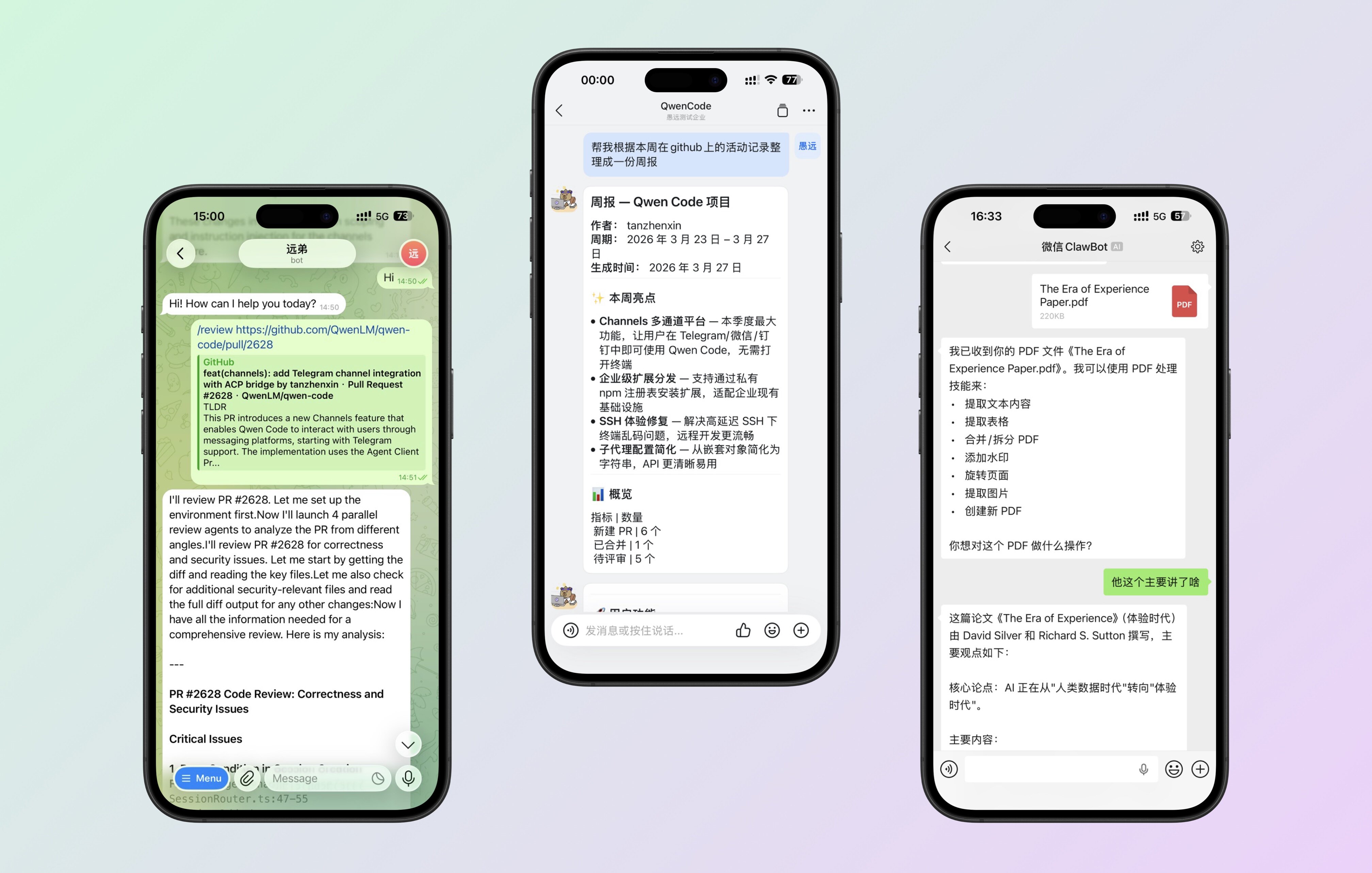
Channels: Operate Qwen Code Remotely via DingTalk, Telegram, WeChat
Qwen Code is no longer limited to the terminal. The Channels system supports plugin-based access to multiple platforms—currently supporting Telegram, WeChat, and DingTalk. You can send a message to the Bot from your phone and have it execute tasks on your server.
What You Can Do With It:
- While out and about, send a message to Qwen Code via Telegram to run a script or check logs
- @mention the bot in a DingTalk group to handle code-related tasks for the team
- Send a quick message on WeChat to remotely operate your development environment
See PR #2628
Cron Scheduled Tasks: Let AI Work on a Schedule
A new Cron tool lets you set up scheduled recurring tasks within the current session. AI will automatically execute them on your defined schedule without you having to watch.
What You Can Do With It:
- Automatically check if tests pass every 30 minutes
- Automatically pull the latest code and run a build every morning
- Monitor log files on a schedule and notify you when anomalies are detected
See PR #2731
How to Enable?
Add the following to ~/.qwen/settings.json:
{
	"experimental":{
		"cron": true
	}
}
Qwen 3.6 Plus Model Launch
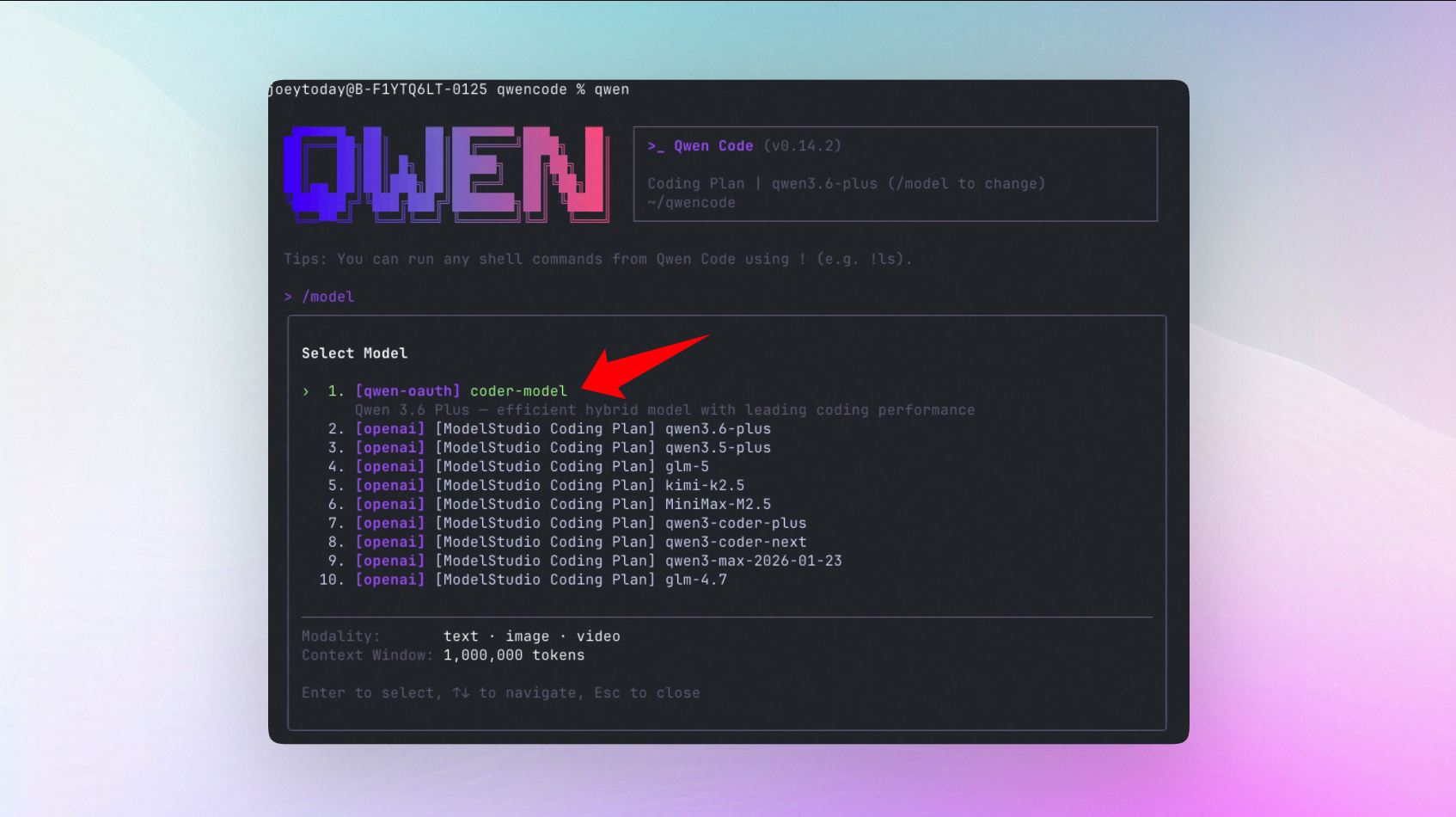
Qwen 3.6 Plus is officially available in Qwen Code, free to use. Its coding performance is on par with GPT-5 and Claude 3.7 Sonnet, with notable advantages in Chinese understanding and long-context processing. Alibaba Cloud ModelStudio Coding Plan is also now available.
What You Can Do With It:
- Use the latest Qwen 3.6 Plus model directly in Qwen Code
- Free 1,000 calls/day, 1 million token context
- Better experience for Chinese programming scenarios
See PR #2820
Follow-up Suggestions: AI Tells You What to Do Next
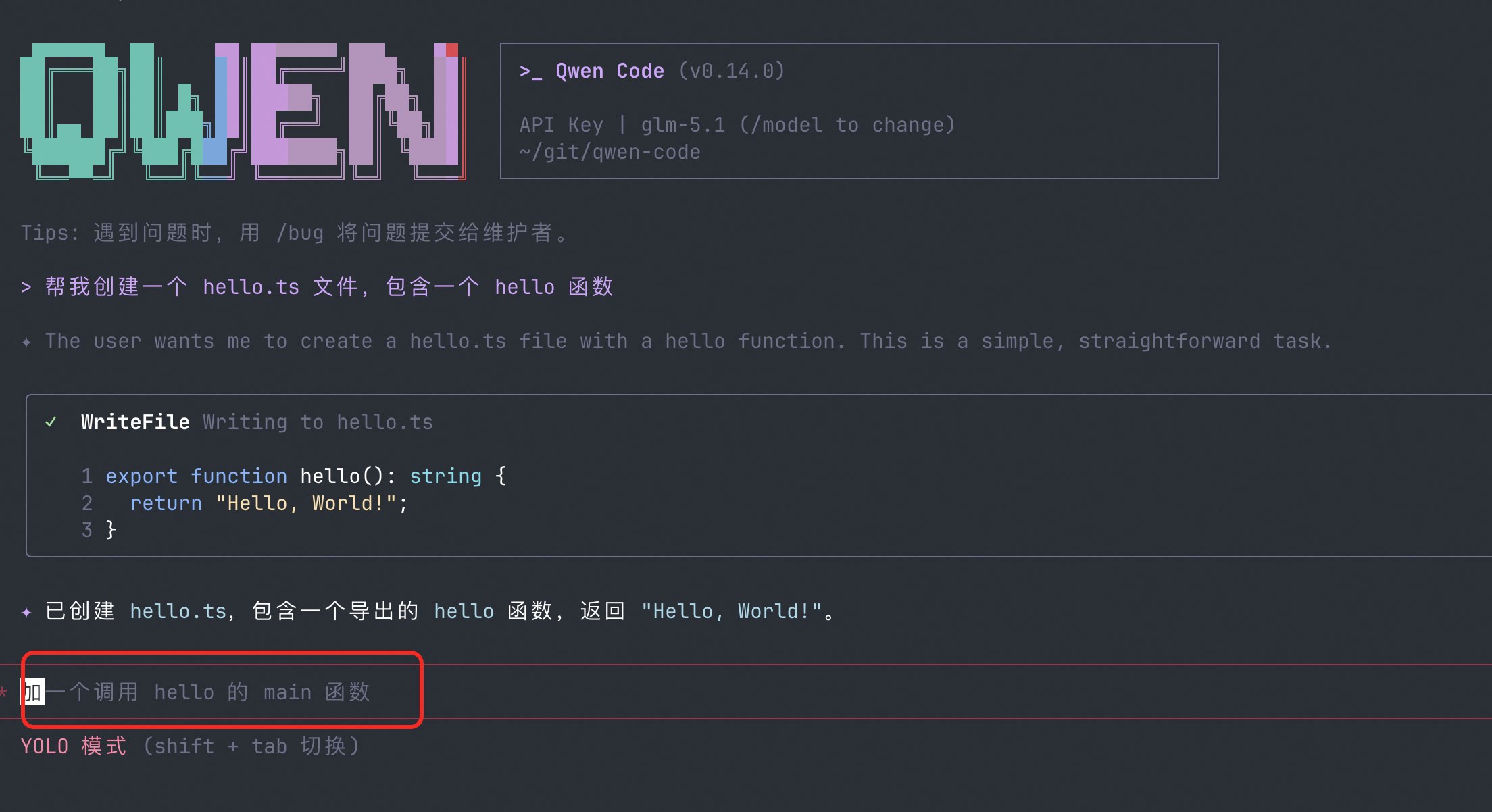
After completing a task, AI automatically provides 2-3 follow-up suggestions. No need to think about “what should I do next”—just click to continue.
What You Can Do With It:
- After writing a component, AI suggests “Want to add unit tests?”—just click to start
- After fixing a bug, AI suggests “Want to check similar places?”—saves you the thinking
- When beginners don’t know what to do next, follow-up suggestions serve as navigation
See PR #2525
How to Enable?
Add the following to ~/.qwen/settings.json:
{
	"ui":{
		"enableFollowupSuggestions": true
	}
}
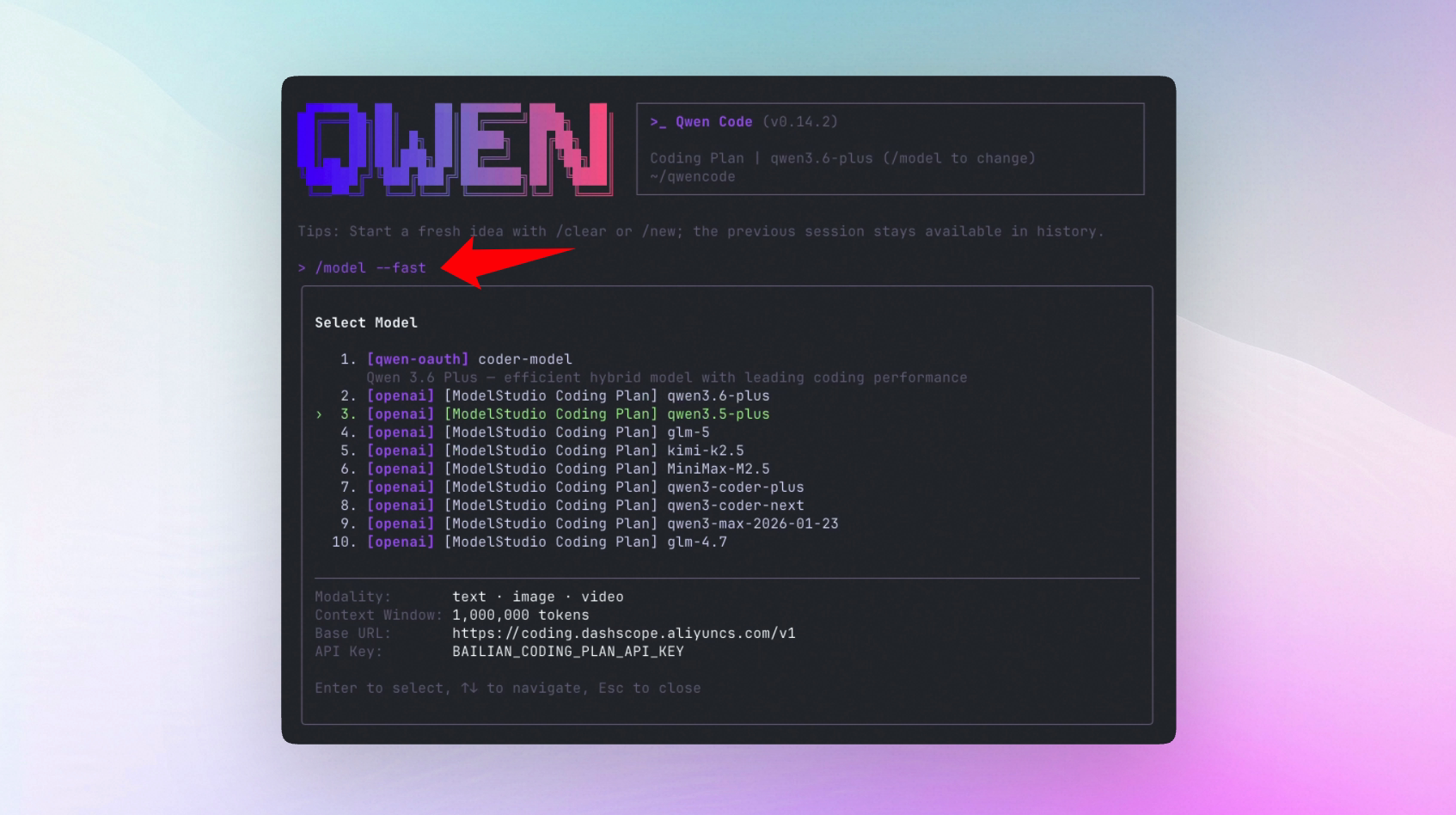
For faster suggestion response times, you can use /model --fast to specify a lightweight model dedicated to background suggestions.
Sub-Agent Cross-Model Selection: Different Models for Different Tasks
Sub-agents can now use different models from the main agent. Use a powerful model for the main task to ensure quality, and a lightweight model for sub-tasks to speed things up—flexible combinations that save tokens without sacrificing quality.
What You Can Do With It:
- Use Qwen 3.6 Plus for the main task and a lightweight model for sub-tasks, reducing token consumption while maintaining quality for critical tasks
- Different types of sub-tasks are automatically assigned the most suitable model
See PR #2698
How to Get Started?
Create a sub-agent Skill file specifying a different model:
---
name: test-cross-provider
description: Test cross-provider Agent
model: openai:gpt-4o
---

You are a test assistant. Please briefly introduce yourself, including the model name you are using.
Then tell Qwen Code to invoke this sub-agent in the conversation.
Ctrl+O Verbosity Toggle: Switch Output Detail Level with One Key
Press Ctrl+O to toggle between verbose (detailed) and compact (concise) modes. View detailed output when debugging, switch to compact mode for daily use—no configuration changes needed.
What You Can Do With It:
- Switch to verbose mode when debugging to see the full execution process
- Switch to compact mode for daily use for a cleaner interface
- Toggle anytime without restarting or editing config files
See PR #2770
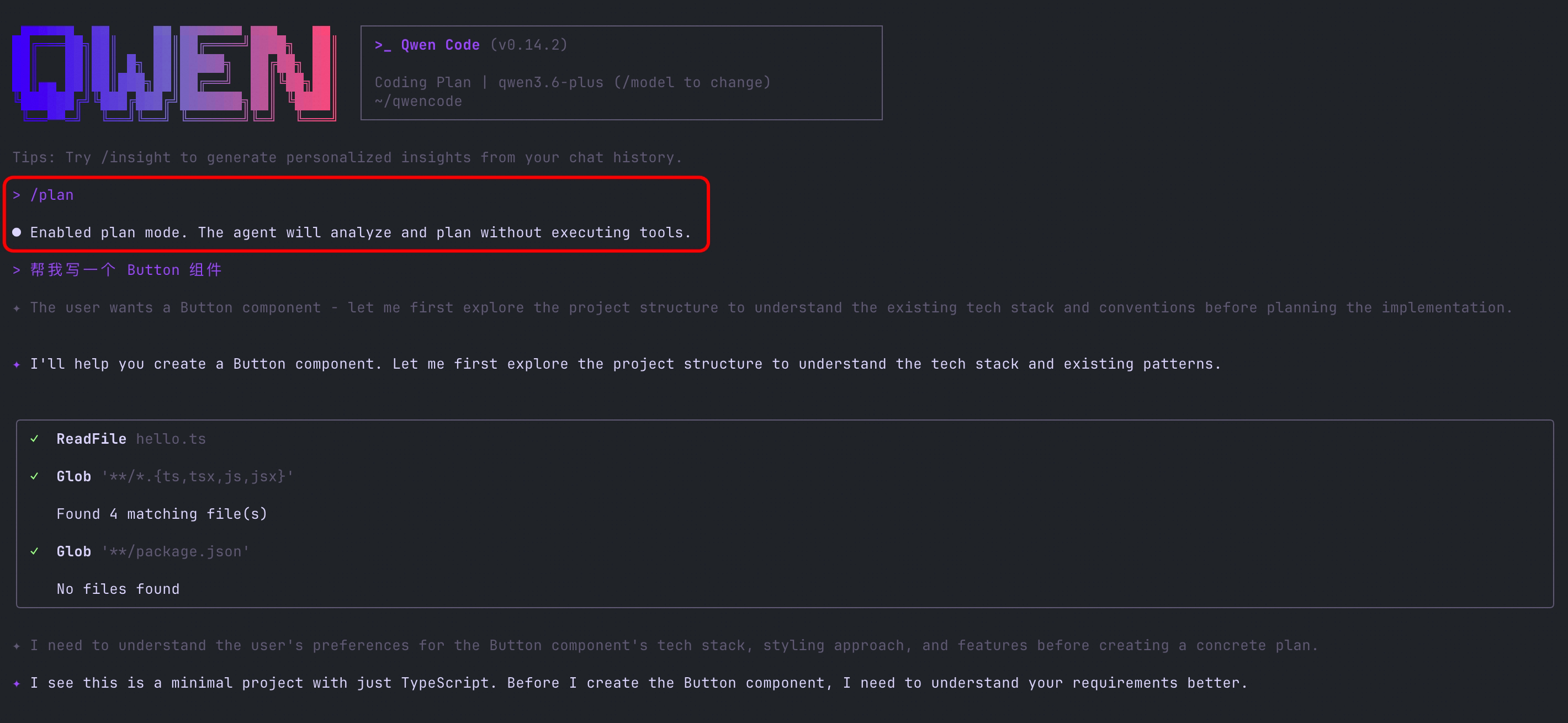
/plan Command: Plan Before You Act
The new /plan command lets you enter planning mode with one command. AI will first provide a complete execution plan, and you confirm before it starts executing. Perfect for complex tasks—see the full picture first, then proceed step by step.
What You Can Do With It:
- Before refactoring a large module, have AI list all files and steps that need to be changed
- Review the plan for multi-step tasks first to avoid AI going off track and having to start over
- In team collaboration, generate a plan for colleagues to confirm before executing
See PR #2921
Adaptive Output Tokens: Responses No Longer Get Truncated
Output tokens default to 8K. When AI detects a response is being truncated, it automatically upgrades to 64K and retries. No need to manually adjust parameters—AI determines how much response space it needs on its own.
What You Can Do With It:
- Long file generation is no longer truncated—complete content in one output
- Complex code generation without needing to piece together segments
- No need to manually configure max_tokens—AI adapts automatically
See PR #2898
Thinking Block Cross-Turn Retention
AI’s thinking process (thinking block) can now be retained across conversation turns, with automatic cleanup during idle time. In multi-turn conversations, AI can better continue its previous reasoning chain for more coherent responses.
See PR #2897
📊 Improvements
| PR | Version | Improvement | Impact |
|---|---|---|---|
| #2781 | v0.14.0 | Hooks GA: removed experimental flag, added disable state UI | Can temporarily disable a Hook without deleting config, more stable as an official feature |
| #2687 | v0.14.0 | /review enhanced: added validation steps and false positive control, supports adding comments on PRs | Review results are more accurate, fewer meaningless warnings |
| #2776 | v0.14.1 | /btw side question enhanced: improved prompt quality, added Ctrl+C/D to cancel | Side question experience is smoother, press Ctrl+C anytime to cancel |
| #2719 | v0.14.0 | Extensions support npm installation | Besides GitHub URLs, you can now install extensions from npm registry |
| #2428 | v0.14.0 | MCP auto-reconnect, added /mcp reconnect command | MCP auto-recovers after disconnection, no need to restart every time |
| #2889 | v0.14.1 | Dangerous operation guidance: system prompt adds dangerous operation behavior guidance | AI will more carefully confirm before executing delete, overwrite, and other operations, reducing accidental operations |
| #2659 | v0.14.0 | /compress optimization: properly handles tool-call-intensive conversations | Compressing long conversations no longer loses key context |
| #2595 | v0.14.1 | WebUI tool label standardization | Tool names display more consistently and clearly in the WebUI interface |
| #2954 | v0.14.2 | Follow-up suggestions disabled by default | Won’t be interrupted by auto-popping suggestions, enable in settings when needed |
🔧 Important Fixes
| PR | Version | Fix | Impact |
|---|---|---|---|
| #2733 | v0.13.2 | Fixed node-pty path resolution on Windows Git Bash | Windows Git Bash users no longer encounter startup errors |
| #2656 | v0.13.2 | Fixed /clear and ESC key lag caused by Hooks system | Clear screen and cancel operations are smooth again |
| #2707 | v0.13.2 | Preserve original line endings (CRLF/LF) when editing files | No more line ending tampering during cross-platform collaboration |
| #2718 | v0.13.2 | Fixed terminal response leakage in high-latency SSH environments | Output no longer serializes during SSH remote development |
| #2777 | v0.14.0 | Upgraded node-pty to fix macOS PTY file descriptor leak | No more lag from FD leaks during extended use |
| #2662 | v0.14.0 | Clean up orphan processes when closing tabs, clean up MCP subprocesses on exit | No more lingering background processes consuming resources after exit |
| #2884 | v0.14.1 | Restored ? shortcut in vim normal mode | Vim users’ search shortcut works normally again |
| #2837 | v0.14.1 | Removed quote drag detection, fixed input delay | No more noticeable input delay when typing |
| #2834 | v0.14.1 | /theme restores previous theme on cancel | Canceling theme switch no longer gets stuck in an intermediate state |
| #2822 | v0.14.1 | Prevent ideCommand failure from affecting all slash commands | A single command error no longer makes all commands unavailable |
| #2804 | v0.14.1 | ACP connection adds retry and auto-reconnect | VS Code integration is more stable, auto-recovers after disconnection |
| #2802 | v0.14.1 | VS Code new tab inherits model selection | New tabs no longer require re-selecting the model |
| #2959 | v0.14.2 | Fixed VS Code 0.14.1 webview white screen | VS Code panel no longer shows white screen after upgrading to v0.14.1 |
| #2995 | v0.14.2 | Fixed csiUPrefix error on Linux/Wayland | Linux Wayland users no longer encounter input errors |
| #2976 | v0.14.2 | Hooks preserve null exit code on signal termination | Hooks no longer incorrectly report exit code as 0 when terminated by signal |
| #2858 | v0.14.1 | MCP tool parameter compatibility fix (anyOf/oneOf schema) | More MCP tool parameters can be correctly parsed, reducing call errors |
| #2943 | v0.14.1 | WeChat Channel missing iLink-App-Id header | WeChat Channel connection is more stable, no longer fails due to missing header |
🎈 Other Improvements
| PR | Improvement | Impact |
|---|---|---|
| #2623 | Built-in qc-helper Skill and qwen-code-claw reference docs | New users automatically get built-in skill guidance on startup, faster onboarding |
| #2715 | envKey documentation optimization: clearer usage instructions and env field examples | No more guessing parameter formats when configuring environment variables |
| #2714 | Bailian → ModelStudio unification | Unified brand naming in docs, new users won’t be confused by old names |
| #2696 | Hooks event UI optimization: switched to dedicated history entries | Conversation history clearly shows which operations were triggered by Hooks |
| #2463 | Markdown table rendering fix | AI-generated tables no longer have formatting issues |
| #2455 | Model configuration persistence | Custom model configurations no longer lost after restart |
| #2763 | Plan Mode supports web fetch approval | AI can now browse web pages during the planning phase |
| #2586 | YOLO mode exit fix | No longer stuck in planning mode |
| sdk-typescript-v0.1.6 | SDK TypeScript v0.1.6 | More complete API for developers integrating Qwen Code capabilities |
👋 Welcome New Contributors
- @chinesepowered — Fixed Hooks abort listener cleanup, sub-agent cache refresh, Telegram message fallback, and more
- @pic4xiu — Fixed Hook system message commit timing, removed WebFetchTool duplicate proxy settings
- @YingchaoX — Restored ? shortcut in vim normal mode
- @euxaristia — Removed quote drag detection to fix input delay
- @kulikrch — /theme restores previous theme on cancel
- @nsalvacao — Fixed exit_plan_mode in YOLO mode
- @mj4444ru — Fixed Markdown table cell separator escaping
- @chiga0 — Implemented Ctrl+O verbosity mode toggle
How to Upgrade: Run npm install -g @qwen-code/qwen-code@latest to upgrade to the latest version.
If you have questions or suggestions, feel free to provide feedback on GitHub Issues !