Qwen Code Weekly: Zero-Config Built-in Computer Use, Feishu Integration, Compression Engine Rewrite
Qwen Code released v0.17.0 and v0.17.1 this week, with 60+ PRs merged across four directions:
Computer Use is now a built-in capability. Previously you had to install extensions, configure MCP, grant permissions, restart—most people couldn’t complete this workflow. Now 9 desktop automation tools are registered as deferred built-ins. The model prompts a one-time confirmation on first invocation, and everything else (binary download, macOS permission guidance, server lifecycle) is fully automatic. While Anthropic continues enhancing Computer Use in Opus 4.8 but locks it to their own model, Qwen Code runs with whatever model you choose—you control the cost.
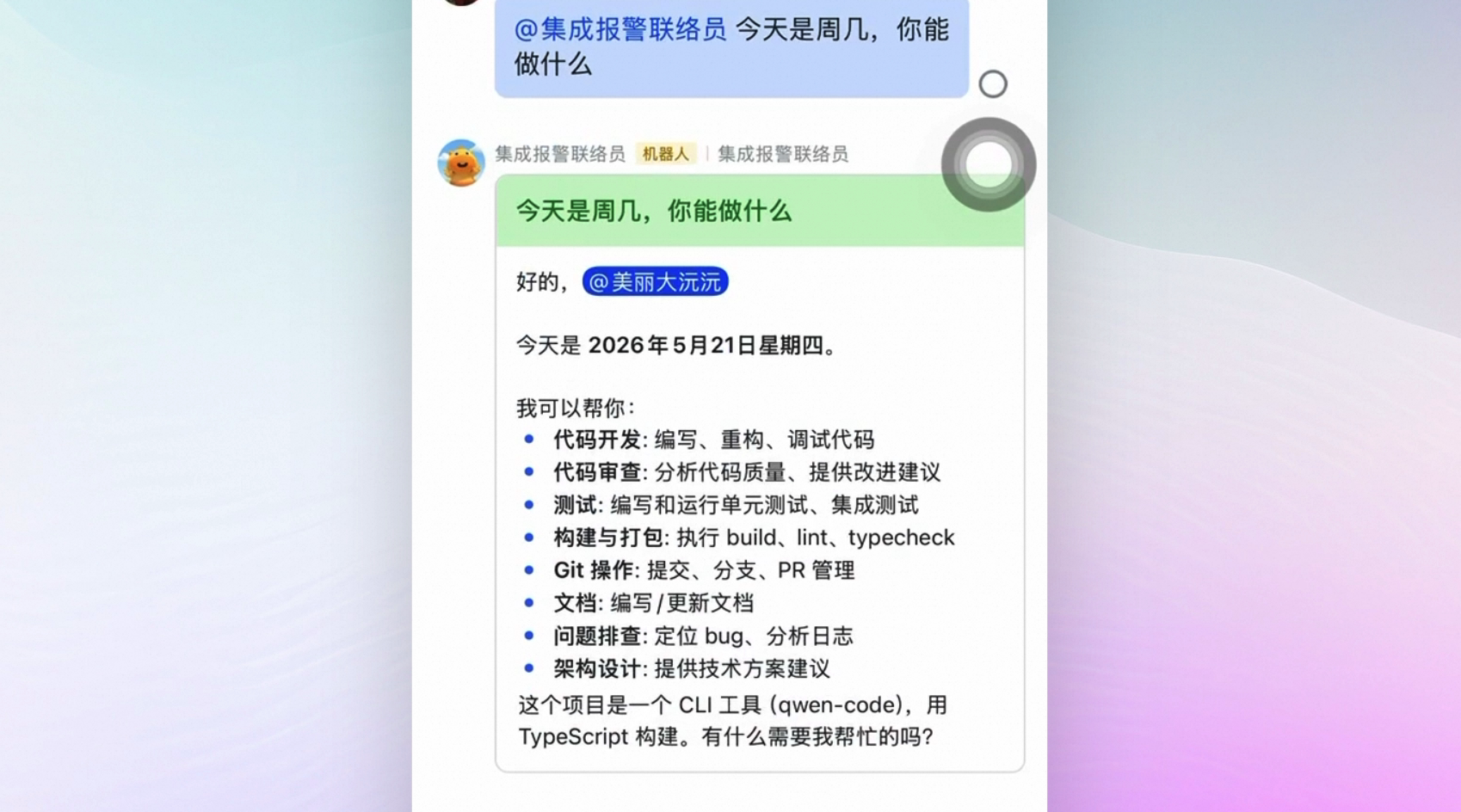
Feishu integration is live. Qwen Code already supports WeChat integration, and this week Feishu was added too. WebSocket and Webhook connection modes, with Agent replies streamed via Feishu interactive cards in real-time, with a stop button. Just @ the bot in a Feishu group chat to use the Agent—no tool switching needed.
Long task compression no longer loses context. The old compression model split by character count at 70/30. Single-turn long tasks (typical computer-use workflows) have only one user message, and the splitting logic couldn’t find a split point, so it discarded all screenshots and the original user prompt. The new engine uses full-history summary + selective restoration: 9-section structured summaries preserve narrative continuity, and the most recent 5 files + 3 images restore state continuity. When Computer Use compresses mid-run, the Agent no longer goes “blind.”
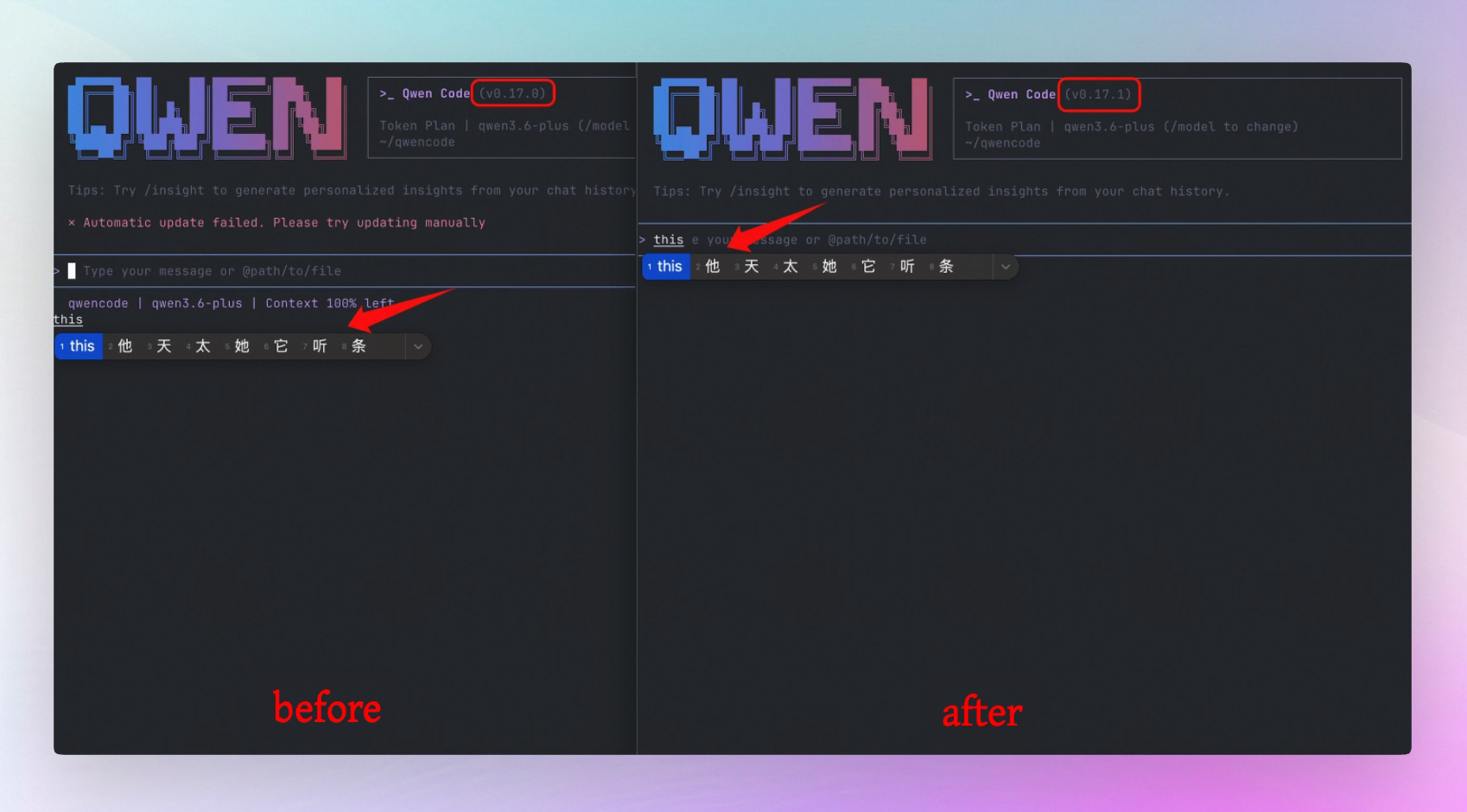
CJK users can finally stop suffering. The IME candidate window for Chinese/Japanese/Korean input methods always jumped to the terminal’s bottom-left corner, miles away from where you’re actually typing. This week, by traversing the yoga tree to move the physical cursor to the visual cursor position, the candidate window finally follows along.
✨ New Features
Zero-Config Built-in Computer Use: Desktop Automation with One Confirmation
Qwen Code makes Computer Use a zero-config built-in capability. 9 tools including computer_use__list_apps, computer_use__get_app_state, computer_use__click are registered as deferred built-in tools. When the model first invokes any of them, a standard tool-permission dialog appears—you click Approve once, and everything after is automatic—npx -y open-computer-use mcp pulls the upstream binary (~50MB), macOS automatically guides Accessibility and Screen Recording permissions, and MCP server lifecycle is auto-managed.
Enabled by default (tools.computerUse.enabled: true). Disable it with one config change if you don’t want it. Runs with your chosen model, not locked to any specific provider.
What you can do with it:
- Ask the Agent “open the Stocks app, click the first stock”—the Agent sees the screenshot, identifies UI elements, and clicks automatically
- First use requires only one confirmation, subsequent calls go through directly
- The model sends
select:computer_use__list_apps,computer_use__get_app_state,computer_use__clickto batch-load schemas, loading multiple tools at once - macOS permission guidance is fully automatic: Accessibility → Screen Recording → auto-reconnect after restart
- Disable with
tools.computerUse.enabled: false, or override the upstream binary version withQWEN_COMPUTER_USE_PACKAGE
See PR #4590
Feishu Channel: Use Qwen Code Directly in Feishu
Qwen Code already supports WeChat integration, and this week Feishu was added. The new Feishu (Lark) channel adapter supports both WebSocket and Webhook connection modes. Agent replies are streamed via Feishu interactive cards in real-time, with a stop button. Quoted/replied context is correctly captured—whether it’s a text message or a card message.
Each message has independent state isolation, so multiple users won’t interfere with each other.
What you can do with it:
- @ Qwen Code in a Feishu private chat or group chat to ask questions or assign tasks directly
- Watch the Agent’s thinking and output process in real-time via streaming cards, interrupt anytime with the stop button
- Quote a message to ask a question, and the Agent can see the quoted original text
- Supports image and file attachments
See PR #4379
Compression Rewrite: Long Tasks No Longer Lose Context
Last week we designed auto-compression as a three-tier ladder. This week we went one level deeper: the compression engine itself was rewritten.
The old model split history by character count into the first 70% (compressed into a summary) and the last 30% (preserved verbatim). The problem was with single-turn long tasks like computer-use—the user says just one thing like “open Safari, click the search result, take a screenshot,” then the Agent runs dozens of tool call rounds. The splitting logic requires at least two user messages to find a split point; single-turn can never find one, and the fallback replaces all screenshots and the original user prompt with a text summary. After recovery, the Agent goes “blind”—no visual context, no verbatim user intent.
The new engine uses summary + selective restoration:
- 9-section structured summary: Section 6 forces verbatim quotation of every user message, ensuring user intent survives compression
- Most recent 5 files restored: Size-adaptive—small files embed freshly-read complete content from disk, large files get only path references
- Most recent 3 images restored: Each image carries a metadata header (turn index + source tool name + args), so the model can correlate visual state with the action that produced it
What you can do with it:
- After compression during a long Computer Use task, the Agent can still see recent screenshots and your original instructions
/compressadds a focus directive:/compress focus on the auth bug—guides the summary to focus on what you care about (max 2000 characters)- Plan mode and background subagent state auto-recover after compression, no silent loss
Approval Mode Renamed: Default → Ask Permissions
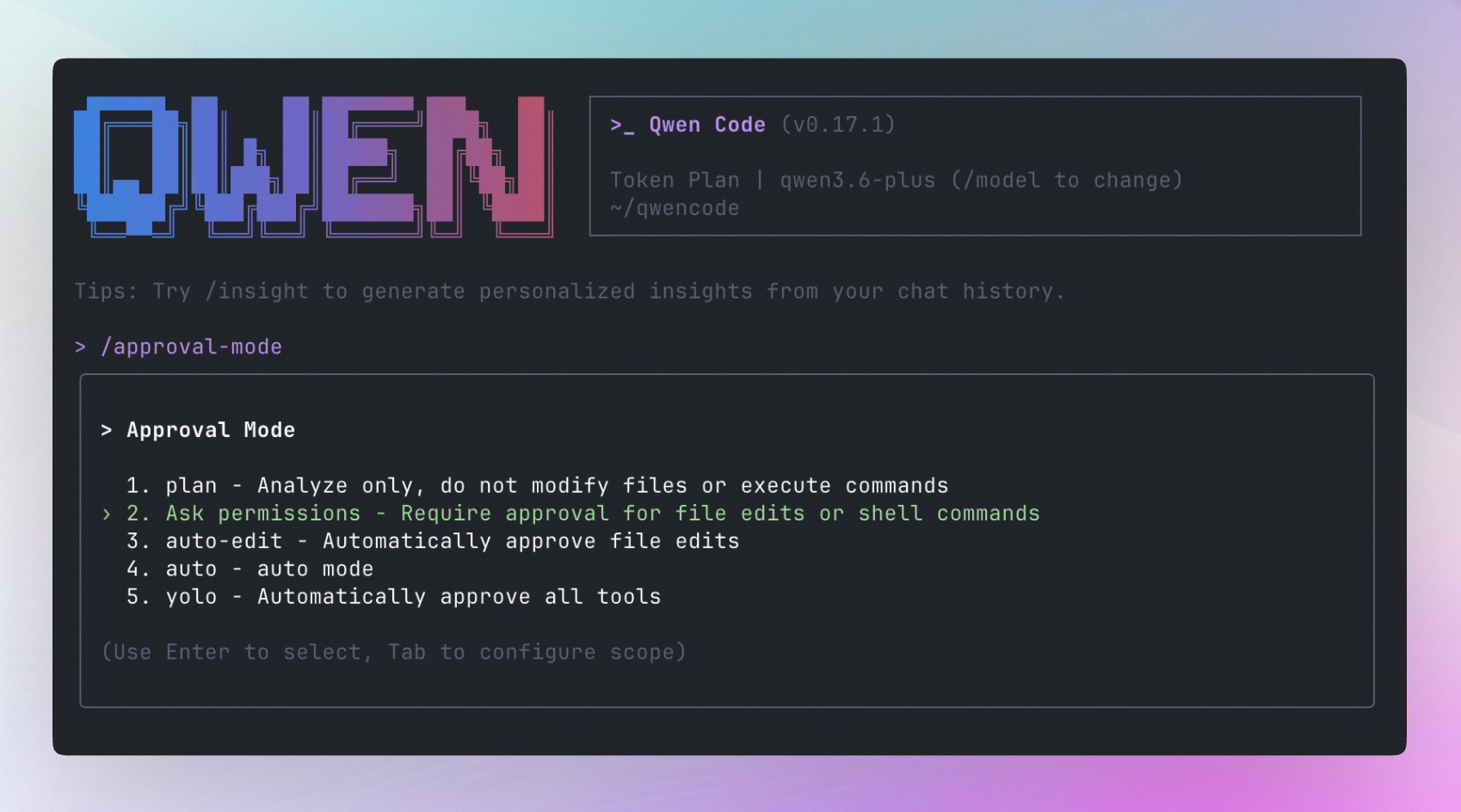
The default approval mode was previously called “Default”—a name that only tells you “this is the default,” not what permissions the mode actually grants. Other modes (Plan, Auto-Edit, Auto, YOLO) all directly describe behavior; Default was the only exception.
Renamed to Ask Permissions, directly answering “will the Agent ask me in this mode?” Simultaneously aligned with Claude Code’s naming for the equivalent mode, reducing cognitive cost across tools.
Internal enum value ApprovalMode.DEFAULT, "default" in settings.json, and CLI command /approval-mode default all remain unchanged—zero migration for existing configs. Translations for 9 locales updated simultaneously.
What you can do with it:
- The Settings dialog shows
Ask permissionsin theTool Approval Moderow—instantly clear that this mode will ask for your consent - The
/approval-modeselector shows behavior descriptions, not a meaningless “Default” - Existing settings.json and CLI commands are fully compatible, no changes needed
See PR #4674
IME Candidate Positioning: CJK Input Methods Finally Work
Qwen Code renders the visual cursor with reverse-color characters, while the physical cursor is hidden and defaults to the terminal’s bottom-left corner. CJK input method users’ candidate windows always follow the physical cursor—an entire screen away from where you’re actually typing. Hermes and OpenClaude have the same issue; their solution is to fork the Ink source code.
Qwen Code takes a different approach: using addLayoutListener (triggered after yoga’s calculateLayout(), zero jitter) to traverse the yoga tree and get the input component’s absolute position, then moving the physical cursor to the visual cursor position. Uses patch-package to expose ink/dom and ink/components/CursorContext internal modules without forking all of Ink.
What you can do with it:
- Switch to Sogou/Apple Pinyin or other CJK input methods, and the candidate window appears next to the cursor instead of jumping to the bottom-left
- The candidate window follows when you move the cursor with arrow keys
- Normal conversations, multi-line input, and history scrolling are unaffected
See PR #4652
More New Features
| Feature | PR | Impact |
|---|---|---|
Virtual Viewport: opt-in virtualized history rendering (ui.useTerminalBuffer: true), only renders visible area, keyboard/mouse scrolling, fixes long conversation flickering and lag | #4146 | 1000-turn conversations no longer flicker/lag/scroll-storm, directly fixes #3702 #2950 #3118 #2972 |
| Fork SubAgent Gating + Prompt Discipline: disables fork in non-interactive mode, injects “Don’t peek / Don’t race” constraints in interactive mode | #4574 | Fork no longer accidentally triggers in CI/headless; in interactive mode the Agent won’t peek at fork intermediate results or fabricate completion status |
| Memory Pressure Monitoring: cgroup-aware RSS + V8 heap monitoring, auto-clears FileReadCache | #4403 | Automatically releases cache during long session memory pressure, avoiding OOM |
| Pre-OOM Auto Diagnostic Dump: writes diagnostic JSON to disk at hard/critical pressure | #4654 | Diagnostic data persists after process crash, can be directly attached to bug reports |
| Background Shell Completion Notifications: terminal notifications when background tasks complete/fail/cancel | #4355 | No need to manually ask the Agent if background tasks are done |
| Atomic Write Phase 2: credentials/memory/config/JSONL all use atomic writes | #4333 | kill -9 / OOM / power loss no longer corrupts credential files or causes JSONL record sticking |
CPU Profiling: /doctor cpu-profile or QWEN_CODE_CPU_PROFILE=1 or SIGUSR1 signal trigger | #4620 | Three ways to generate .cpuprofile, load directly in Chrome DevTools for analysis |
| Settings JSON Corruption Warning: warning dialog when config file has syntax errors | #4560 | Manual settings.json editing errors no longer silently swallowed |
Statusline Customization: respectUserColors + hideContextIndicator options | #4670 | Status bar colors and context indicator adjustable per preference |
| MiniMax-M3 Model: added MiniMax-M3 model configuration | #4668 | Select MiniMax-M3 directly from /model |
| Web Shell /delete: batch delete sessions | #4603 | Batch clean old sessions in Web UI |
| Runtime MCP add/remove: dynamically add/remove MCP servers at runtime | #4552 | Manage MCP servers without restarting |
| Triage Skill: built-in issue/PR classification skill | #4577 | Agent can do initial issue and PR classification for you |
| Simplify Skill: built-in code simplification skill | #3570 | Agent has a systematic code simplification workflow |
| Agent Reproduction Workflows: Agent issue reproduction workflows | #4118 | Standardized Agent behavior issue reproduction and debugging workflow |
| Shell Subprocess Context Env Vars: session/agent/prompt ID injected into shell environment variables | #4649 | Custom scripts can access current session context |
| AUTO Denial Observability + Caps: observability and caps for AUTO mode denials | #4476 | What AUTO mode denied and why—now there’s data |
| Web Shell Inline Terminal: inline terminal command interface in Web UI | #4710 | See command execution directly in Web UI |
| Computer Use Signed Package: uses signed + notarized @qwen-code/open-computer-use fork | #4726 | macOS Gatekeeper no longer blocks Computer Use binary |
| Desktop Multi-Brand Support | #4581 | Desktop app supports multi-brand builds |
| Daemon Non-Blocking Prompt | #4585 | POST /prompt immediately returns 202 + promptId, non-blocking |
🔧 Important Fixes
| PR | Fix | Impact |
|---|---|---|
| #4644 | Replace structuredClone with shallow copy/tail variant during resume, preventing OOM | Resuming long sessions no longer causes memory overflow from deep-copying entire history |
| #4650 | /memory toggle state correctly persists after dialog reopening | /memory switch no longer loses settings after reopening |
| #4605 | Disable undici 300s bodyTimeout (no-proxy Node.js path) | Long model calls no longer interrupted by 300-second timeout |
| #4580 | Fix rewind false “compressed turn” error when mid-turn messages exist | Conversation rewind no longer falsely reports errors in compressed sessions |
| #4505 | DashScope correctly sends enable_thinking when reasoning is disabled | DashScope users no longer see reasoning output after disabling thinking |
| #4540 | Expose Anthropic empty stream provider error | Clear error message when Anthropic provider returns empty stream, no longer silently hangs |
| #4474 | Load ~/.env variables before settings variable resolution | Environment variable references in settings.json can finally correctly resolve variables defined in ~/.env |
| #4431 | atomicWriteFile preserves file uid, avoiding shared write file corruption | Atomic writes in multi-process scenarios no longer change file ownership |
| #4689 | Daemon isolates parallel subAgent text streams | Parallel subAgent outputs no longer interleave in transcripts |
| #4701 | Arena model selection dialog Space key fix | Space key finally works when selecting models in Arena mode |
| #4558 | Suppress completion menu before history restore text edit | Pressing ↑ to restore history input no longer immediately triggers completion menu |
| #4623 | Screenshot-triggered compression correctly labeled in auto-compact notification | Compression notifications no longer mislabel screenshot-triggered compression as regular compression |
| #4531 | Guard oversized resume history sends | Resuming ultra-long sessions no longer fails due to oversized payload |
| #4439 | Fix hostile provider usage token counting | Abnormal token counts from certain providers no longer display incorrect data |
🎉 New Contributors
Thanks to the following first-time contributors:
| Contributor | Contribution |
|---|---|
| @kagura-agent | Display startup warnings on stderr before TUI rendering #4461 |
| @yuanyuanAli | Feishu (Lark) channel adapter #4379 |
| @he-yufeng | IDE proxy requests use undici fetch #4607 , hide completed sticky todos #4635 , honor list extensions flag #4673 and more |
| @zzhenyao | Settings JSON corruption warning dialog #4560 , IME candidate positioning #4652 , Statusline customization options #4670 |
| @Pepograminger | Disable undici 300s bodyTimeout #4605 |
| @InfiniteUselessness | Update @google/genai dependency to 2.6.0 #4485 |
| @ZijianZhang989 | Arena model selection Space key fix #4701 |
How to upgrade: Run npm i @qwen-code/qwen-code@latest -g to upgrade to the latest version.
If you have questions or suggestions, feel free to provide feedback on GitHub Issues !