Qwen Code Weekly: Token Costs at a Glance, Voice Input, Save & Reuse Workflows
Qwen Code shipped five releases this week — v0.18.4 through v0.19.2 (major bump to v0.19.0) — with over 140 PRs merged across three directions:
Voice input — just talk, no typing. Every input used to be typed out — long commands, complex parameters, mixed Chinese-English. Slow and prone to typos. This week /voice lets you speak into your microphone; when you finish, the fast model automatically strips filler words and typos so you see a cleaned-up transcript.
Workflows are now saveable and reusable. Previously a workflow ran and disappeared. Next time you’d have to write the prompt again from scratch, and there was no way to resume an interrupted run in the same session. This week Dynamic Workflows closes that gap: after a run, press s to save the script as a slash command — next time just type /<name> to invoke it. You can also resume a previously interrupted run within the same session.
UI slimmed down across the board. Terminal tool-call boxes stacked into a wall of rounded borders, thinking blocks had no dedicated expand key, and extension / MCP server management required editing config files by hand. This week: borders gone, completed tools collapse to one line, Alt+T specifically manages thinking, /extensions becomes an interactive manager, and MCP Resources can be browsed and @-completed.
Voice Input: Just Talk Into Your Microphone
Every input used to be typed. Long commands, complex parameters, mixed Chinese-English — slow and easy to mistype.
This week adds /voice voice input. Two modes: hold mode — press Space to talk, release to stop; tap mode — click once to start, click again or silence auto-stops and submits. Audio is captured via a native microphone backend (@qwen-code/audio-capture N-API addon). On Linux it auto-falls back to arecord/SoX; on macOS it requests microphone permission.
Transcription has two paths: batch mode (qwen3-asr-flash) uses OpenAI-compatible chat/completions + input_audio API; realtime mode (qwen3-asr-flash-realtime, fun-asr-realtime) streams PCM via WebSocket with partial text displayed live. After you finish, the fast model cleans up filler words (“um”, “嗯”) and typos while preserving your original phrasing — no rewriting. On timeout or failure, the raw transcript is used directly. Voice input always produces text.
/model --voice selects the transcription model; general.voice.{enabled,mode,language} configures behavior.
What you can do with it:
/voice hold— hold Space to talk, release to stop transcription/voice tap— click once to start, speak a sentence or silence to stop/model --voice qwen3-asr-flash-realtime— pick a realtime streaming transcription model/voice status— check current voice configuration- Web Shell: click the microphone button for voice input (browser recording, daemon-side transcription)
Dynamic Workflows: Save After Running, Invoke Next Time Directly
A workflow used to vanish once it finished. Want to run the same task again? Rewrite the prompt from scratch. Interrupted mid-session? No way to pick up where you left off.
This week Dynamic Workflows closes that gap. After a workflow finishes, press s to save the script to .qwen/workflows/<name>.js. Once saved, it becomes a slash command — next time just type /<name> to run it without rewriting the prompt. You can choose project-level (only available in the current project) or user-level (available across all projects) when saving. Existing scripts with the same name will prompt a overwrite confirmation.
Within the same session, you can also resume a previously run workflow: resumeFromRunId replays from JSONL logs, resumes at the longest unchanged prefix from cache, then continues at the first divergence point. Each completed terminal run auto-saves to <projectDir>/workflows/<runId>.json; the /workflows panel shows history (persists across restarts; oldest entries auto-cleaned).
Additional capabilities: agent stall watchdog (sub-agent timeouts auto-retry 3 times), nested calls (workflow('<name>') inside another workflow), “workflow” keyword soft-redirect to the workflow tool (disable with ui.disableWorkflowKeywordTrigger), and terminal bell notification on completion/failure.
What you can do with it:
- After a workflow finishes, press
sto save as/<name>slash command /workflowspanel shows history, persists across restarts- Resume an interrupted workflow within the same session
- Save at project-level or user-level, choose visibility scope as needed
See PR #5600
UI Experience Optimized Across the Board
This week both the terminal and Web Shell got a concentrated slim-down — visual noise reduction, interaction efficiency, and management capabilities all improved in one go.
TUI border removal + completed tool collapse. Every tool call used to be wrapped in rounded borders; parallel calls stacked into a wall of boxes. This week borders are gone entirely. In compact mode, completed tools collapse to one line (status icon + tool name + duration); only active and errored calls stay expanded. Non-compact mode is unaffected.
Thinking Alt+T + full-screen viewer. Last week Thinking was collapsible but had no dedicated expand key — you had to share Ctrl+O for compactMode toggle. This week Alt+T specifically manages expanding/collapsing all thinking blocks. Clicking a collapsed thinking line opens an AlternateScreen full-screen viewer with keyboard navigation (↑↓, PgUp/PgDn) + mouse scroll.
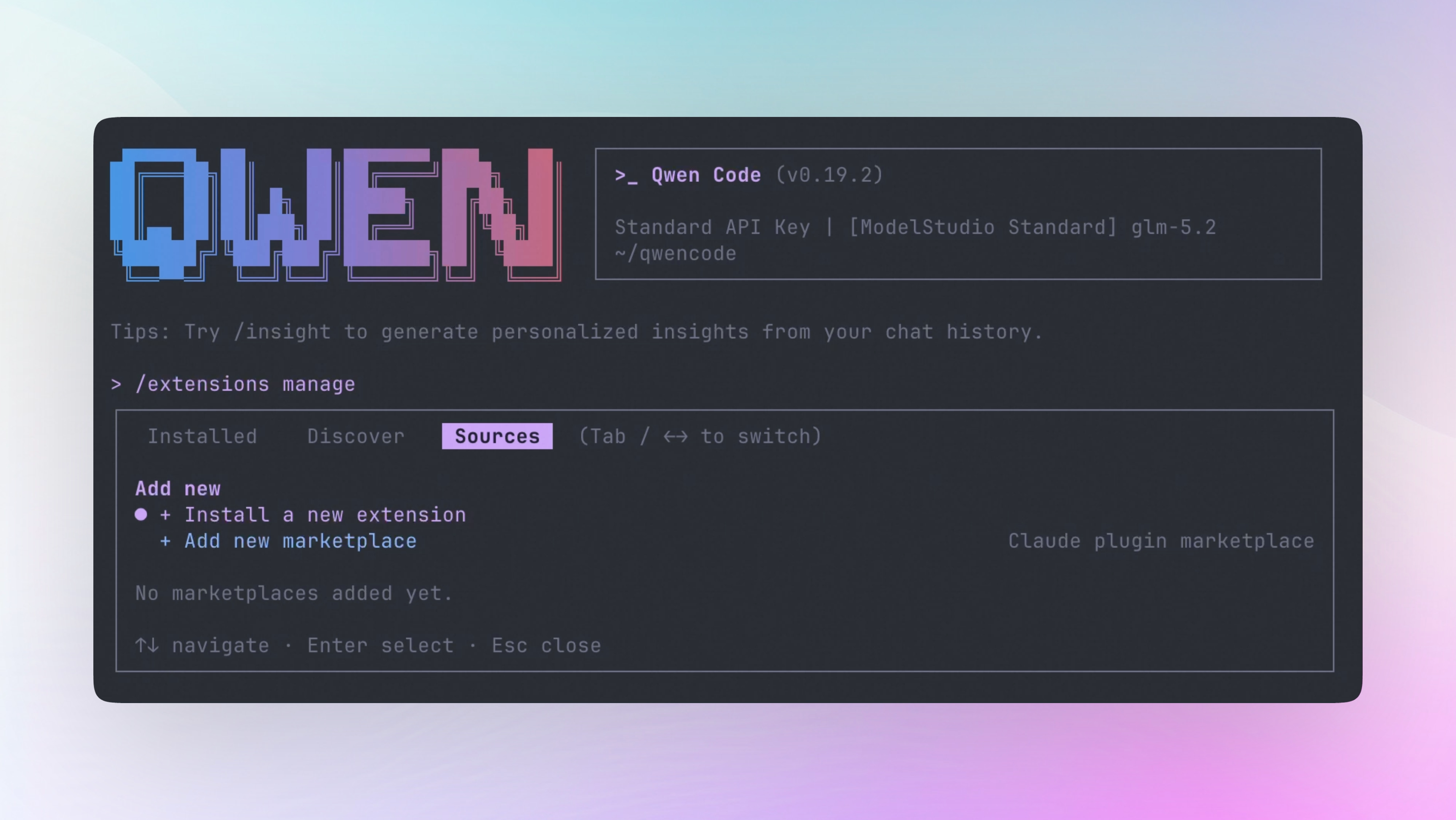
/extensions becomes an interactive manager. Previously /extensions was a read-only flat list; installing or configuring meant editing settings manually. This week it becomes an interactive multi-tab manager: Installed tab groups by level + per-extension action menu (enable/disable/favorite/change scope/update/uninstall); Discover tab searches and one-click installs marketplace extensions; Sources tab adds new marketplaces (supports GitHub repo, Claude marketplace, npm package, local path). CLI also has qwen extensions sources add/list/update/remove command group.
MCP Resources browseable and @-completable. MCP server resources had no discovery mechanism — users didn’t know what data was available. This week /mcp dialog adds a View resources action, opening a resource URI list with details; typing @server: auto-completes that server’s resource URIs; typing @ searches resources across all servers. Prompts are no longer over-filtered by strict capability gating.
What you can do with it:
- In compact mode, completed tools collapse to one line; Alt+T manages thinking
/extensionsopens the manager — search, install, configure, uninstall extensions/mcp→ View resources to browse MCP server data,@server:to complete resources/extensionsSources tab to add Claude marketplace or GitHub repo
See PR #5003 , #5627 , #4850 , #5398 , #5544 , #5635 , #5733 , #5774
Artifact: The Model Gives You an Interactive Web Page
Previously when you asked the model to draw an architecture diagram or build an interactive dashboard, it could only output text and tables in the terminal — you’d see formatted output, not real charts you could click or drag.
This week adds the Artifact tool (experimental, opt-in). When enabled, the model can package generated content as a web page and open it directly — architecture diagrams where you click nodes to expand details, data tables you can sort and filter, code walkthroughs with clickable links. Like getting a prototype from a designer that opens in the browser.
All content is written to local files (~/.qwen/artifacts/), opened via file:// URLs — no network access. Re-running the same file overwrites the old version; a different file creates a new page. Generated content must be fully self-contained — no external CSS or JS references, avoiding uncontrollable external resources. Single page size limit: 16 MB.
Enable via settings: set experimental.artifact, or set environment variable QWEN_CODE_ENABLE_ARTIFACT=1. Not available in non-interactive and SDK modes by default.
What you can do with it:
- Ask the model to generate an interactive architecture diagram — click nodes for details
- Generate a data dashboard with sort and filter
- Generate a code walkthrough page with clickable navigation
- Enable
experimental.artifactin settings, or setQWEN_CODE_ENABLE_ARTIFACT=1
See PR #5557
Vision Bridge: Text-Only Models Can Now See Images
Previously when using a text-only model (like DeepSeek V4), @-referenced images were replaced with an “unsupported-image” placeholder — the model couldn’t see any image content.
This week adds Vision Bridge automatic compatibility. When a user @-references an image, the primary model is known to be text-only, and the same provider has an image-capable model, Qwen Code automatically borrows a vision model to transcribe image content into text, then sends that text to the primary model. No user configuration needed — it triggers automatically when all conditions are met: primary is text-only + same provider has a vision model + user turn contains image parts. If the primary already supports image input, images are sent directly without bridge; if the primary’s modalities are unknown or no vision model is available from the same provider, bridge doesn’t trigger and original behavior is preserved.
Bridge only borrows models within the same provider — no cross-provider routing, credentials don’t leak to third parties.
What you can do with it:
- Use text-only models like DeepSeek V4 and
@-reference screenshots — automatically transcribed into text descriptions - No configuration needed; triggers automatically when conditions are met
- Borrows vision model within same provider, no cross-provider routing
See PR #5126
/stats: Token Costs at a Glance
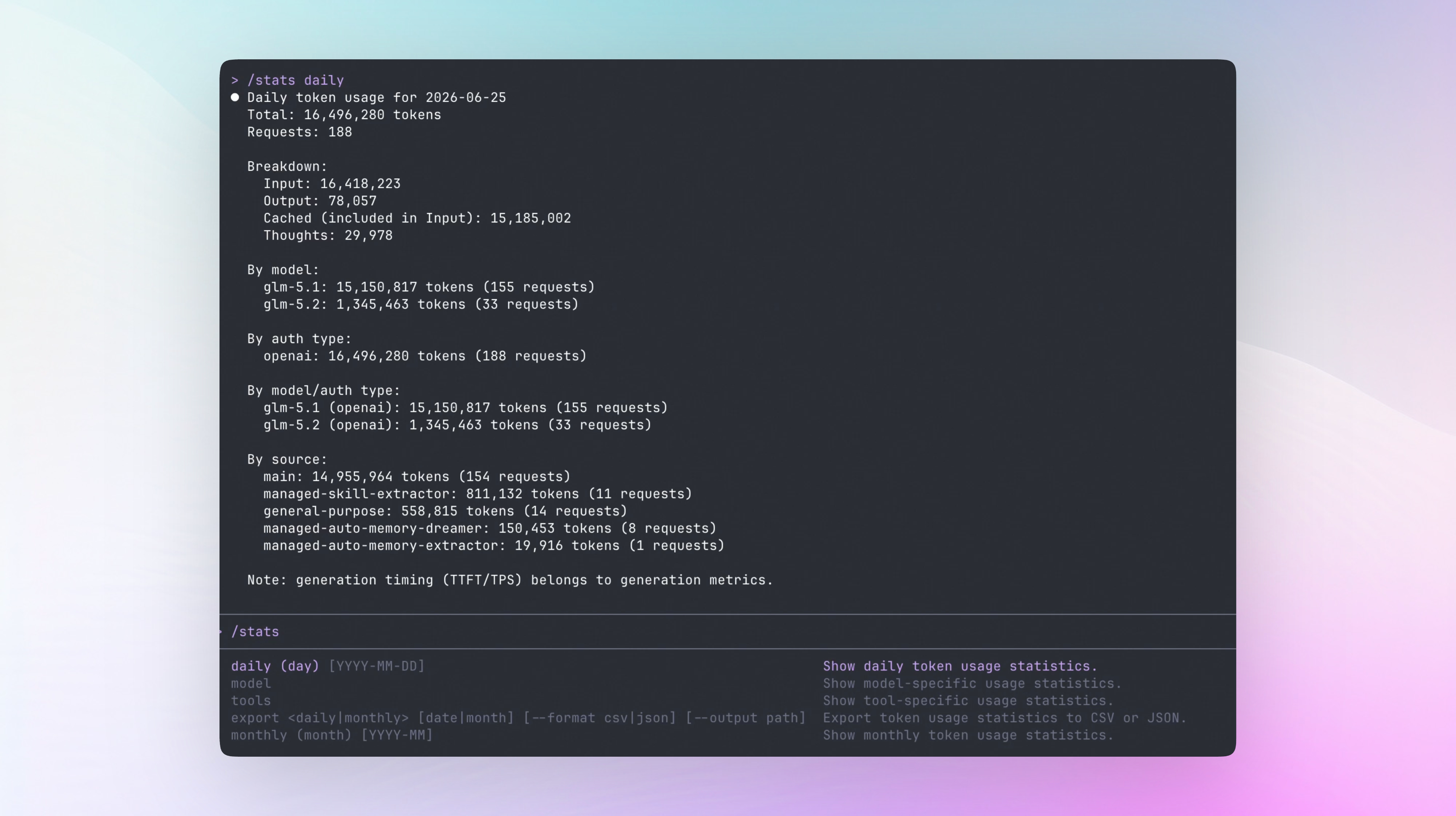
Previously you could only guess how many tokens you’d used or how much you’d spent. Running a long task might burn tens of thousands of tokens unnoticed, but /stats only showed session-level totals — no per-day, per-month, or per-model breakdowns.
This week /stats adds persistent token accounting. /stats daily shows the day’s total tokens, request count, and input/output/cached/thought breakdown grouped by model and auth type; /stats monthly shows a full month summary; /stats export daily YYYY-MM-DD --format csv or /stats export monthly YYYY-MM --format json --output <path> exports a file containing only aggregated data — no prompt/response text or project paths. Export paths are restricted to the project working directory; path traversal, symlinks, and Windows alternate-data-stream paths are rejected.
Data persists in ~/.qwen/stats/ and survives restarts.
What you can do with it:
/stats daily— see today’s token spend grouped by model/stats monthly— see full month consumption summary/stats export— export CSV/JSON with only aggregated data, no private content- Data persists across restarts
See PR #4564
More New Features
| Feature | PR | Impact |
|---|---|---|
| Revivable subagent + transcript TTL | #5556 | Completed background Agents can be re-activated within the same session without rebuilding context; old transcripts auto-expire by cleanupPeriodDays |
| Desktop file preview side panel | #5730 | Desktop app file preview no longer covers full screen; right-side docked resizable panel lets conversation and file tree coexist; fixes CJK paths and .md domain misidentification |
| desktop-pet skill | #4808 | Enter /desktop-pet + character name to auto-generate pixel pet spritesheet and activate |
| macOS 26+ Liquid Glass icon | #5284 | brand-create auto-compiles Assets.car; macOS 26+ Liquid Glass icon rendering |
| Auto mode destructive command hard block | #5754 | git reset --hard, git clean -fd, terraform destroy etc. have deterministic regex pre-filter in AUTO mode, no longer relying on LLM classifiers |
| /history collapse-on-resume | #4085 | History defaults to collapsed when resuming long sessions; /history collapse-on-resume saves preference; /history expand-now temporarily expands |
| Response timestamps [HH:MM:SS] | #5001 | output.showTimestamps setting shows a timestamp before each assistant reply; opt-in, default off |
| Web Shell from qwen serve | #5392 | qwen serve directly serves Web Shell UI, no extra configuration needed |
| QQ Bot channel | #5202 | New QQ Bot channel adapter; Qwen Code can connect to QQ groups |
| Loop second-level wake engine | #5182 | /loop timing precision upgraded from minutes to seconds; delay range [60, 3600]s; self-paced wakeup doesn’t count toward MAX_JOBS limit |
| Loop self-paced cycle | #5197 | /loop <prompt> (no interval) becomes a self-paced cycle — model decides when to re-check, no fixed 10-minute cron; shorter intervals when polling fast, auto-extends when stable, stops when done |
| Workspace permissions rules API | #5743 | Daemon and ACP clients can read/write workspace allow/ask/deny rules via REST API |
| Requesty provider | #5478 | New Requesty model provider support |
| Workflow P5 token budget + per-run UI | #5231 | Workflows add token budget control and per-run UI display |
| DashScope preserve_thinking default on | #5637 | DashScope provider defaults to sending thinking tokens; model reasoning process more complete |
| fastOnly/voiceOnly model tags | #5632 | Models can be tagged fastOnly or voiceOnly, hidden from the main model list |
| Settings file change detection | #4933 | chokidar watcher detects settings file changes and auto-refreshes config |
| /extensions archive install source | #4909 | Supports installing extensions from archive files |
| MCP resource read tool | #5781 | Model gets read_mcp_resource tool to autonomously read MCP server resource URIs — no manual @ injection needed |
| Web Shell session branching | #5613 | Web Shell supports session branching |
| Daemon idle detection | #4934 | GET /health?deep=true detects daemon idle state |
| Agent ignore files configurable | #4653 | Agents can configure file ignore lists |
| Response token rate display | #5401 | Status bar optionally shows response token rate |
| hook system toolCallId | #4918 | Hook system receives raw API call ID |
| i18n tool display names | #5220 | TUI and web-shell tool names localized |
| kebab-case filename lint | #4797 | ESLint enforces kebab-case filenames |
| ACP permission timeout configurable | #5260 | Daemon ACP permission timeout duration configurable |
| Remote LSP status route | #5741 | qwen serve adds remote LSP status query endpoint |
| Extension operation polling | #5753 | Extension operations support polling wait for completion |
🔧 Key Fixes
| Fix | PR | Impact |
|---|---|---|
| Cancel permission stops execution immediately | #5258 | When user denies permission, agent stops immediately — no skipping past the gate |
| per-turn tool-call circuit breaker | #5279 | Hard cap per turn + optional loop detection prevents infinite tool-call loops |
| Consecutive identical tool call always-on guard | #5573 | Repeated identical tool calls auto-blocked, no opt-in needed |
| plan gate has escape path when unavailable | #5430 | plan gate agent failure no longer blocks the entire turn; user can continue |
| Manual plan mode entry requires confirmation | #5595 | Prevents accidental plan mode toggle |
| workflow path-traversal protection | #5740 | Validates runId to prevent path traversal causing directory mis-deletion |
| fork turn cap + permission escalation | #5737 | Fork sub-agents have turn caps; permission requests escalate to main agent for confirmation |
| Desktop fixes markdown link bugs | #5730 | readme.md misidentified as domain redirecting to parked page; CJK paths /Users/me/项目/笔记.md not linkified due to ASCII-only regex |
| IME cursor positioning restored | #4993 | IME composition input cursor offset regression from #4779 fixed |
| systemd-inhibit no longer pops password box breaking TUI | #5318 | --no-ask-password param prevents systemd requesting password and corrupting terminal UI |
| auto-memory /quit no longer OOM | #5181 | Exit-time auto memory extraction no longer crashes on large conversations |
| Preserve mid-turn image messages | #5183 | Images pasted mid-model-reply no longer lost |
| Duplicate model name disambiguation | #5769 | Same model name across providers no longer conflated; shows provider identifier |
| voice addon packaged into standalone archive | #5628 | @qwen-code/audio-capture N-API addon included in standalone tar.gz; voice input no longer missing prebuilt binaries |
| Stale prompt client rejection | #5784 | Daemon rejects expired prompt clients, preventing ghost sessions |
| MCP Claude server transport type mapping | #5812 | Claude MCP server sse/stdio/streamable-http transport types correctly mapped in import and .mcp.json |
| Paste image path auto-promoted to attachment | #5803 | Terminal-pasted image file paths auto-recognized as attachments, no manual @ needed |
| Model remembers selected provider | #5179 | When multiple providers share the same model ID, selection no longer loses provider |
| Thinking emoji → Unicode symbol | #5788 | Thinking and summary icons switch from emoji to Unicode text symbols (💡→⟡) to avoid terminal rendering inconsistencies |
🎉 Contributors
Thanks to the following new contributors who submitted their first PR this week:
- @shiloong — hook system toolCallId passes raw API call ID (#4918 )
- @Eric-GoodBoy-Tech — QQ Bot channel adapter (#5202 )
- @aspnmy — MCP server config (#5311 )
- @xxlaura — desktop-pet pixel-art skill (#4808 )
- @mvanhorn — Windows home path expansion and desktop session ghost entry fix (#5253 )
- @CubeLander — plan gate AbortSignal isolation (#5185 )
- @water-in-stone — Settings file change detection (#4933 )
- @OrbitZore — systemd-inhibit —no-ask-password (#5318 )
- @Gove2004 — /history collapse-on-resume (#4085 )
- @Zoean-z — trustedFolders comments preserved (#4746 )
- @ken-jo — hooks dead field cleanup (#5423 )
- @Thibaultjaigu — Requesty provider (#5478 )
- @interconnectedMe — MCP improvements (#5488 )
- @lcheng321 — Input box background fill fix (#5568 )
- @russeell — OpenAI log file limit fix (#5569 ) and ask_user_question answer index validation (#5622 )
Thanks to the following core contributors for their continued iteration this week:
- @he-yufeng — BMP/WebP/AVI image format fix, model text-only tag, duration rendering, emacs ediff path escaping, strict env var parsing (10+ PRs)
- @wenshao — circuit breaker, consecutive call guard, daemon mid-turn events, settings v5 migration idempotency, theme background fix, triage cross-repo interception, SDK bundle budget (8+ PRs)
- @doudouOUC — sed file history, mid-turn image preservation, model provider memory, permission-cancel stop, daemon workspace provider refresh, duplicate model disambiguation, stale client rejection, MCP OAuth docs (7+ PRs)
- @yiliang114 — extension list spacing, bare fast model auth, settings migration, VSCode sidebar chat view (4+ PRs)
- @qqqys — artifact confirm + cancel, voice addon standalone packaging, fork turn cap + permission escalation, /context token source fix (4+ PRs)
- @huww98 — VSCode per-session McpServer, Token Plan model completion, stats double-count fix
- @ZijianZhang989 — window title shows session name, auto-memory /quit OOM fix
- @kkhomej33-netizen — streaming thought buffer limit, interactive tool output memory reduction
- @Alex-ai-future — @path dropdown Enter close, plan gate escape path, slash completion ranking
- @LaZzyMan — plan mode manual confirmation, workflow path-traversal protection
- @DragonnZhang — telemetry crash protection, extension secrets fallback
- @pomelo-nwu — thinking emoji→Unicode, custom model ID save/restore
- @chiga0 — theme background fill removed from input box and user messages
- @ZevGit — VP mouse interaction stabilization
- @BZ-D — Claude MCP transport type mapping fix
- @cyphercodes — resume preview history rendering, loop detection non-interactive failure
- @BenGuanRan — IME cursor positioning restoration
- @Jerry2003826 — output language effective in side queries
- @tanzhenxin — GLM on DashScope no longer drops web_fetch content
How to upgrade:
- CLI: Run
npm i @qwen-code/qwen-code@latest -gto upgrade to the latest version. - Desktop: Download the installer for your platform from GitHub Releases .
Questions or suggestions? Open an issue on GitHub Issues !