Qwen Code Weekly: /loop Autonomous Mode, Desktop Voice Dictation, Tabbed Settings View
Qwen Code shipped v0.19.4 this week with 80+ PRs merged across three directions:
/loop keeps working while you’re away. A bare /loop launches autonomous mode — the agent advances established work while you’re gone, without inventing new tasks or performing irreversible operations. Add a .qwen/loop.md task file and the loop re-reads the editable checklist each tick; delete it and the loop fires no-op ticks to stay alive. Claude Code recently published a getting-started guide on agent loops about agents repeatedly executing an established plan — /loop autonomous mode does something similar, with one addition: the task list is editable at any time and the loop picks up changes automatically.
Desktop voice dictation is here. Voice dictation was already available in CLI and Web Shell, but the desktop app was missing it. This release closes the gap — all three surfaces now share the same experience.
Terminal interaction catches up. /settings is now a tabbed view instead of a flat list — search, status, and stats all on one screen. Virtualized History mode now supports mouse clicks and hover on menus, completions, and the input box.
New Features
/loop Autonomous Mode + loop.md Task File
/loop now supports two new modes:
Autonomous mode: A bare /loop (no prompt, no interval) no longer prints usage hints — it launches a self-paced autonomous loop. The agent advances established work while you’re away — maintaining open PRs, continuing half-finished tasks, delivering on commitments — but only what the transcript has already established. It won’t invent new tasks, won’t perform irreversible actions (push/delete/send) without explicit authorization, and stops when things go quiet. The autonomous preamble fires once at the start; each subsequent tick sends only a short reminder to keep token costs low.
loop.md task file: Create .qwen/loop.md at the project root or under ~/.qwen/, set the wakeup/cron prompt to a sentinel (<<loop.md-dynamic>> or <<loop.md>>), and the loop re-reads the file on every fire. The full content is delivered on first read; subsequent ticks send a short reminder if unchanged; editing the file triggers full re-delivery. When the file is missing, the loop fires no-op ticks (the agent does nothing, just re-arms to keep the loop alive), falling back to autonomous-mode base behavior. Recreate loop.md and the next tick auto-detects the change and re-delivers the full content.
Channel loops: /loop isn’t limited to the terminal — DingTalk and Feishu channels work too. Use /loop add "0 9 * * 1-5" check CI status in a group chat to create a scheduled loop, /loop list to see all loops in the current channel, /loop inspect <id> to check run count and recent results, and /loop cancel <id> to stop one. Loops execute through the channel session router, waiting for the current active turn to finish before starting; results are written back through the channel’s proactive send. One-shot loops auto-disable after success or failure.
What you can do with it:
- Bare
/looplets the agent watch and advance work while you’re away - Use
.qwen/loop.mdto maintain a persistent, editable task list without re-describing it every tick - Delete loop.md and the loop fires no-op ticks to stay alive; recreate it to seamlessly resume
- Use
/loop addin DingTalk/Feishu group chats to schedule recurring agent work
Desktop Voice Dictation: All Three Surfaces Aligned
Voice dictation was already available in CLI and Web Shell, but missing from the desktop app — users who configured voice input lost the capability when switching to the desktop. This release closes the last gap.
A microphone button has been added to the composer toolbar. During recording, the toolbar transforms into a recording bar (dotted guide line, live waveform, timer). When stopped, the transcription result is inserted into the input box for review. Transcription runs server-side, reusing the CLI voice pipeline (batch qwen3-asr-flash and realtime *-realtime models); provider credentials never enter the renderer. Voice can be toggled and the model selected in Settings > Input and the composer model dropdown.
What you can do with it:
- Click the microphone and speak — see live waveform and timer
- Select a realtime model (e.g.
qwen3-asr-flash-realtime) to see interim text as you speak - Go hands-free for input on a tablet or multi-monitor setup
See PR #5856
How to get started:
- Clone the repo:
git clone https://github.com/QwenLM/qwen-code.git
- Navigate to the desktop package
cd qwen-code/packages/desktop
- Install dependencies and start dev mode
bun install && bun run dev
Mobile Sidebar Drawer + qwen serve Experience Improvements
Previously, when accessing qwen serve from a mobile browser, the sidebar (session list, search, new session) was hidden below 760px with display: none — there was no way to switch sessions. Now it uses an overlay drawer instead: a menu button appears in the chat panel header, and tapping it slides the sidebar in from the left with a semi-transparent backdrop. Selecting a session, creating a new one, or tapping the backdrop all close the drawer. The desktop layout is completely unaffected.
Behind this is a series of changes that take qwen serve from “usable” to “good”:
- Lazy session creation (#6066 ): Sessions are only created on first prompt, reducing empty-session overhead and speeding up Web Shell startup
- Workspace remember (#5884 ): Serve mode remembers the workspace, no need to re-specify after restart
- Session archive (#6058 ): Daemon supports session archival — long-lived sessions finally have a management path
What you can do with it:
- Access
qwen servefrom a mobile browser and tap the menu to switch sessions - Serve mode auto-remembers the workspace when switching between projects
- Archive long-lived sessions instead of deleting them
See PR #6003
| Description | Sidebar collapsed | Sidebar expanded |
|---|---|---|
| Screenshot | 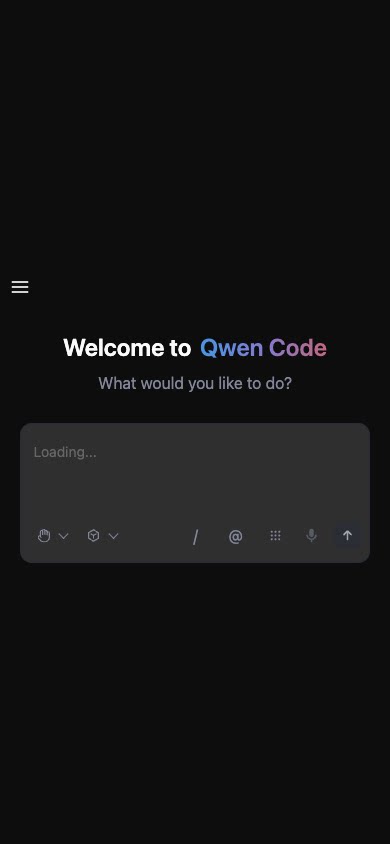 | 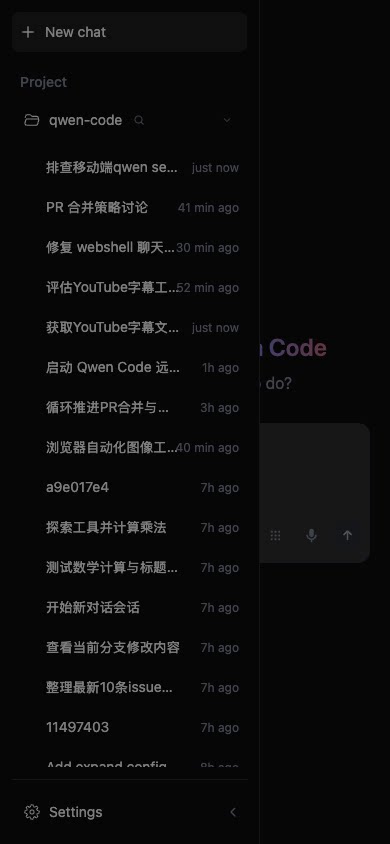 |
TUI Mouse Click and Hover
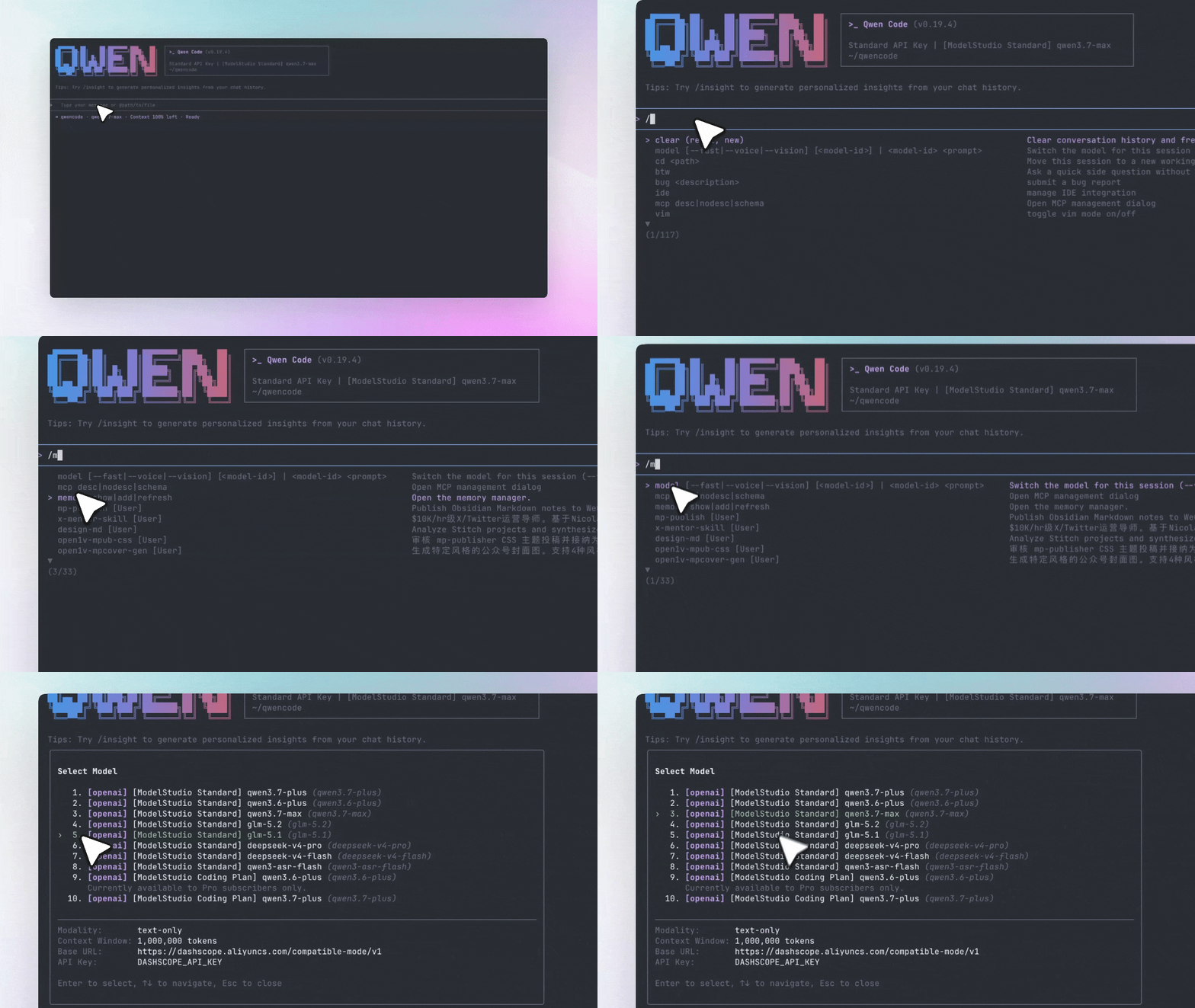
The CLI previously only supported mouse wheel and scrollbar in Virtualized History mode — no pointer interaction. Now with Virtualized History enabled (ui.useTerminalBuffer), three types of interaction are available:
- Selection menus and dialogs (permission confirmations,
/model,/config, themes, etc.): hover highlights the row under the pointer, click to select /command and@file suggestion lists: hover highlights suggestions, click to accept- Input box: left-click positions the text cursor (supports multi-line wrapping, scroll offsets, wide characters)
What you can do with it:
- Click to select a model in the
/modeldialog instead of arrow-keying through - Click a completion item after typing
/ - Click to reposition the cursor in multi-line input
See PR #6011
Tabbed Settings Dialog: Search, Status, and Stats on One Screen
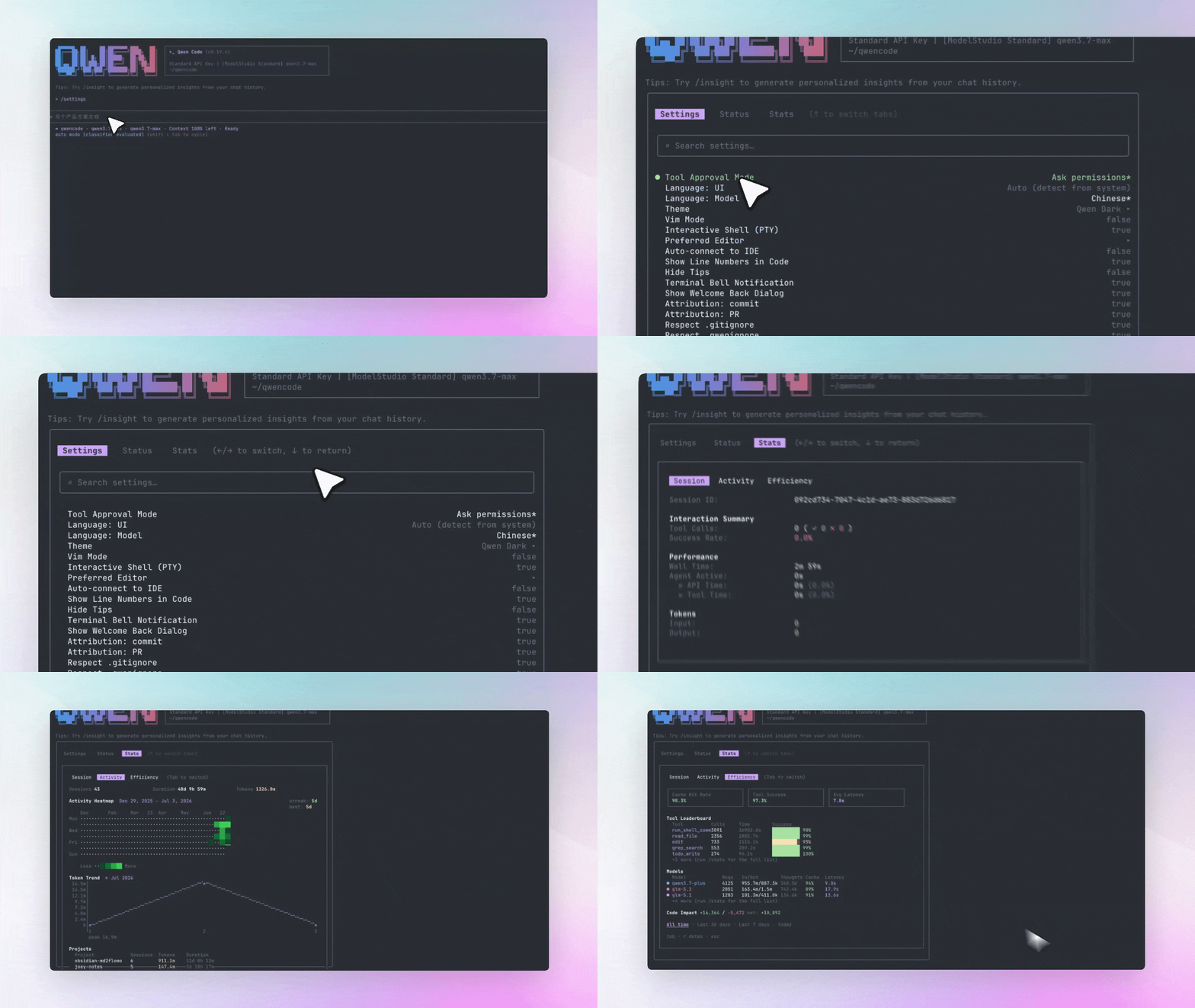
/settings has been redesigned from a flat list into a tabbed view, inspired by Claude Code’s /config. A top tab bar splits into Settings / Status / Stats pages. The Settings page adds a search box — type to filter instantly.
The Status page shows the same system info as /status. The Stats page embeds the full /stats dashboard (Session / Activity / Efficiency sub-tabs). Keyboard focus moves vertically through tab bar, search box, and settings list — highlights only appear on the region that actually holds focus.
What you can do with it:
- Open
/settingsand immediately type a keyword to filter settings - Use left/right arrows to switch to the Status page for runtime info — no need to run
/statusseparately - In the Stats page, Tab through Session / Activity / Efficiency; the Efficiency table auto-collapses to “+N more” when it exceeds the dialog height
See PR #6044
Chrome Extension: Chat and Operate Pages Directly from the Browser
The Chrome extension has been revived on a daemon-direct architecture — the extension is no longer a Native Messaging host, but a thin client of the local qwen serve daemon.
Sidebar chat connects directly to qwen serve via DaemonSessionProvider (HTTP+SSE, same path as Web Shell); when the daemon isn’t reachable, it prompts “run qwen serve”. Browser tools (read page, screenshot, console, navigate, click, fill forms) are exposed to the agent as client-hosted MCP servers via daemon WebSocket. Both chat and tool paths have eliminated Native Messaging entirely.
Note: The reverse tool channel is currently enabled via the QWEN_SERVE_CLIENT_MCP_OVER_WS environment variable and is off by default — you need to explicitly set this flag when starting qwen serve.
What you can do with it:
- Chat with Qwen Code directly in the Chrome sidebar — no OS-level native host installation needed
- Let the agent read the current page, take screenshots, and interact with browser elements
- Reuse the shared Web Shell UI for a consistent experience
See PR #5777
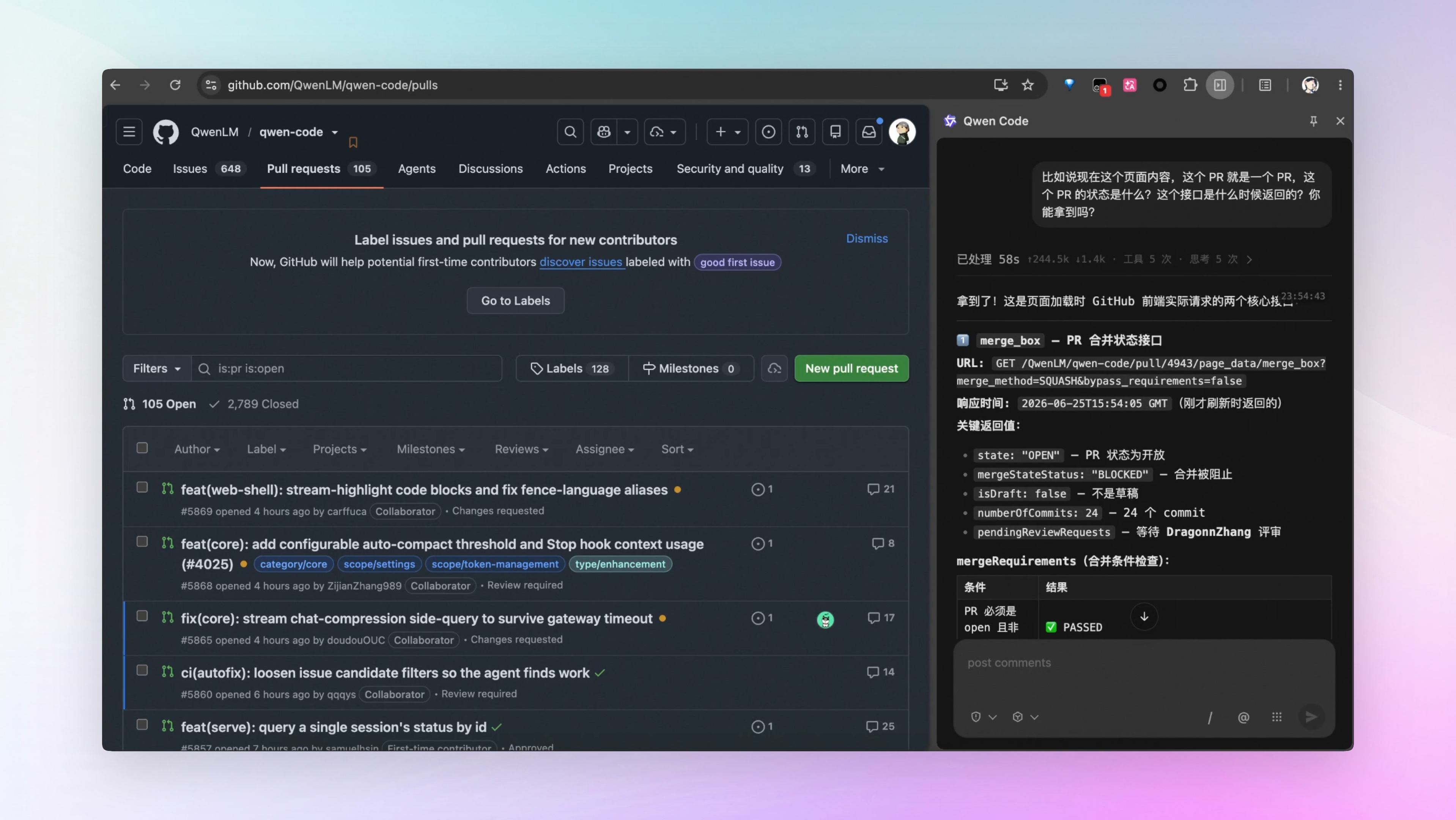
More New Features
| Feature | PR | Impact |
|---|---|---|
/config key=value: Change any config directly at the prompt, with Tab completion + spell-check | #5773 | No more editing settings.json manually |
| Session timeline rail: Compact timeline on the web shell left edge, hover to show turn details | #6078 | Quickly locate turns in long sessions |
| /skills ACP output enhanced: Shows description and level | #6117 | More complete skills listing info |
Auto-mode full shell classification: New classifyAllShell setting (off by default) | #6040 | Defense in depth for production |
qwen tag multi-identity in group chats: DingTalk shared sessions support [sender] speaker tags | #5888 | Agent can tell who’s talking in group chats |
| Group history backfill: Backfill group history messages | #6074 | New members can see past messages |
| Browser tab favicon: Web Shell browser tab icon | #6091 | Easier to distinguish across tabs |
| Chat UI and table rendering polish: Web Shell chat interface refinements | #6099 | Improved visual experience |
| Queued-prompt UX: Web Shell Esc interruption is friendlier | #6025 | Smoother interruption flow |
| Resumable /acp session stream: Supports Last-Event-ID for resume | #5852 | More stable SDK connections |
| Glob patterns in mcp.allowed/excluded: MCP allowlist supports wildcards | #6012 | More flexible MCP configuration |
Inline model override: /model supports one-shot model override | #6022 | Easier temporary model switching |
| Leader approval for plan-required teammates: Plan-required teammates need leader approval | #6138 | Safer multi-agent collaboration |
Key Fixes
| Fix | PR | Impact |
|---|---|---|
| MCP tool idle timeout: Server auto-aborts after 5 minutes of no response, preventing hung sessions | #6061 | Long-running MCP tools no longer block indefinitely |
| Diff whitespace-only edits: Whitespace-only changes no longer show “No changes detected” | #6141 | More accurate diff output |
| TUI input latency: Yields to React after addItem, reducing input jank | #6059 | Smoother typing |
| Non-VP multi-agent scrolling: Transcript is scrollable during multi-agent runs | #6015 | Can review history in multi-agent scenarios |
HTTPS/TLS support: qwen serve adds --tls-cert and --tls-key flags | #6032 | Works in self-signed cert environments |
Windows tilde paths: Supports Windows-style ~ path expansion | #6029 | Path compatibility for Windows users |
Contributors
| Contributor | Contributions | PR Links |
|---|---|---|
| @qqqys | /loop autonomous mode + loop.md task file, voice dictation, qwen tag multi-identity in group chats, group history backfill, channel loop support | #5890 , #5991 , #5856 , #5888 , #6074 , #6073 |
| @DragonnZhang | /effort unified reasoning intensity, TUI mouse click and hover, tabbed settings dialog | #6072 , #6011 , #6044 |
| @doudouOUC | Session archive, skills ACP output enhancements, leader approval for plan-required teammates, diff whitespace-only edit display | #6058 , #6117 , #6138 , #6141 |
| @DennisYu07 | /config command, auto-mode full shell classification, MCP allowlist wildcards, MCP tool idle timeout | #5773 , #6040 , #6012 , #6061 |
| @pomelo-nwu | Mobile Sidebar Drawer, HTTPS/TLS support | #6003 , #6032 |
| @callmeYe | Workspace remember, session timeline rail | #5884 , #6078 |
| @ytahdn | Lazy session creation, chat UI and table rendering polish | #6066 , #6099 |
| @chiga0 | Resumable /acp session stream, non-VP multi-agent scrolling | #5852 , #6015 |
| @yiliang114 | Chrome extension revival | #5777 |
| @wenshao | Browser tab favicon | #6091 |
| @carffuca | Queued-prompt UX improvements | #6025 |
| @Alex-ai-future | TUI input latency optimization | #6059 |
| @VectorPeak | Windows tilde path expansion | #6029 |
| @Minerest | First contribution: Fixed memory recall to only trigger when auto-memory is enabled | #5963 |
| @TianYuan1024 | First contribution: Added --insecure flag to skip TLS verification, /model inline model override | #5962 , #6022 |
| @gauravyad86 | First contribution: Fixed critical-severity npm security vulnerabilities (simple-git, shell-quote, and other runtime dependencies), added CI audit check | #6065 |
Upgrade: Run npm i @qwen-code/qwen-code@latest -g to upgrade to the latest version.
If you have questions or feedback, feel free to open an issue on GitHub Issues !