Qwen Code Weekly: Hand Work to Claude Code and Codex, Run Workflows by Name with a Token Cap, Limit Goal Turns and Time
Qwen Code shipped three stable releases this week — v0.23.3, v0.23.4, and v0.24.0 — with 267 PRs merged.
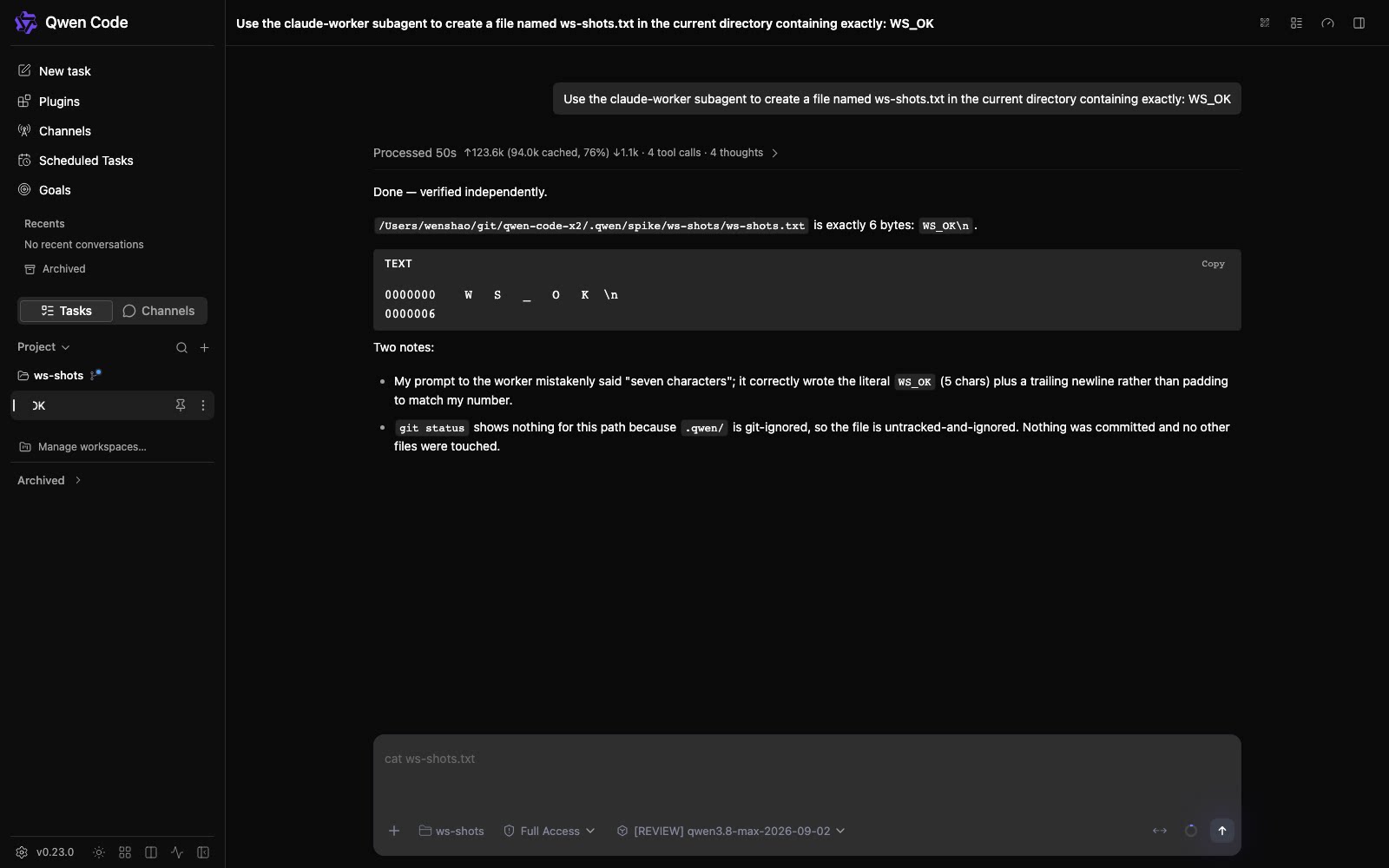
Work can go to Claude Code and Codex. Two built-in subagents run on the account and model you’re logged into. Qwen Code assigns the task, manages permissions, and collects the result.
Workflows run by name. Saved ones and the ones an extension brings all start directly. End a message with +500k and the token cap for that turn is set.
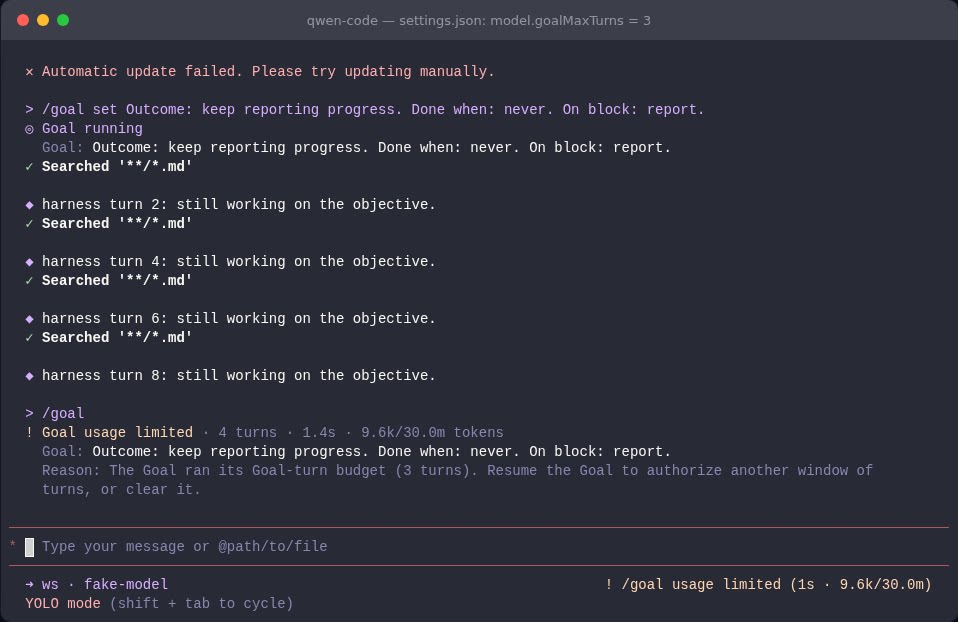
Goal can be capped by turns and time. Set the limits and it stops itself when it runs out — the status card shows 3/20 turns.
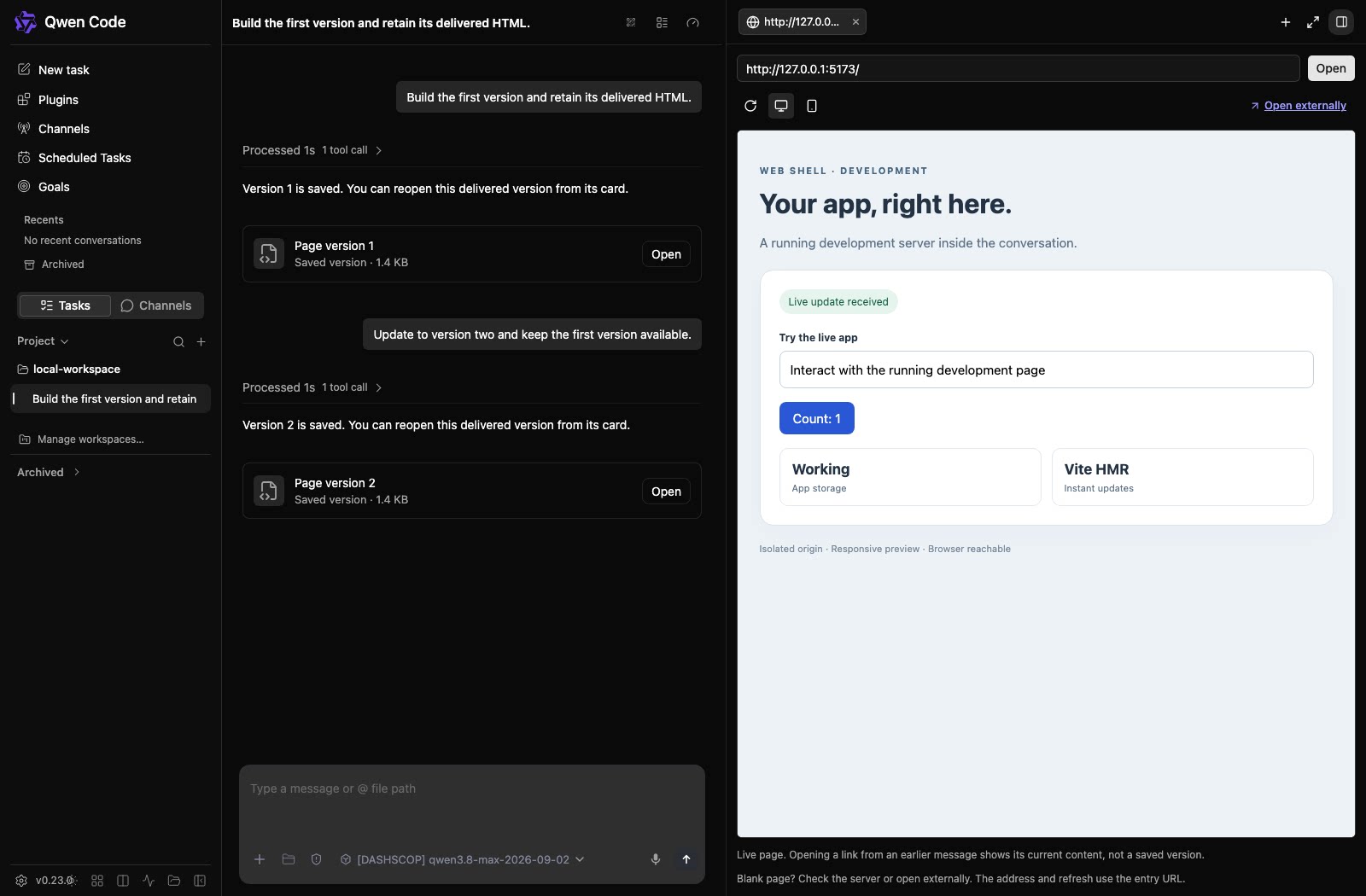
The Web Shell previews web pages. Point it at a local dev server and watch results live, switching between desktop and mobile widths freely. Every HTML delivery in a conversation is stored as its own version, and opening it later shows exactly that version.
✨ New Features
Hand Work to Claude Code or Codex, Keep It All in One Conversation
If you have Claude Code or Codex installed, you can now hand a piece of work to them right from Qwen Code: say “use the claude-code subagent to review this module” in the conversation, and that subtask goes to Claude Code, running on your logged-in account and model. The finished work and its permission requests all land inside this one Qwen Code session — what you see is still a single conversation stream.
Both subagents run in the foreground by default. Codex is read-only by default: it reads code and gives opinions, and to touch files you need auto-edit or YOLO turned on in the session, or write access granted explicitly in the subagent definition. Claude Code supports several rounds of back-and-forth while a task runs; Codex currently takes one task and returns one answer. It works out of the box on macOS and Linux; on Windows, use WSL.
To plug in other agents, declare an executor block in a subagent definition file under .qwen/agents/ and write the command that launches it.
What you can do:
- Hand code reviews or a revised plan to Claude Code or Codex, on your logged-in account and model
- Let Codex read the repo and comment read-only — you decide whether any file changes
- Connect other external agents that speak the ACP protocol through a subagent definition
Workflows: Run Them by Name, Set the Token Cap in the Message
Last week workflows got a management page. This week they’re easier to get running.
Once a workflow is saved, one line runs it. Say “run the audit workflow” in the conversation, or type /audit in the input box, and it gets to work.
You can write the token cap for a turn right into the message. Append +500k and the running flow plans its work against that cap, reining itself in as it gets close. The approval dialog now carries a structure preview: which steps spawn subagents, where work fans out at once, where it loops back and forth — visible before you run. If the actual run comes in bigger than expected, the task bar raises an oversized-workflow notice.
Workflows can be packaged into extensions. Once an extension is installed, the workflows it carries show up directly on the workflows management page, labeled with which extension they came from; before you install, you’re told which workflows the extension ships.
You can set a subagent’s thinking depth. Every subagent you spawn gets its own setting, and you can restrict which tools it may use. Shallow for lookup and tidying work, deep for judgment and review.
Permission approval binds to the exact version you approved. Change one character in the flow and the next run asks for permission confirmation again.
What you can do:
- Run the same flow this time and next, directly
- See how much work it will dispatch before it runs, and set a token cap while you’re at it
- Get a colleague’s workflow just by installing their extension
See PRs #11943 , #11917 , #11939 , #11805 , #11691
Goal Can Now Be Capped by Turns and Time
Last week Goal showed its token spend. This week adds the two limits people reach for more often.
Cap both turns and time. Set model.goalMaxTurns and model.goalMaxActiveMinutes in settings and you can say “at most 20 turns” or “at most 30 minutes” — both are off by default. When a limit runs out, it first grants one wrap-up turn to report what’s on hand, then stops. /goal resume opens a new window on the original allowance and only renews the item that ran out (#11457 ).
You can see how much is left. The status card shows 3/20 turns and 12m 3s/30m directly (#11999 ). Time counts only the stretch actually at work. The tokens spent by foreground subagents and acceptance checks a Goal dispatches all land on that Goal’s bill (#11998 ). When there’s too much to check, the checks split into small batches automatically, and a stalled batch retries with a narrower scope (#11365 , #11690 ).
Approve in the Web Shell and it starts. Approve a Goal proposal and the Goal starts on its own once the current reply finishes normally (#11360 ).
What you can do:
- Let Goal dig into a problem with the limits set up front — when it runs out, resume
- Glance at the status card to know how many turns and how much time remain
- Approve a proposal in the Web Shell and let it go
Channel: Pick How the Bot Notifies, and Trace Why It Replied Like That
Three things for the Channel bot this week: you can pick how background-task notices arrive, message-prefix filtering is retired, and Channel sessions are inspectable as-is.
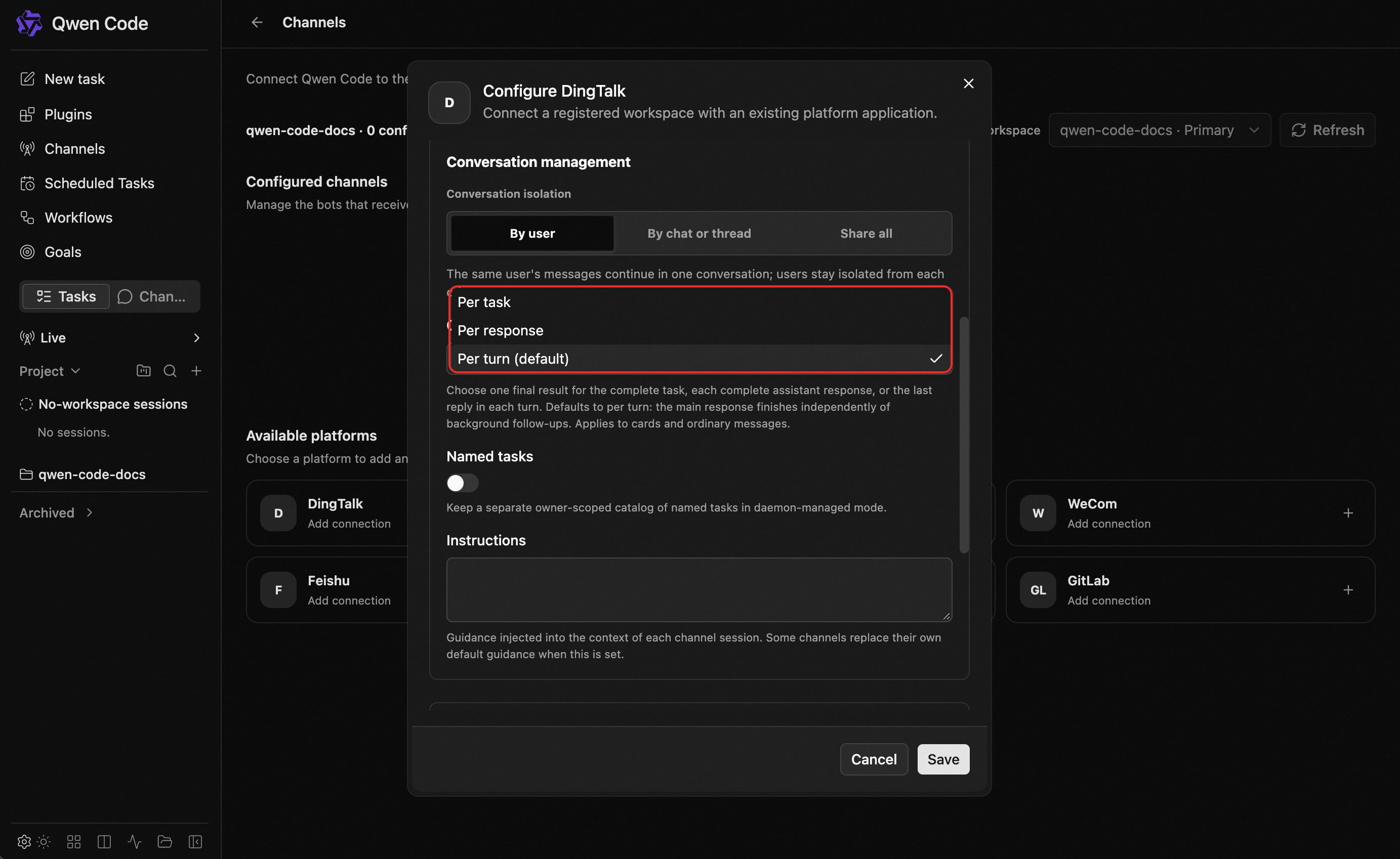
Pick how background tasks report. Choose it in Channel settings, DingTalk first. The default, Per turn, sends the main result first and then a separate notice for each finished background task. Per response sends every complete answer as it lands. Per task waits until all the linked background work is done and delivers a single final result — that last one keeps the group quiet.
Message-prefix filtering is retired. You used to set a prefix a message had to carry before the bot would respond. That setting is gone: any message that passes the sender, group, and @ rules now triggers the bot, whatever it says.
Channel sessions show what the model actually got. Reopen a Channel session in the CLI or the Web Shell and every turn shows the full content the model actually received — including standing instructions, group history, and who sent what. When you’re debugging “why did the bot reply like that”, everything is there in one step.
What you can do:
- Let long tasks report only when done, instead of flooding the group message by message
- Drop the mandatory prefix — just @ the bot or DM it and say what you need
- When a reply looks wrong, see exactly what it received at the time in the CLI or the Web Shell
See PRs #11822 , #11571 , #11646
Web Shell: Live Preview, Versioned Deliveries, Session-Aware Notifications
Preview your dev URL, archive every HTML delivery. The Web Shell gains a web preview panel on the right. Type a local dev address and watch the page, switching between desktop and mobile widths freely. Every time HTML is delivered in a conversation, it’s stored as its own version — open it a week later and it’s still that exact version, and the versions sit side by side for comparison (#11276 ).
Edit a message and resend, resume an interrupted session in place. The last message you sent can be edited right there and resubmitted, regenerating the reply for that turn while images and files carry over untouched (#11650 ). A conversation that broke mid-run offers a continue action when reopened, picking up where it left off (#11545 ).
Browser notifications know which session they’re about. The notifications added last week now name the session and carry excerpts of the question and answer; clicking one lands you straight in that conversation (#11447 ).
Context usage reads exactly right, and one click compresses. The context panel shows exact used, total, remaining, and the share per category, with a compress button built right in; the hover card next to the input box has it too — one click and compression is done (#11700 , #11782 ).
Other improvements. The sessions overview page is sectioned by status and searchable by branch and PR number (#11238 ); uploaded files, project files, and web links now group into one Sources list (#11262 ); scheduled tasks can pick which model to use and which group to belong to (#11396 ); you can type an address and connect to Qwen Code on another machine (#11548 ).
📊 More New Features
Web search has a per-turn cap. By default one session may call web_search up to 200 times; adjust it with tools.webSearch.maxPerSession. Once the cap is used up, the AI keeps writing with the information already gathered and tells you more budget can be requested. See PRs #11852 , #11692
Cross-session messaging is on by default. Qwen Code sessions on the same machine can discover each other by default, /peers lists the live ones, and sessions can have the AI message each other for progress updates; set agents.crossSessionMessaging to false to turn it off. See PR #11840
More models have configurable thinking effort. Moonshot K3 supports low/high/max, K2.6 uses its native thinking toggle, Qwen 3.8 supports low/medium/xhigh, DeepSeek V4 Pro and Flash support low/high/max; the Standard API Key setup flow picked up this batch of new models too, and Token Plan added Qwen 3.8 Flash and DeepSeek V4 Pro-0813. See PR #11349
VS Code session history merges into one. Conversations created in the terminal, the browser, and VS Code now appear in the same history list — open them straight from there. See PR #11713
Browse your hooks in the terminal. /hooks grew from a one-line status into layered views of events, match rules, and every hook’s details; config you just changed is re-read when you open it, and if hooks are disabled globally it says why; hook runs report progress too. See PRs #11903 , #11904 , #11906
Connect models over the OpenAI Responses protocol. A new provider type openai-responses uses OpenAI’s /v1/responses endpoint, with streaming, tool calling, and reasoning summaries all supported. See PR #8169
Linux gains another kernel sandbox. After you pick the bwrap backend in settings, the AI’s writable scope is limited to the workspace, temp directories, and necessary caches; the rest of the file system is read-only. No container tooling, no root. A separate subcommand shows the current boundaries and runs a self-check. See PR #11614
One background service carries more workspaces. The workspaces qwen serve carries by default went from 25 to 256; override with QWEN_SERVE_MAX_WORKSPACES. See PR #11515
👏 Experience Improvements
Reopening big sessions is noticeably faster. Long old sessions and the Web Shell panels all open quicker now. See PRs #11595 , #11644
Links you send are clickable. URLs in your own messages render as clickable links in the Web Shell. See PR #11464
The UI holds still while you read. The approval panel no longer resizes mid-read; the turn summary appears exactly once, fixed at the end of the output. See PRs #11930 , #11986
Sources page open when you hover. Footnotes in a reply group by source, and hovering opens a paged preview; under each turn there’s also the full list of sources that turn used, including attachments that never got a footnote. See PR #11480
The questions you asked stay in the conversation. After a turn finishes and gets summarized, your question and the answer remain visible in the conversation to revisit. See PR #11461
Turn navigation follows your reading. The turn rail on the right of the Web Shell lights up by reading position — the turn you’re on is the one lit. See PR #11801
New models sit at the top. Freshly discovered models sort to the head of the provider’s model list, easy to find. See PR #11449
The standalone Web Shell knows your settings too. Theme and language settings take effect on the standalone page as well. See PR #11961
🔧 Important Fixes
| Fix | What it means for you | PR |
|---|---|---|
| Terminal crash when background tasks report | When a background agent or monitor finished and its notice landed back in the conversation, the terminal UI could crash outright and the turn was wasted — fixed at the root | #11565 , #11835 |
| Windows commands leave no stray processes | Each shell command used to leave a conhost.exe holding resources until the process exited; short PowerShell commands went from about 3.2 seconds to 0.23 seconds in real tests | #11497 , #11313 |
| Pending confirmations survive a page refresh | After a session reload, unanswered permission prompts and questions are kept | #11468 |
| A network blip no longer kills the turn | Transient disconnects such as EOF now retry automatically with a cap — most visible in scenarios like Channel and hosted sessions, where manual retry isn’t possible | #10347 , #11291 |
| Messages you send mid-run aren’t lost | A message sent while the model is still working is kept and moves into the queue | #11289 |
| Cancelled replies stay visible across refresh | An interrupted answer survives reload and shows how long it ran before stopping | #11608 |
| The web terminal works again | The web terminal in standalone installs is fixed, and the terminal panel no longer locks up | #11881 , #11748 |
| Images and files in DingTalk quoted messages are readable | Images and files inside a quoted message used to come back empty | #11759 |
| Command hook timeouts now count seconds | "timeout": 10 used to be killed after 10 milliseconds; it now means 10 seconds, matching the docs (values ≥1000 in existing configs are still treated as milliseconds — no changes needed) | #11615 |
| Project paths with spaces no longer break hooks | When a bash hook referenced the project directory variable, a path containing spaces was assembled wrong | #11864 |
| Scheduled tasks fire correctly across daylight saving | When a daylight-saving transition is crossed, the next firing time is computed right | #11723 |
| Dialogs aren’t clipped in short terminals | Confirmation dialogs now display fully on screen in short terminal windows | #9040 , #11656 |
| VS Code diff panel closes; edits aren’t lost | The diff panel closes normally; if you cancel a permission prompt, the editor content is still yours | #10494 , #11171 |
| The VS Code panel’s history is back | The session history that vanished after an earlier switch is visible again | #11495 |
| Team tasks aren’t dispatched twice | A stale team-lead identity no longer assigns the same item to several teammates at once | #10237 |
| Notifications aren’t dropped when a turn errors | When a turn ends in an error, queued background-task notifications still drain and arrive | #11559 |
👥 Contributors
| Contributor | Contributions | PR Links |
|---|---|---|
| @yiliang114 | Web Shell remote daemon connection, VS Code session history merged and recovered, Windows terminal process cleanup, a batch of web terminal fixes, notification drain on errored turns, theme and language in the standalone Web Shell | #11548 , #11713 , #11497 , #11881 , #11495 , #11961 |
| @qqqys | Goal turn and time limits, auto-start after a proposal is approved, workflows run by name with +500k token caps, cross-session messaging on by default, Channel notification modes and prefix-filter retirement, model and group choice for scheduled tasks, web search call cap | #11457 , #11360 , #11943 , #11917 , #11840 , #11822 , #11396 , #11852 |
| @wenshao | Handing tasks to Claude Code / Codex, Web Shell web preview and archived deliveries, in-place resume for interrupted sessions, context overview and manual compression, redesigned sessions overview page | #11003 , #11474 , #11276 , #11545 , #11700 , #11238 |
| @ytahdn | Web Shell message edit-and-resend, cancelled replies kept, file preview in tool details, custom context details, approval panel stability and summary de-duplication | #11650 , #11608 , #11982 , #11996 , #11930 , #11986 |
| @qwen-code-dev-bot | CI and test stability fixes | #11537 , #11530 , #11362 |
| @doudouOUC | Browser notification upgrade, Linux bwrap kernel sandbox, service hosting admission, SDK standalone session creation | #11447 , #11614 , #11911 , #11812 |
| @callmeYe | Kimi/Qwen/DeepSeek thinking levels, unified session sources list, paged source-footnote previews, navigation follows reading position, external inference config | #11349 , #11262 , #11480 , #11801 , #11856 |
| @LaZzyMan | Computer Use app-bound actions and observation compression, Omni multimodal pipeline merged into trunk, desktop packaging fixes | #11705 , #12019 , #11841 , #11479 |
| @DragonnZhang | Faster session restore, error recovery on the Responses path, shell output token cap, CodeMode execution mode | #11595 , #11596 , #11652 , #11727 , #10607 |
| @bluefateludi | Fireworks request compatibility fix, unified Web Shell sidebar tests | #11701 , #9797 |
| @chiga0 | OpenTUI rendering gap fix, ACP permission queue isolated per session | #11630 , #11802 |
| @netbrah | OpenAI Responses protocol support, thinking signature preserved | #8169 , #8260 |
| @shenyankm | LSP document sync fix, dialog clipping fix on short terminals | #11443 , #9040 |
| @tanzhenxin | Responses streaming error messages preserved, Computer Use efficiency fixes | #11523 , #11683 |
| @yu-xin-c | Goal blocked-status card label fix, hardened /compress integration tests | #11174 , #11259 |
| @AaronZ345 | Multi-agent duplicate task dispatch fix | #10237 |
| @BenGuanRan | DingTalk direct messages carry the sender’s identity | #12017 |
| 🆕 @Bug-killer-prog | 🎉 First contribution: Windows test session fix | #11750 |
| 🆕 @CanReader | 🎉 First contribution: VS Code diff close fix | #10494 |
| @harjothkhara | Skill toggle identity resolution fix | #11831 |
| 🆕 @kabishou11 | 🎉 First contribution: MCP config loading fix for qwen serve | #11145 |
| 🆕 @lorenzozanee | 🎉 First contribution: cancelled queued tool requests no longer run | #11483 |
| @nerdalytics | Extension skills named after the extension | #10841 |
| @now-ing | Error message preserved when a subagent closes | #11190 |
| @pomelo-nwu | README UI overview | #11491 |
| @shoemoney | DashScope request metadata sent per model family | #11606 |
| @TianYuan1024 | Re-apply skill side effects when restoring a session | #11280 |
| 🆕 @wangxiongts | 🎉 First contribution: Qwen Live visual input, proactive assistance, and local memory | #11369 |
| 🆕 @zaalipro | 🎉 First contribution: root-cause fix for the terminal UI crash | #11565 |
| @zhangxy-zju | ACP resource links keep the original file name | #11721 |
Upgrade: Run npm i @qwen-code/qwen-code@latest -g to upgrade to the latest version.
If you have questions or feedback, feel free to open an issue on GitHub Issues !