Qwen Code Weekly: Qwen Live Is Live, Work the Pages You're Already Logged Into, Assign Tasks by Email
Qwen Code shipped four stable releases over the past two weeks — v0.24.5 through v0.25.0 — with 467 PRs merged.
Qwen Live is live. Talk to it and it answers in voice. Mid-call you can share your screen, so it sees what’s happening on it.
Qwen Code can work the pages you’re already logged into. It goes into the Chrome you use every day — turning pages, filling forms, submitting — and does all of it in the background, so your computer stays yours.
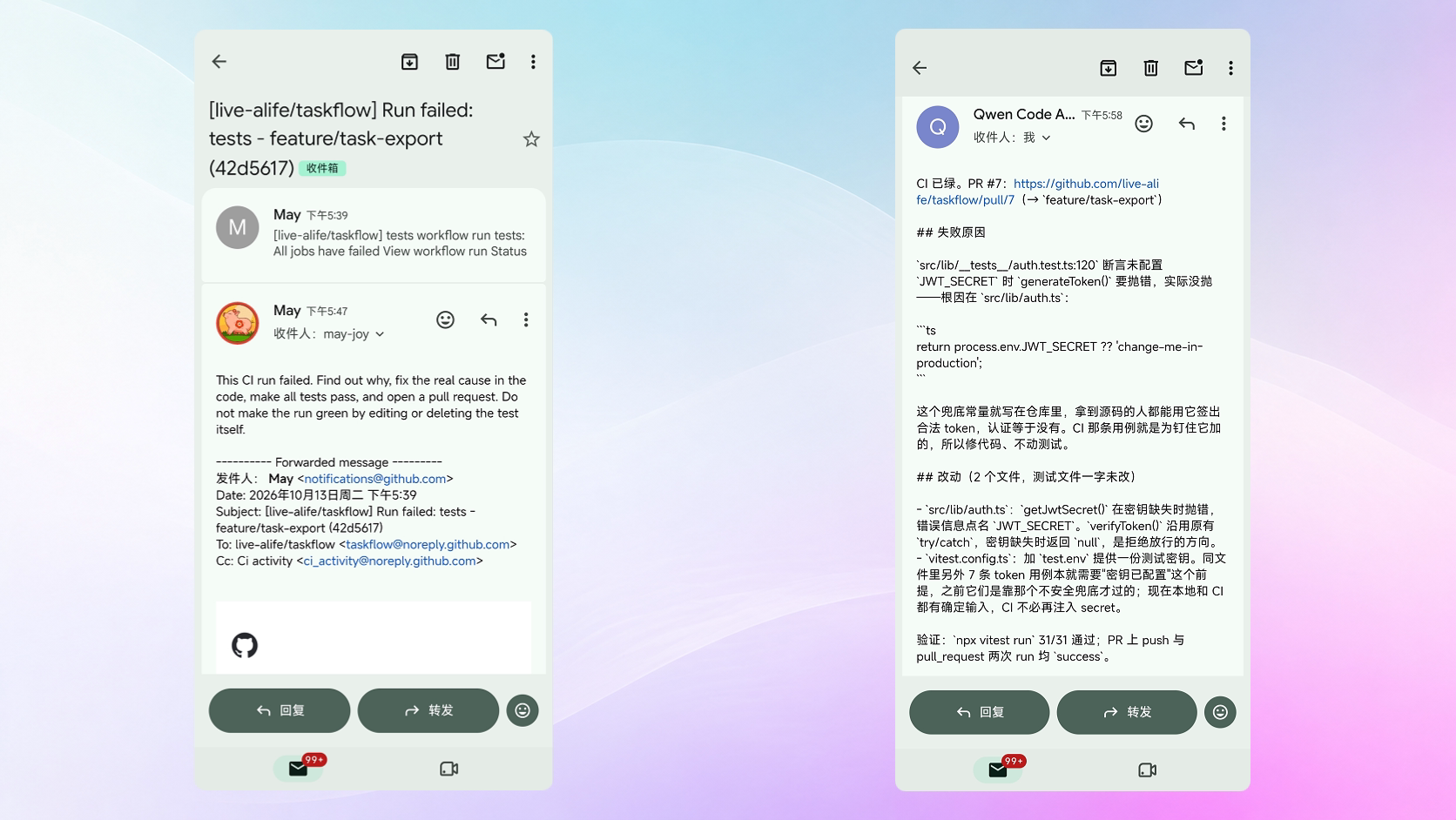
One email assigns the work. Not at the machine? Say it from the mail app on your phone, and the Qwen Code on that computer handles it and replies with the result.
A pile of repetitive work goes to the background at half price with /batch-api. Describe the job, get a plan that costs nothing first, approve it, and hours later the results land as files.
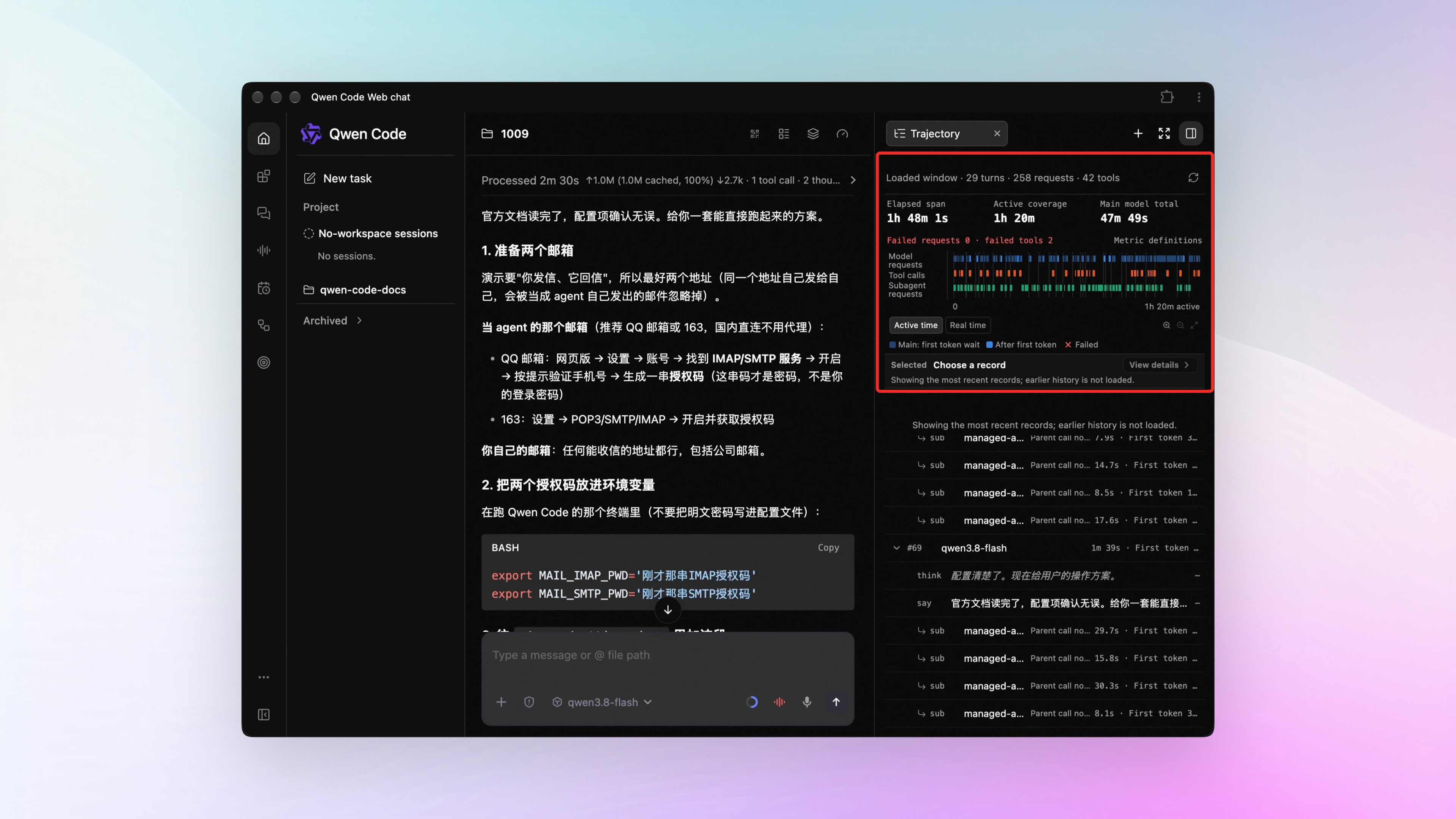
A turn felt slow or expensive? The Trajectory tab shows where it stuck. Model requests, Tool calls, and Subagent requests each get a lane, so an unusually long stretch stands out.
✨ New Features
Qwen Live Is Live
Qwen Live is available in both the Web Shell and the desktop version. Click the Live icon in the left sidebar and the Qwen Live card opens on the right: flip the switch, paste in your Bailian DashScope Realtime API key, click Save. See PR #12529
Once it’s on, click Open Live Voice on the Live page, or the real-time voice button at the bottom right of the composer, and talk — it answers in voice. See PR #12189
During a call you can turn on screen sharing so it sees what’s on your screen, then ask it about that error message right there in front of you. See PRs #12378 , #12623
What you can do:
- Your hands are on the keyboard — say the next step instead of typing it
- An error on screen you can’t read — share the screen, let it look, get its take
- A round trip that takes a dozen messages — finish it by talking
Qwen Code Works Inside the Chrome You Already Use
Qwen Code can go into the Chrome you use every day and get things done: the tabs you have open, the accounts you’re signed in to — it keeps using them. It turns pages, fills forms, submits, and leaves the result page for you. Just say something like “read the report I have open and summarize today’s orders”. See PR #11242
Install the Qwen Code extension from the Chrome Web Store first. After that, say what you need in the conversation. Works on Mac and Linux; Windows isn’t supported yet. See PR #12510
None of this comes to the foreground. Chrome isn’t switched to, so your computer stays usable, and several sessions can use it at the same time — each gets its own tab group, without interfering with the others. See PR #12229
What you can do:
- Have it read the admin console you’re logged in to and pull today’s numbers against your own sheet
- Expense forms and tickets spread over several pages — one sentence, it fills and submits each
- Watch a process you can only see in the browser — an approval queue, a to-do list — and have it pick out what needs action
One Email Assigns the Work
Sometimes a task comes to mind and the machine running Qwen Code isn’t within reach. Email Channel is new: send it an email.
Say it in any mail app on your phone, and the Qwen Code on that computer picks it up, does the work, and replies with the result. Something looks off? Reply to that email and it knows how far it already got. Error reports people send you, alerts your systems fire — forward them into that mailbox and it takes over.
To set it up, give Qwen Code a mailbox account, then put your own address in its allowlist — it only acts on mail from you.
What you can do:
- Send one on your commute and reach your desk to a finished result
- Forward a user’s bug report as-is; it reads the logs in the attachment and gives a first assessment
- The moment an alert mail goes out, Qwen Code is on it, and replies with the cause
See PR #12939
/batch-api: Repetitive Work in the Background at Half Price
You have hundreds of small, independent jobs: a whole directory of docs to translate, dozens of tickets each needing a few fields, every post needing a summary. Sending them one by one fills the conversation with waiting, and the money goes fast.
Type /batch-api with the job in one sentence. It samples a few items and hands you a plan first — how many items, where the output goes, roughly how many tokens. That step is free. It submits only after you approve. The batch then runs in the background billed at half the real-time rate, and usually within tens of minutes to a few hours the results land as files where you said. Meanwhile this conversation keeps working.
/batch-api translate the Markdown docs under docs/zh into English, writing each to docs/en with the same filenameIt fits batches where one pass finishes each item and the items don’t relate to each other. Anything that needs several rounds of discussion stays in a normal conversation.
What you can do:
- Translate an entire Chinese docs directory in one submission and collect the files hours later
- Extract fields from a batch of logs or tickets, folded into one run
- Sort and tag hundreds of pieces of user feedback in one submission
See PR #12492
Trajectory Tab: See Where a Turn Spent Its Time
After a turn, all you know is that it took a while. You don’t know whether the model was silent for half of it, talked too much, or one tool hung in the middle.
The Trajectory tab in the right panel spreads the time over three lanes: Model requests, Tool calls, Subagent requests. An unusually long stretch is easy to spot, and when the bars get dense you can widen one section to look. See PRs #12524 , #12557
Circle a suspect stretch on the axis and only what happened in that window stays below. Pick one entry and its input, its return, and its token cost open up for you to copy out. See PRs #12543 , #12971
The axis also has a Real time view that counts the time you spent waiting, and gives two numbers — elapsed and actually running. That’s how much of your time a turn really took. See PR #12607
Finished turns collapse, so a long session doesn’t have to be scrolled end to end. See PR #13081
What you can do:
- It feels slow — read the axis and you know the next move: switch models, or go look at that tool
- Back to one stretch of a long session — circle it, and collapse the turns that are done
- One call looks wrong — see its input, output, and token cost right there
Channel: Sessions Split by Prefix, Private and Group Access Separated, Long Threads Roll Over
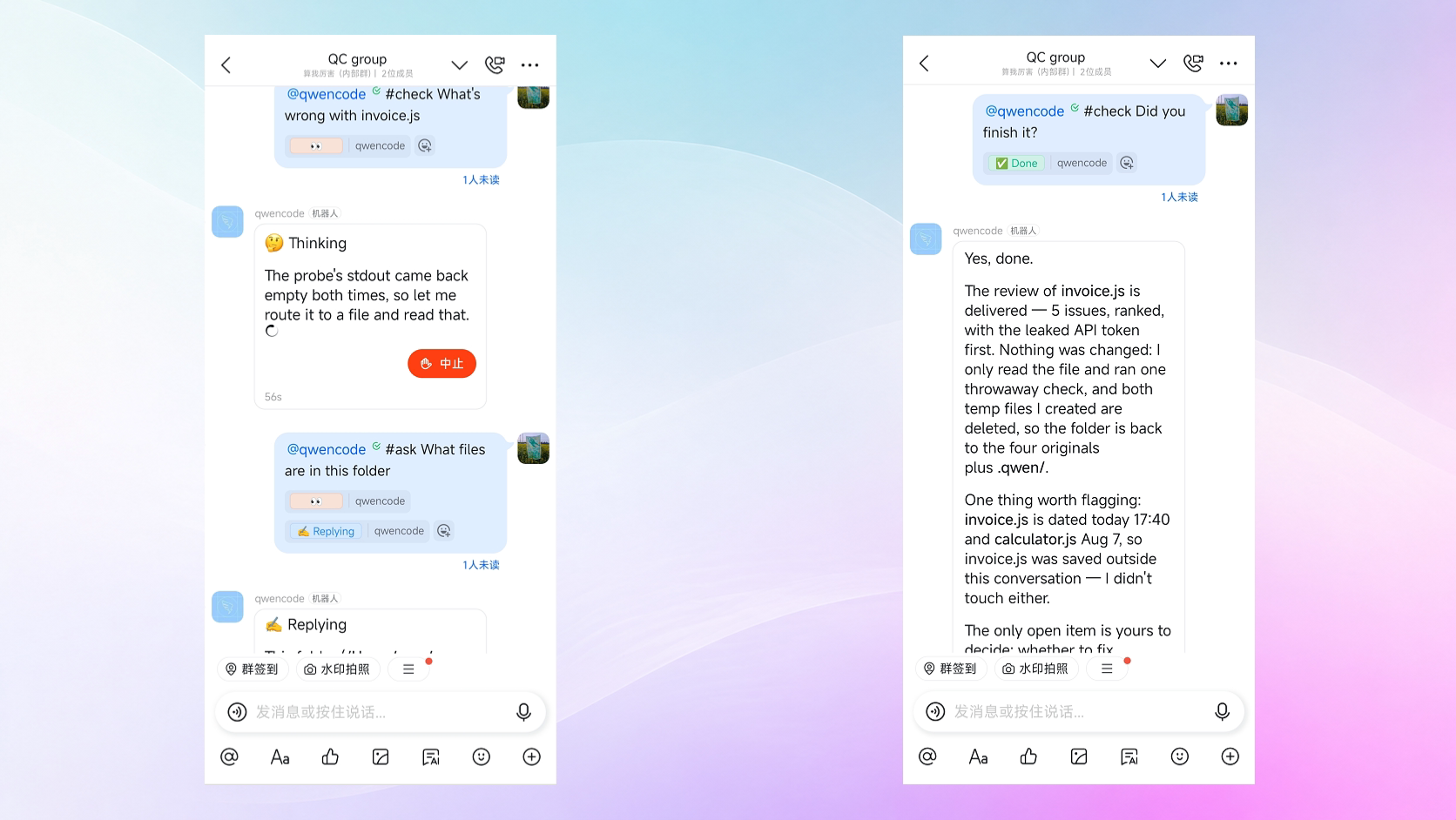
One bot can take work on separate tracks. Put a different prefix in front of the message and it goes to a different session, each with its own requirements for how work is handed over — one side reviews code while the other answers questions about the repo, and the two don’t bleed into each other. No extra connection needed for that. In a group, @ the bot and then add the prefix. See PR #12595
Who may message it privately and who may use it in a group are now two settings. You can open the group completely while keeping DMs to a few people on a list. The two sides don’t affect each other. See PRs #12547 , #12475
Long group threads roll over on their own. A thread just keeps growing until no message can be sent, and only that one session is broken — one DingTalk thread reached 8,577 messages. Set a limit and it rolls to a fresh session when the limit is hit, saying so in the group. See PR #12616
Web Shell: Re-Laid-Out Sidebar, Search in Long Sessions, Multiple Worktrees per Repo
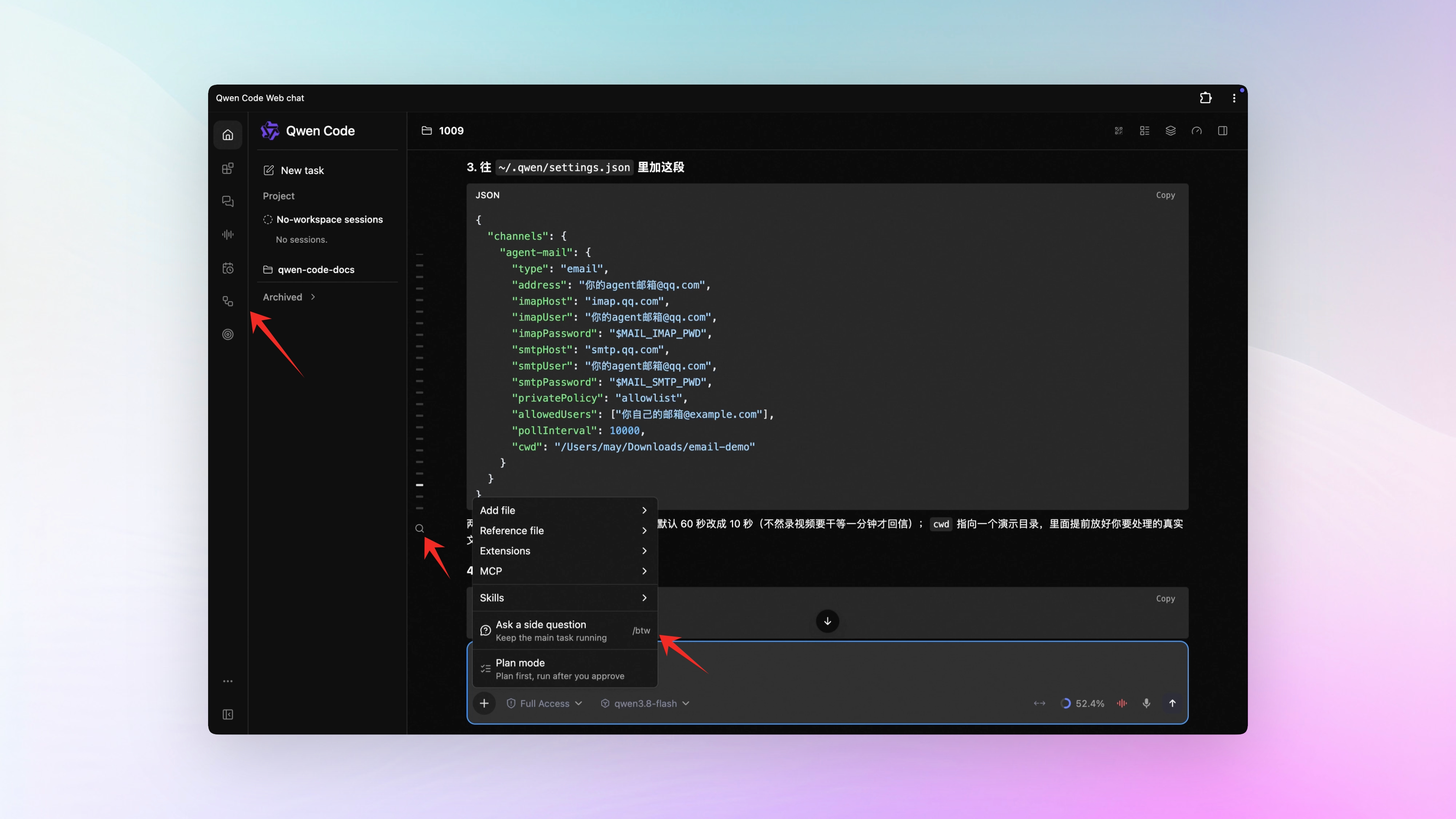
The sidebar is laid out again. A narrow navigation strip on the left gives Channel, voice, and the rest their own entries; the version number and infrequent actions move into More. See PR #12943
You can search inside a long session. Look for a line you said or a block of code you pasted — search the keyword and jump straight to that message. Older messages don’t have to be scrolled up to first; searching reaches them. See PR #12234
Ask a side question without stopping the main task. A small question while the main task is still running is in the ”+” menu of the composer; open it and the wording is written for you. The answer appears in the panel beside it, and the main task is untouched. See PR #12775
One repo can have several working copies open at once. Following last issue’s branch graph, the Git dialog has a Worktree tab: each session uses its own copy, so edits don’t collide. Which copy is running a session and which has uncommitted changes is visible at a glance, and one click switches. See PRs #12154 , #11816
📊 More New Features
Committing is something you can hand over too. Type /commit: it looks at which files you changed, drafts a commit message in the repo’s own style, and stages only the files that belong in this commit. Files holding secrets, like .env, it refuses outright. It only creates the commit — the push stays yours. Narrow the scope by adding a sentence, like /commit only stage the parser changes. See PR #10586
See what one message made it do. In the Web Shell, hover over a message you sent and a wrench icon appears next to the copy button. Click it for the Tool calls tab: which files this turn read, which commands it ran, what it changed — item by item, and each expands to its result and diff. Earlier turns are there too. See PR #12466
/advisor stops waiting to be called. Once it’s on, the working model checks in with an advisor before it starts changing things and again before it hands work over; the advice comes back into the conversation and it carries on. Subagents it dispatches can ask too. Each question costs extra tokens, and that conversation is shown to the advisor model — pick one you trust. See PRs #9636 , #12688
Adding a new model asks you for less. How large its context window is, how much it can output, whether it takes images — it works these out on its own now, from a built-in model catalog that updates in the background daily and still works offline. Values you set yourself still win. See PR #11959
Hooking up external memory got simpler. To make it remember things across sessions, an address and a secret are enough now — the extension install and service registration are gone. Search works out of the box. Writing to memory needs one more switch, and once it’s on, everything stored goes past you first. See PR #12891
A lot of memory no longer has to be laid out in full. Once it’s on, it puts only the entries relevant to your current question into context and pulls the rest on demand. When memory has grown to tens or hundreds of files, that saves a lot. See PR #10183
QQ bots can receive images and videos. Images and short videos sent in a group it can look at directly, instead of you turning them into text. See PR #12850
👏 Experience Improvements
Typing is ready twice as fast when you open it. On a clean machine, from qwen to a ready prompt used to take about 2.5 seconds, and the first 2 of those showed a blank terminal. That wait is halved now, and memory usage is down about 60% from 575 MB. See PRs #12622 , #12602 , #12603
Chinese covers the whole settings panel. With the interface language set to Chinese, the panel reads Chinese throughout. See PR #12783
Channel group speakers and session admins are edited in a dialog. No more opening the config file and typing it by hand. See PR #12535
The interface got cleaner. Empty parameters stop taking a line, the top of the stats page is laid out, and raw data moved into details. See PRs #12601 , #13091
Edit a skill, refresh, and it takes effect. See PR #12182
🔧 Important Fixes
| Fix | What it means for you | PR |
|---|---|---|
| Workflows started by a slash command report their result | /<workflow name> used to finish with nothing in the conversation — you had to go dig in /workflows to find out. Success and failure are both stated now | #12415 |
| New task during a call creates a normal task | You were talking in real-time voice and wanted a plain task; clicking New task tried to start another voice session, showed “Live Voice is unavailable.” and created nothing. It now does what you clicked | #12516 , #12519 , #12626 |
| A worktree holding only new files survives | If a worktree contained only files you had just written and never committed, it was treated as unused and deleted along with them — unrecoverable. Anything with content is kept now | #12739 , #12785 |
| Search still works after an auto-update | Auto-update used to break the built-in search tool, so nothing you searched found anything. Fixed | #12673 , #12892 |
| Turning off usage reporting really turns it off | With usage statistics off in settings, extension events, reconnect commands, and reports sent through a proxy kept going. All four honor the switch now | #12604 , #12857 , #12789 , #13023 |
| Credentials no longer travel with helper model requests | A request to another address could carry account information in the URL. It’s stripped before sending now | #12862 |
The memory panel won’t overwrite a QWEN.md it can’t read | When the global QWEN.md failed to load, the panel still saved it back as empty. It refuses to save when it can’t read | #13154 |
| The soft keyboard no longer covers the composer on phones | Typing on a phone pushed the input box and tool buttons out of reach. Normal to use now | #12462 |
| The macOS desktop right panel clears the title bar | The panel’s top was hidden under the macOS title bar and its buttons were cut off. It makes room now | #12876 |
| Standalone sessions read their history again | The session opened empty and couldn’t reach earlier content. Restored | #12615 |
| Chinese command output on Windows is no longer garbled | Command output containing Chinese came out scrambled. It follows the system encoding now | #12731 |
| A failed paste on Linux says why | With an unavailable clipboard or a failed query, nothing happened and you couldn’t tell whether the paste missed or the environment can’t do it. The reason is stated now | #12489 , #12508 , #12504 , #12666 |
| A re-pasted image isn’t taken for the newest one | After pasting an image again, the old copy was treated as the latest. Each image carries its own marker now | #12549 |
| Channel survives an oversized message | One notification too large tore down the whole connection. Now only that message is dropped and the connection holds | #11925 |
/context estimates stay inside the window | The estimate could come out larger than the context window itself. It stays within the window now | #13246 |
👥 Contributors
| Contributor | Contributions | PR Links |
|---|---|---|
| @yiliang114 | /commit messages drafted by AI, /batch-api for batch jobs, external memory shipped with the main package, faster one-shot startup, Linux paste failures explained, model capabilities detected automatically | #10586 , #12492 , #12891 , #12602 , #12489 , #11959 |
| @wenshao | More stable background service, review findings recorded per file and still valid after history edits, one-click update and restart in the sidebar, worktree management in the Git dialog, side questions added to the ”+” menu | #9661 , #12154 , #12734 , #12775 , #9273 , #13211 |
| @doudouOUC | Connection checks and safety fallbacks for the background service, an alternate execution path when the Linux sandbox is unavailable, slimmer system prompt, settings panel Chinese completed, approval mode remembered when a session is restored | #12278 , #12360 , #12783 , #12918 , #12506 |
| @qqqys | The Trajectory timeline, a zoomable and collapsible Trajectory chart, messages routed to sessions by prefix, private and group access separated, screen sharing in real-time voice | #12524 , #12557 , #13081 , #12595 , #12547 , #12623 |
| @tanzhenxin | Time to a typeable prompt halved, memory down about 60%, a bundled runtime for browser automation, concurrency and free-form input in Code Mode, full access can allow directories outside the workspace | #12622 , #12548 , #13150 , #13151 , #12927 , #12510 |
| @callmeYe | Model and reasoning effort selectable when creating a session, faster extension list loading, stalled streaming messages closed out automatically, session-creation failures show their cause | #12308 , #12640 , #12439 , #12331 |
| @dvd233 | Several fixes to MCP registration and status detection, wider read-only command recognition, MCP detection no longer starts unrelated services | #12205 , #12221 , #12256 , #12500 , #12268 |
| 🆕 @yc2bgr8 | Corrections to /clear and other command help, tool suggestions prefer registered prefixes, two background-service configuration issues, memory read-limit markers preserved | #12555 , #12743 , #12893 , #12788 |
| @jabrailkhalil | Local documents selectable on phones, microphone permission scoped by purpose, IPv6 loopback addresses connect, login state survives an offline retry | #12126 , #12127 , #12963 , #13176 |
| @qwen-code-dev-bot | Group membership and sender rules separated, open-source notice restored after a release dependency change, flaky failures in automated checks retried | #12475 , #12479 , #12772 , #12764 |
| 🆕 @BlackishGreen33 | 🎉 First contribution: skill switches respond when clicked, MCP approval dialog no longer shows an empty title, Chinese docs added for workflow reload | #12641 , #12644 , #12625 |
| 🆕 @holny | 🎉 First contribution: comments allowed before workflow declarations, a collapsed sidebar no longer leaves a blank strip, Linux paste failures explained | #12217 , #12453 , #12504 |
| @XIQIXIQIXIQI | Scheduled task prompts are retained, restore to a chosen workspace, background processes it started are cleaned up after a lost config | #8838 , #9050 , #11071 |
| @ytahdn | Review what one turn did, message by message; phone access switched to opt-in; simpler split-screen composer; new sidebar navigation with Live settings in one place | #12466 , #12537 , #12943 |
| @destire-mio | The new Email Channel, and workflows started by a slash command report their result | #12939 , #12415 |
| @kabishou11 | An oversized notification drops only itself and keeps the connection; steadier tool dispatch | #11925 , #12069 |
| @Lilian0122 | Hosts can control the model-management entry; pages and sessions share one navigation scheme | #12345 , #12499 |
| @samuelhsin | Search within the current session, wider MCP app windows, tool-call origin isolation | #12234 , #12258 |
| @yar3333 | Correct message position after edits in the VS Code extension; edits wait for pending work before sending | #12502 , #12711 |
| @ZijianZhang989 | The advisor checks in on its own while work is running; structured memory recall on demand | #9636 , #10183 |
| 🆕 @Andrea-Bruno | 🎉 First contribution: look for the answer in the existing conversation before troubleshooting | #12580 |
| 🆕 @banned2054 | 🎉 First contribution: session exports keep their origin marker, so an exported record matches the session it came from | #12118 |
| @barry166 | Desktop version error names the missing dependency version lock | #12684 |
| @dreamWB | Hosts can take in only the artifact previews they need | #12588 |
| @Eric-GoodBoy-Tech | QQ bots receive the images and videos sent to them | #12850 |
| @jkxiao | Skill refresh picks up edited content | #12182 |
| 🆕 @JuampiHernandez | 🎉 First contribution: Firecrawl added to the web search service list | #12646 |
| @LaZzyMan | Unified Computer Use flow; screen capture works on machines with older graphics cards | #12386 |
| 🆕 @liwenjie200543 | Unsafe download URLs rejected outright with a clear error | #12697 |
| 🆕 @niheaven | 🎉 First contribution: extension files replaced by copy when a Windows directory is locked | #11889 |
| @now-ing | Less duplicate computation in the Web Shell; one shared data source across views | #10865 |
| @pomelo-nwu | With Claude-family models, reasoning content survives across tool rounds | #12621 |
| 🆕 @pratikgx | 🎉 First contribution: dead links fixed in the docs site | #12717 |
| @PratikWayase | Hook enablement resolved by name | #11965 |
| 🆕 @sherxlg-gif | A config comment corrected so it no longer leads to an invalid setting | #12163 |
| 🆕 @Shizoqua | 🎉 First contribution: /context usage estimate corrected | #13246 |
| 🆕 @sxh313 | Comments corrected where they disagreed with the code | #11950 |
| @Theater-ahyeon | Developer docs added for the configuration used by automated checks and release | #11129 |
| @TianYuan1024 | Backslashes inside single quotes parse literally; command splitting no longer misreads escapes | #11765 |
| @water-in-stone | Branched sessions get their own working copies | #11816 |
Upgrade: Run npm i @qwen-code/qwen-code@latest -g to upgrade to the latest version.
If you have questions or feedback, feel free to open an issue on GitHub Issues !