Qwen Code Weekly: /autofix-pr Keeps a PR Moving After You Open It, Scheduled Tasks Clear a Gate Before the Model Runs, qwen attach Brings a Background Session Back to the Terminal
Qwen Code shipped three stable releases this week — v0.26.1, v0.26.2, and v0.26.3 — with 357 PRs merged.
After you open a PR, /autofix-pr takes it from there. It watches on your own machine and looks every two minutes: a build that failed, review comments from a colleague, a conflict with the main branch. It fixes the problem, verifies it, pushes it, and replies to each point in the PR.
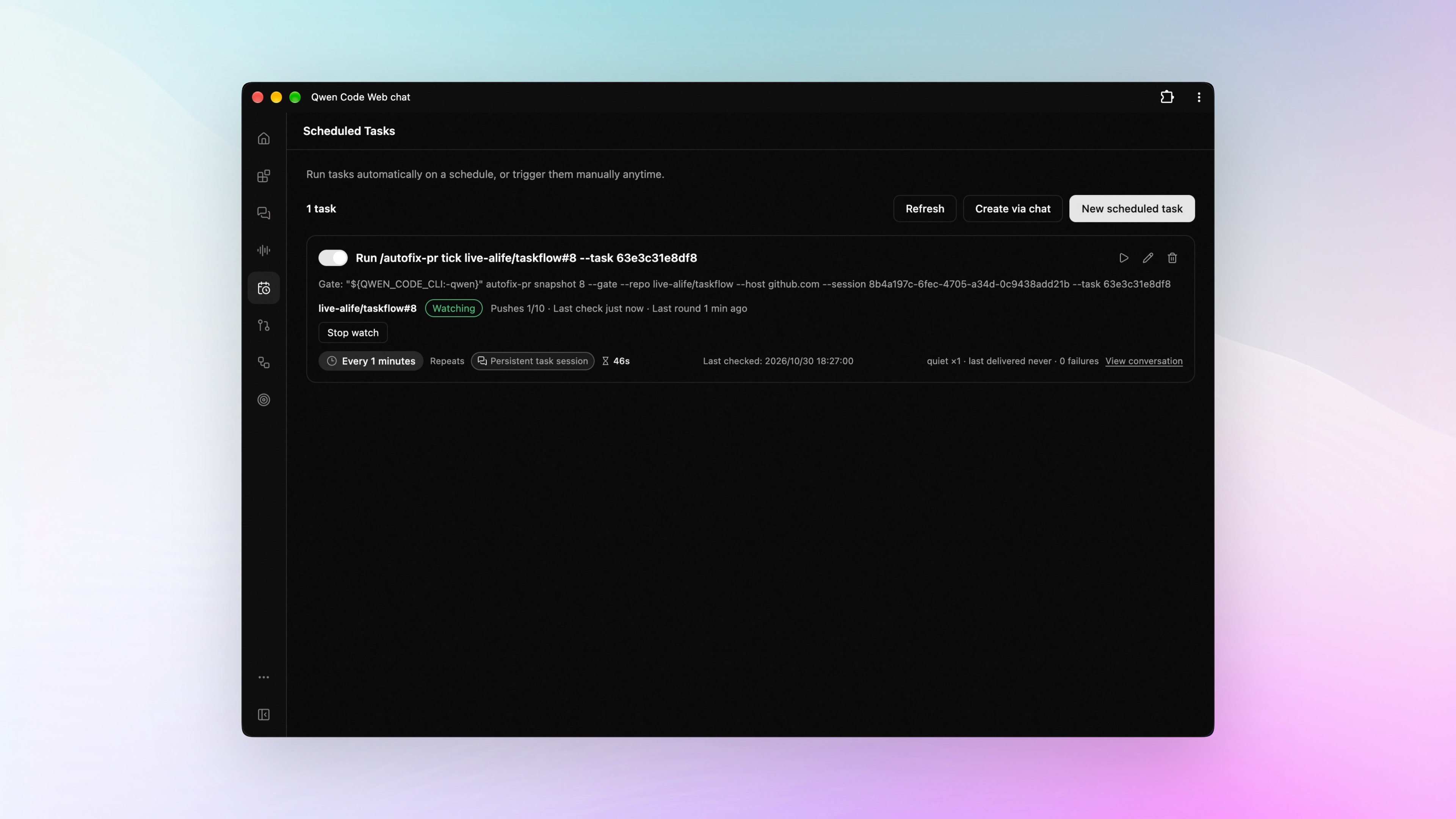
A scheduled task takes a look before it runs. A gate decides first whether anything is actually new. If nothing changed, that whole round is skipped — and what you save is tokens.
A session still running in the background comes back with qwen attach, in another terminal. You put it to work on a large project in the morning and close that window halfway through. The service is still up. Open a terminal in the afternoon, rejoin, and the conversation continues.
✨ New Features
Automatic PR Follow-Up: Fix Failed Checks, Answer Review Comments
You open a PR and walk away. Then it’s on you to notice whether CI broke, what a colleague left in review, whether the main branch moved out from under it. Run /autofix-pr <PR number> and Qwen Code watches that PR on your machine and fixes what goes wrong.
Say lint fails. It reads that job’s log, makes the change, verifies it with the repository’s own checks, and only then commits and pushes — then replies in the PR with what it changed. Every edit happens in its own worktree, so the directory you’re working in stays untouched. It looks every two minutes, and only at changes that are new. See PR #15385 , #15057
This round adds the commands that keep a watch going over time: /autofix-pr status shows where it stands, and /autofix-pr resume <PR number> picks the follow-up back up in a later session. A watch you start with auto-execution chosen runs its fixes in the background. A normal start still follows your approval settings. See PR #15510 , #15548 , #15578
Web Shell gains a PR watch page. It lists each project’s watch status, how many pushes it made, and the items waiting on a human decision. For a watch running from the current Web Shell session, the page takes you back into that conversation or starts a stop. Before a watch begins, if the PR branch still has uncommitted changes or commits that were never pushed, it stops and explains the situation. See PR #15668 , #15736
What you can do:
- Open a PR before you leave, and find the failed check already fixed and pushed the next morning
- Get a response to every review comment a colleague leaves, with the ones it can’t fix marked and left for you to decide
- When an update to the main branch causes a conflict, it merges other people’s work in first, then runs the repository’s checks again
The Scheduled-Task Gate: Add a Check Command, and the Model Runs Only When It Finds Something
Maybe you have it check every few minutes for anything new: did the PR’s build fail, did a new issue come in. The time arrives, but eight runs out of ten find nothing — and that round still goes all the way through, just to tell you nothing happened.
Recurring tasks like these can now carry a gate: a small check you choose, run first every time the task is due. That step is nothing more than an ordinary command. If the check finds nothing, the run ends right there. If it finds something, work carries on, and whatever the check saw goes in with it. Say you have it watch a build every two minutes and you give it a script that only queries the build result: the build is healthy, so that run does nothing at all; the build fails, and that one line of output goes to the model, which reads the log and fixes it. See PR #15069
You supply the gate’s command, and the rule for it is stay quiet when nothing happened and print only when something did — which usually makes it a short script. You can also have Qwen Code write that script for you first, then attach it to the task.
The field in the Web Shell scheduled-task form is this gate, and the task card shows its most recent result. Run now executes the gate first, and the task runs only if the gate prints something. The PR watch above is built on this same gate. See PR #15211
What you can do:
- Check the build result every ten minutes, and let it fix only the run that failed
- Watch for new issues coming in, and let it read and sort them only when one arrives
- Put the work that goes nowhere eight times out of ten on a schedule — everything you save is tokens
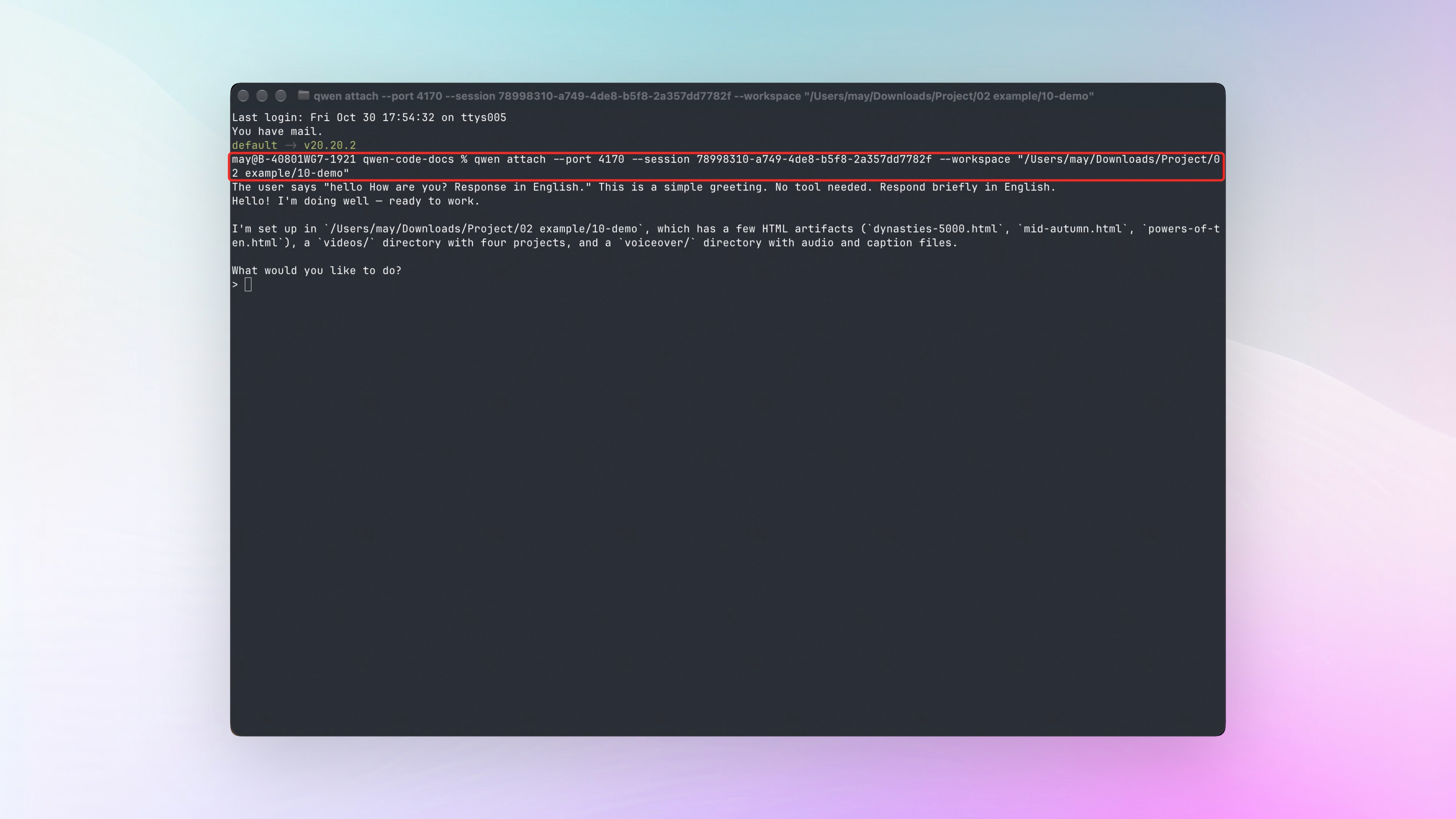
qwen attach: Rejoin a Background Session from the Terminal and Keep Talking
Last week added the qwen daemon group of management commands, so the local service can keep running in the background. Sessions inside it do too — close the terminal window that created one, go do something else, and the session is still right where it was. Getting back into that conversation used to mean opening Web Shell in a browser.
Now qwen attach --session <session id> in a terminal rejoins that session: everything said earlier shows up as usual, every line you type goes over as a new message, and you get a fresh place to type once it answers. The service you started in the morning, you pick up in the afternoon from another terminal and keep asking. See PR #15209
The session id is the string after /session/ in that session’s Web Shell address. What you rejoin is its output stream and one place to type. The completions, history scrolling, and approval cards you’re used to in a terminal aren’t in this window.
What you can do:
- Have it change a large project, close that terminal window halfway through; rejoin and ask how far it got
- Start a long task in Web Shell, then want to add “remember to update the docs too”? Switch to a terminal and say it
- The service runs on a dev machine: SSH in, then rejoin the session in that machine’s terminal to check progress and send instructions
Web Shell: Sessions and Workspaces Are Easier to Find and Manage in the Sidebar
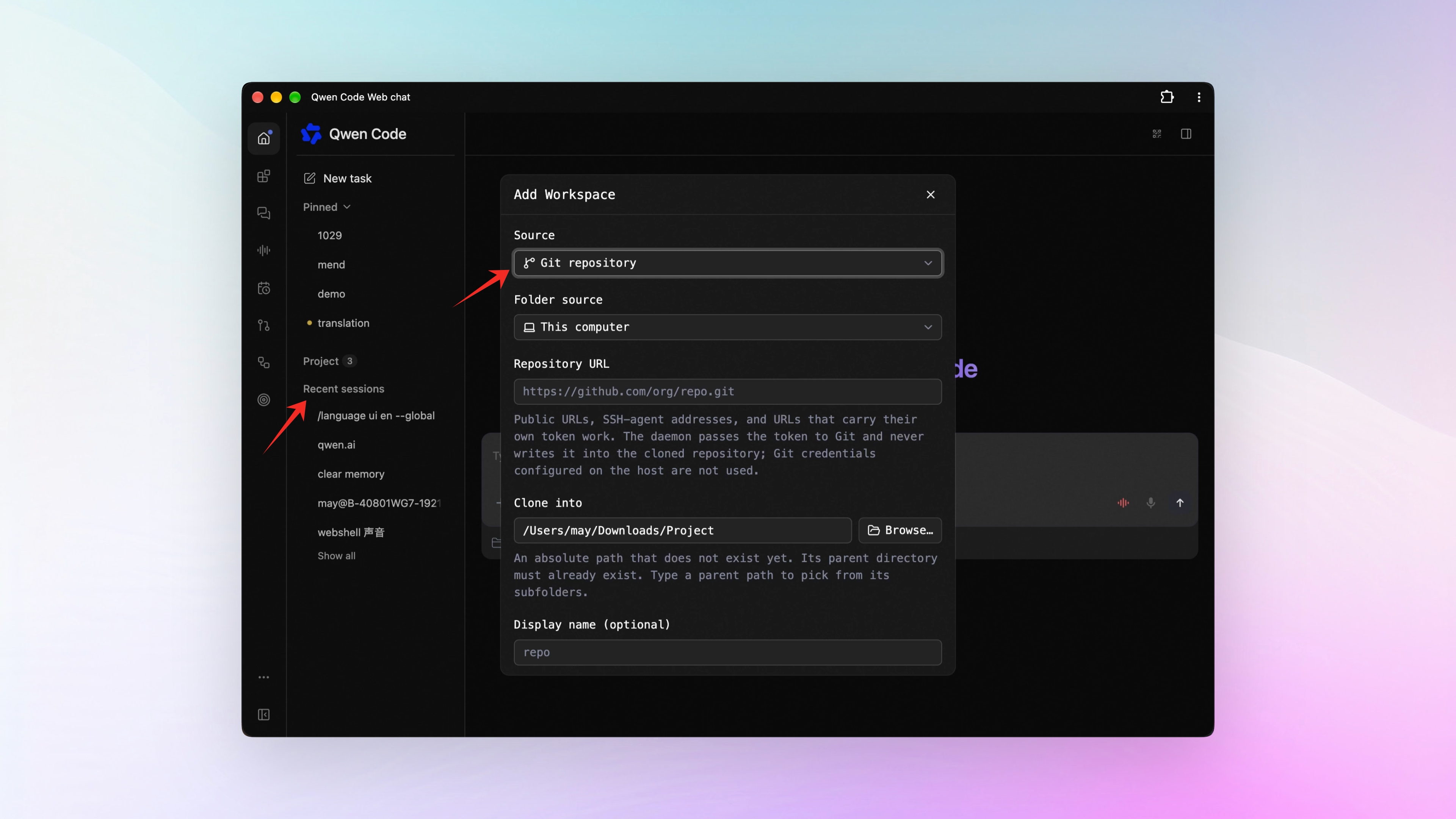
The sidebar has a new section: Recent sessions. Conversations inside projects and conversations without a workspace are sorted together by their most recent activity. When several projects run at once, every session is now in one place under Recent sessions. See PR #14904
Work an Agent did for a conversation collapses under that conversation. Background Agents, side branches you open on the fly, and scheduled tasks that run in their own session all hang under the conversation that sent them out. The sessions for one job sit together, and you can tell the main one from the branches it spawned at a glance. See PR #15714
Workspaces can be sorted, and a new one can come from a pasted Git URL. The workspace menu gained Move up and Move down, so the projects you use every day hold the top of the list where you can find them. When you add a project, choose Git repository and paste the address: the code is pulled down and you go straight into that workspace. See PR #15360 , #15361
Extra directories for a workspace are set in settings now. A new Workspace directories entry lists, adds, and removes paths, and a path you add takes effect immediately for every running session in that workspace. See PR #15393
Other improvements. A new session takes its name from the first thing you ask the AI (#15689 ). Archived conversations moved to their own place in settings, grouped by workspace and filterable by source (#15557 ). A reply copies whole in two formats: Copy content gives plain text, Copy Markdown gives the original source (#15345 ). Which language answers come back in is now visible and selectable in the settings panel, right beside the interface language (#15363 ).
📊 More New Features
Parameters you tuned on an interactive card can go straight back into the conversation. A card finishes calculating and stops there. To keep asking the model about those numbers, you had to copy them out and send them again. Cards now have an action that hands the applied set of parameters back to the conversation they came from. You see a frozen list of them first, and it sends only after you confirm. See PR #15333
Memories built up in Codex can be imported. Look over a preview first, then choose which passages to bring in and what scope each lands in. A background pass sorts them out with the model configured for this workspace, and what comes out enters Qwen Code’s own memory — retrieved, used, and forgotten as usual. Run qwen memory import codex on the command line, and add --dry-run to stop at the preview. See PR #14281
One command starts the local service and a managed Agent together, on your own machine. Run qwen serve --managed --open and ordinary sessions and managed sessions sit in the same interface, with the database included. It needs Node.js 22 or later and Java 21. This one is experimental, and it’s meant only for your own computer. See PR #14928
Managed Agent sessions take interruptions while they run, and permissions can be set per session. What you type and the files you reference while it’s working queue up and reach the model at a safe point; items still in the queue can be edited or withdrawn. When it’s idle, you can write allow, ask, and deny rules for that session alone, or choose Auto approval. See PR #15449 , #15448
Managed sessions can take file uploads, fetch web pages, and keep to-do lists, and new ones hand work to subagents by default. Upload a file from the browser into the workspace you choose — up to 8 MB — and its path goes straight into the session. It can now also fetch public web pages and maintain its own to-do list. See PR #15586 , #15313 , #15089 , #15171
Web search can recognize the domain of your own gateway. Teams that route all model traffic through a self-built gateway found that search didn’t recognize their own domain, and there was no way around it without changing the source. Now one configuration entry is enough, and it covers the whole domain and every subdomain under it. See PR #15638
👏 Experience Improvements
Workflow mode now holds in the session. Turn it on with --workflow-mode on or /workflows mode on, and every later turn in that session carries this instruction. Restore, fork, rewind, and clear each have their own behavior, and a switch that doesn’t succeed falls back to the state it was in. Both terminal interfaces show whether the session is in this mode, and the switch follows the session into a Docker sandbox. See PR #15422 , #15743
The other terminal interface (OpenTUI) picked up a lot this round. With the input box empty, press Space and start talking — transcription, cancel, the microphone permission prompt, and the recording state are all connected. Leave and come back to find the text, images, and tool results you recorded earlier; rewinding returns the conversation, the next request, and the draft to that point together. The checkpoint is written to disk at the moment a change is actually approved. The Discover and Sources panels for extensions now run through to a completed install. And running it no longer needs you to install Bun on your own machine. See PR #15617 , #15384 , #15389 , #15671 , #14959
When context is nearly full, a batch of tool results is trimmed against the room left. The batch shares what remains as one group. Text, images, and structure that should be protected are set aside first, and the complete originals still land on disk and stay retrievable. When there isn’t room for a full truncation notice, the batch is left to ordinary compaction instead. See PR #13599
Models with a one-million-token context are recognized. The qwen4 generation and invite-only names such as qwen-latest-series now count as a one-million-token window instead of falling back to the smaller default. See PR #15758 , #15762
Every model listed in settings is one the provider actually serves. The list used to carry names that had been retired, models where choosing to turn thinking off didn’t turn it off, and images pasted for DeepSeek that came back as unsupported. All three are fixed. To connect to Alibaba ModelStudio with a standard API key, fill in the key and the region and pick straight from the models your account can use. See PR #15184 , #15189 , #15164
🔧 Important Fixes
| Fix | What it means for you | PR |
|---|---|---|
| Selected chat text copies in VS Code | Selecting text in the message log and pressing Ctrl+C or choosing copy kept the highlight but never touched the clipboard (and with nothing selected, it cleared the clipboard instead); the selection now really does reach the clipboard | #15403 |
| Unsent images and files survive a page change | Type something and don’t send it, then switch sessions or refresh the page — the images and files now stay with the draft; the main view and the split view of one session share that same draft | #15025 , #15303 |
| Cost estimates stopped counting thinking tokens twice | When the API returned no total token count, the thinking part was added a second time and the cost looked higher than it was; each response is now tallied on its own first, then added into the total | #15464 |
| Renaming a session stops lagging as sessions pile up | Past a few hundred sessions in the sidebar, renaming one redrew the whole list and typing couldn’t keep up; typing now redraws only that input box | #15688 |
| Interactive cards stop reporting a false “calculated” | Change a number on a card and a background “processed” was shown as a completed recalculation, when that change might have been dropped or never picked up; those cases now display separately, and a skipped change stays visible even if a later attempt succeeds | #15004 |
| Cards keep their state across paging and session switches | Scrolling history, switching sessions, clicking a new task, or moving between the main view and the split view reset everything you had filled in and calculated on the card; it all stays as you left it now | #15611 |
| A broken card isn’t handed to you broken | Faults in the card itself — wrong markup, a failure on the first calculation, a click target that doesn’t exist — reached you as a broken card; it is now run once first, and failures go back to the model with row and column numbers to fix before you see it | #15790 |
| Cards generated during a running session are usable right away | The result showed as a placeholder you had to reopen, and only a page refresh let you interact with it; it’s interactive the moment the result arrives | #15787 |
| Interfaces that can’t show cards no longer receive them | In the terminal and in one-shot command-line runs the model would say the card was ready and tell you to drag its sliders, though there was nothing of the sort there; cards now go only to interfaces that can display them | #15720 |
| Artifact cards stop overlapping on narrow screens | On a phone, long file info pushed out of its own box and the download and open buttons sat on top of the text above them; those two buttons moved below the file info | #15300 |
| A failed skill install says why | The dialog used to say only that the install didn’t work; it now names the kind of problem — format, fields, a name mismatch, package structure, an unsafe path — and follows it with next-step suggestions in both English and Chinese | #15013 |
| Confirmation requests from plugins are no longer auto-approved | With auto-approve on, a plugin’s own confirmation requests were waved through; they now always come to you to answer, and the dialog says which plugin raised it | #15306 |
| Thinking and reply keep their order | When thinking and reply came in alternating blocks, the terminal and the replay flattened the sequence; it stays ordered now, and an earlier finished summary can be expanded while later content is still streaming out | #15621 |
| An edit with truncated parameters no longer reaches the file | When model output hit its length limit and only half an edit’s parameters came through, that half-request was still written to disk; it is now judged and rejected by the same rules the terminal uses, with matching error text | #15346 |
| Call markers inside a parameter no longer take down the whole batch | When a parameter value happened to carry another call’s markers, the entire tool call was judged invalid and dropped; the complete outer call is recovered now, and only the broken part is rejected | #13579 |
| Backslashes inside sed character classes read correctly | Patterns like s/[ \t]*$// were read as JavaScript escapes, so the substitution range went astray and the spaces that should have been deleted stayed; inside and outside the brackets now follow one set of rules, and escapes like \t are handed straight to the real sed | #13557 |
| Local Control picks another port when its first choice is taken | Startup failed outright when something else held the preferred port; it now retries once on a free port assigned by the system, and the pairing address, cross-origin allowlist, and status all report the port actually bound | #12352 |
| Several QQ groups shared one session | With the bot configured by topic scope, conversations from different groups ran into a single session; each group gets its own session again. This is a behavior change | #13882 |
| A session that changed directories isn’t treated as interrupted | Internal records brought in by a directory refresh were read as something you hadn’t finished saying, so restoring asked, for nothing, whether to continue; only a genuinely unanswered prompt and a pending tool call count now | #15012 |
| Retrying after a cancel in OpenTUI stops losing things | The files and images staged for the retry disappeared, and a command you had already cancelled could still fire the moment history finished writing; both are fixed now | #15283 |
| Linux offers the native directory picker only when a display is reachable | With no display connected, the choose-directory button was still on screen, and clicking it could only fail; startup now confirms that display is actually reachable before giving you the button | #15434 |
| Images and PDFs from a provider now reach the model | Images and PDFs that a tool had read couldn’t get through before; they can now — images go through the existing safety handling, and a PDF arrives as raw content or as extracted text | #13606 |
| VS Code leaves edit mode when an edit is rejected | After an edit to a message was rejected, the interface stayed in editing state and your next ordinary message couldn’t go out; rejection now exits editing, and a successful edit keeps the original rewind target | #15439 |
| Managed session controls are brought together | Renaming moved into each session’s own menu in the sidebar; MCP and extensions are managed from the single Plugins place; the row that repeated directory, model, and runtime when creating a task is gone. Changing the working directory after a session has started is no longer available (choosing a directory when creating one is unchanged) — this is a behavior change | #15616 |
👥 Contributors
| Contributor | Contributions | PR Links |
|---|---|---|
| @deggs7 | Adds the Recent sessions section to the sidebar, moves archived conversations into settings, tucks the create-group entry into the workspace menu, and simplifies the status bar when loading hints are hidden | #14904 , #15557 , #15320 , #15423 |
| @Jun516 | Adds one check each for the focus handoff when reopening session details and for the spinner on a running title | #15351 , #15371 |
| 🆕 @sxl-lucky7 | 🎉 First contribution: fixes the example for a scheduled task’s first gate run, and clears up usage accounting across the different sign-in methods | #15452 , #15554 |
| 🆕 @Aling33 | 🎉 First contribution: keeps the failure report and the SQL cause when a Java SDK check run breaks | #14910 |
| @barry166 | Pins the upload path for JUnit reports | #15502 |
| @CanReader | Pins the escaping of the html lang attribute in the web view | #10492 |
| @Eric-GoodBoy-Tech | Restores one session per group when the QQ bot is configured by topic scope | #13882 |
| 🆕 @EthDing | 🎉 First contribution: captures the disk-full log lines as expected | #8549 |
| @he-yufeng | Isolates the permission-control test cases from shared memory state | #11401 |
| @jabrailkhalil | Adds test cases for the whole lifecycle of an attachment received in Feishu, from arrival to landing on disk | #13278 |
| @MohammedAlkindi | Fixes the sed emulation reading backslashes inside character classes wrong | #13557 |
| @shpaker | Documents .agents/skills and skills.directories | #15086 |
| @Sumire-no-kai | Falls back to a free port assigned by the system when Local Control’s port is taken | #12352 |
| @waybarrios | Leaves long sed options that the emulation can’t parse to sed, instead of taking them over | #15223 |
| @yar3333 | Copying a selection in the VS Code chat log no longer loses the selection | #15403 |
Upgrade: Run npm i @qwen-code/qwen-code@latest -g to upgrade to the latest version.
If you have questions or feedback, feel free to open an issue on GitHub Issues !