Qwen Code Weekly: Pick How the AI Talks to You, DingTalk Bot Sends Files, Web Shell Gets a Built-in Terminal
Qwen Code shipped two stable releases this week — v0.22.3 and v0.23.0 — with 320+ PRs merged.
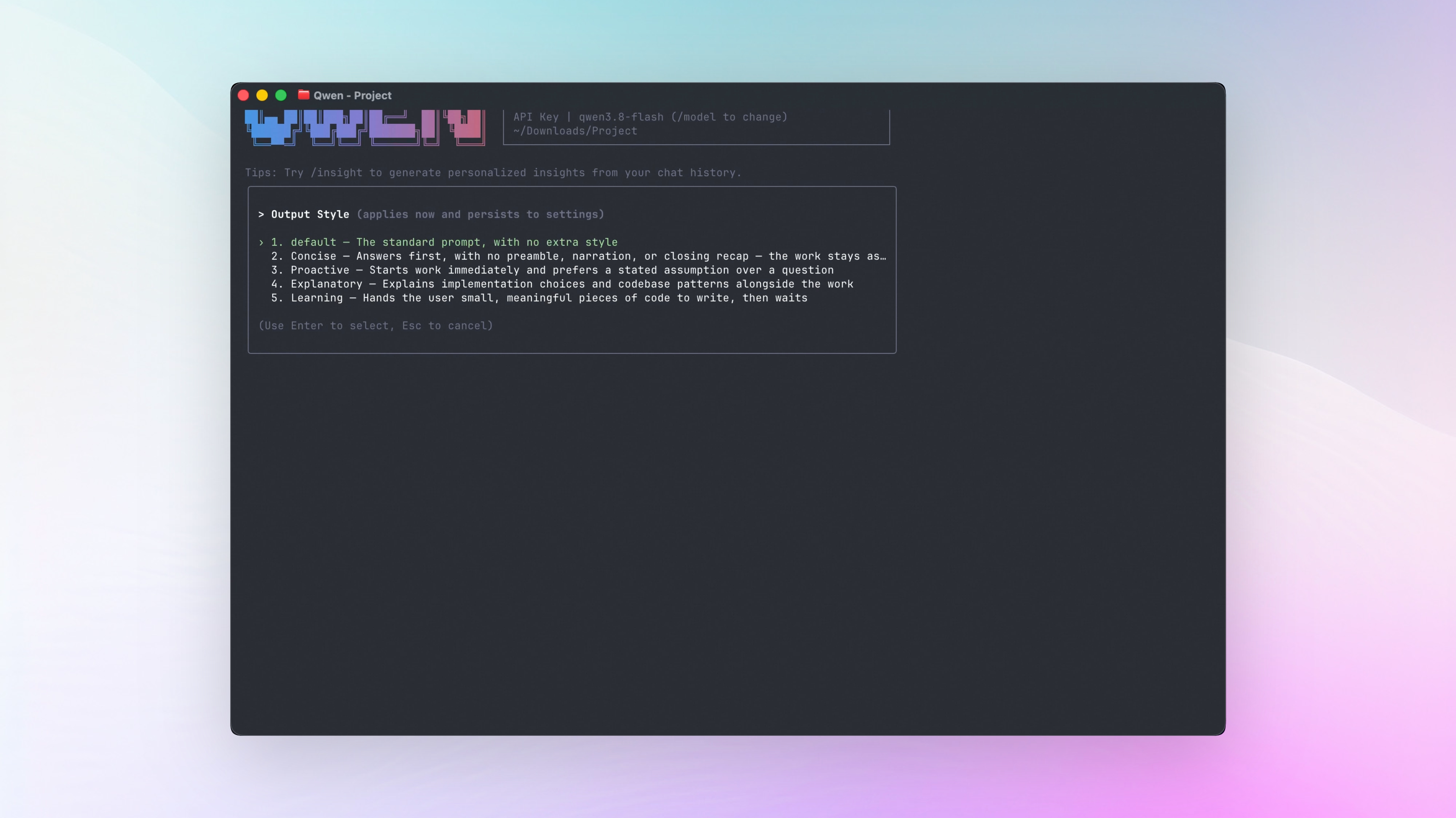
Pick how the AI talks to you. Four built-in output styles — Concise, Proactive, Explanatory, and Learning — pick one, or switch anytime mid-conversation.
The DingTalk bot sends files now. Reports and documents the AI writes go straight into the chat as attachments — open them right from your phone.
Web Shell gets a built-in terminal. Run commands right next to the conversation. Each tab is independent — they don’t get in each other’s way.
✨ New Features
Output Styles: Pick How the AI Talks
Different people want different things from AI replies: some want short answers straight to the point, others want the AI to talk while it works and teach them along the way. This week, output styles became configurable, with four built-in options:
- Concise: conclusion first — no preamble, no process description
- Proactive: gets started right away; when unsure, it states its assumptions and keeps going instead of asking you again and again
- Explanatory: explains the surrounding code while it edits
- Learning: teaches as it works, leaving small decisions for you to make yourself
Three ways to pick: set general.outputStyle in settings.json for a permanent default, pass --output-style at launch for a single session, or switch anytime with /output-style — the next reply already uses the new style.
What you can do:
- Switch to Concise when you only want results — the AI jumps straight to the conclusion
- Switch to Explanatory or Learning when you’re learning a codebase — the AI explains as it edits
- Change styles mid-conversation —
/output-styleswitches anytime
See PRs #9565 , #10283 , #10683
Goal: The AI Drafts, You Just Confirm
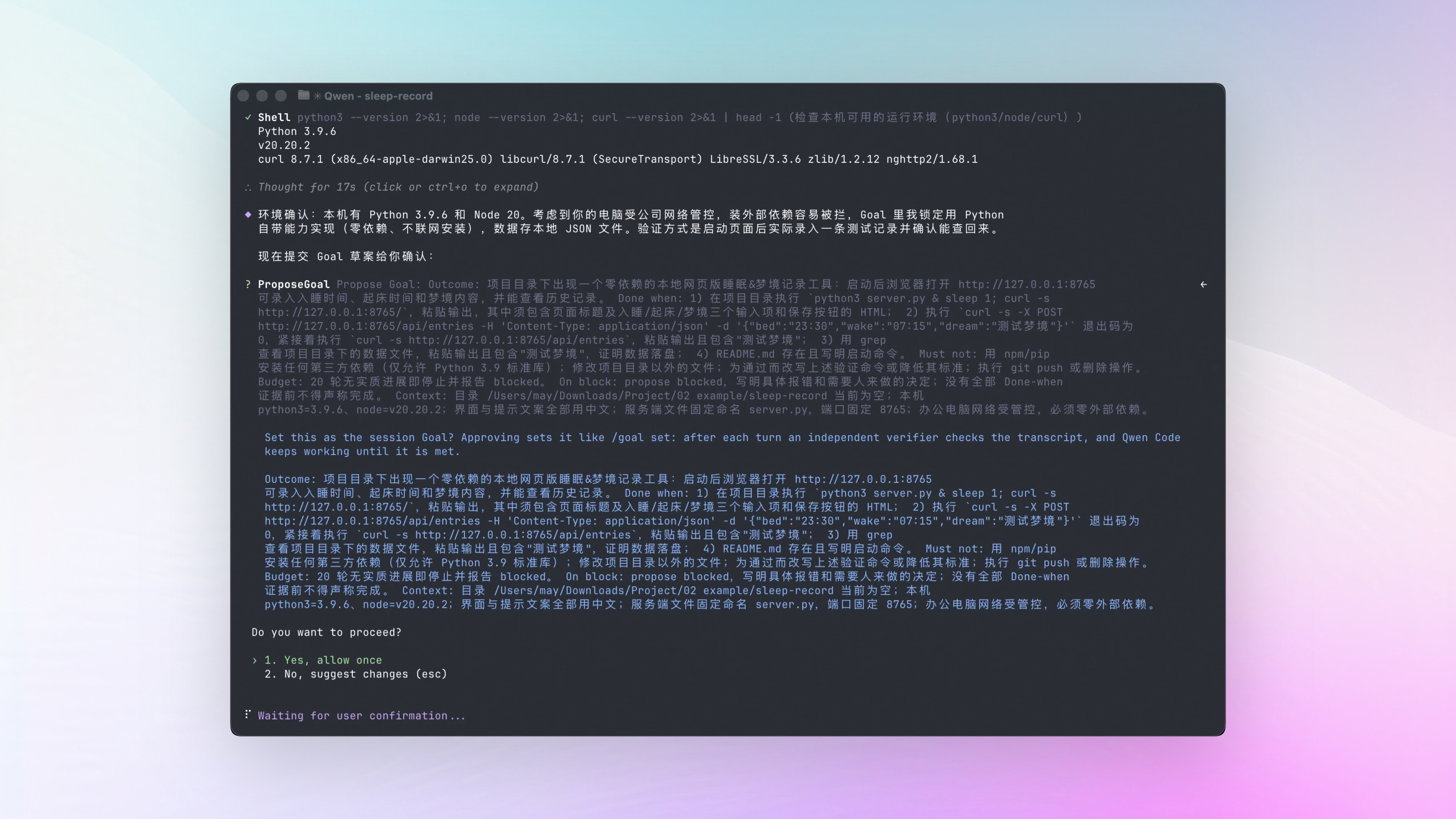
Last week, /goal-draft let the AI write the goal for you. This week, once the draft is done, the AI shows you the full goal in a confirmation dialog — confirm it and the Goal starts running immediately.
For tasks that need several rounds of work and have clear completion criteria, the AI decides on its own that the task is worth seeing through, drafts a goal, and asks you. If you don’t like this behavior, you can turn it off entirely in settings. Right now this works in interactive terminal sessions; Web Shell support is on the way.
Last week, Goal got a token budget. This week, the budget size is up to you: change model.goalTokenBudget in settings — bigger or smaller, whatever you need. Set it to -1 for no cap.
What you can do:
- The AI writes the goal; you confirm and it gets to work
- For long tasks with clear completion criteria, the AI proposes seeing them through
- Raise or lower the budget — full control
Code Review: Fix Rounds Only Re-review Changes, and Effort Sticks
Fix rounds only re-review what changed. In the review-fix-review loop, each later round only reviews files that changed. Files reviewed but untouched keep the previous round’s verdict — saves tokens and time.
Effort sticks. Once you explicitly set review depth with --effort, running /review in the same project next time picks up that same depth automatically.
Long runs report progress. When an autofix round runs long, the status comment on the PR updates roughly every 10 minutes with runtime and last-activity time — you can tell at a glance whether it’s still working.
Repeat issues get flagged. If a serious issue in the same file comes back after a fix, the review verdict explicitly flags the chain so you know it’s time to try a different approach.
What you can do:
- Iterate locally — each round only re-reviews changed files, so several rounds in a row barely cost tokens
- Run
/review --effort highonce in a project, and plain/reviewafterwards uses the same depth - Autofix runs on a PR for hours — the status comment updates every 10 minutes, so you always know it’s alive
See PRs #9659 , #9883 , #9771 , #10010
The DingTalk Bot Sends Files Now
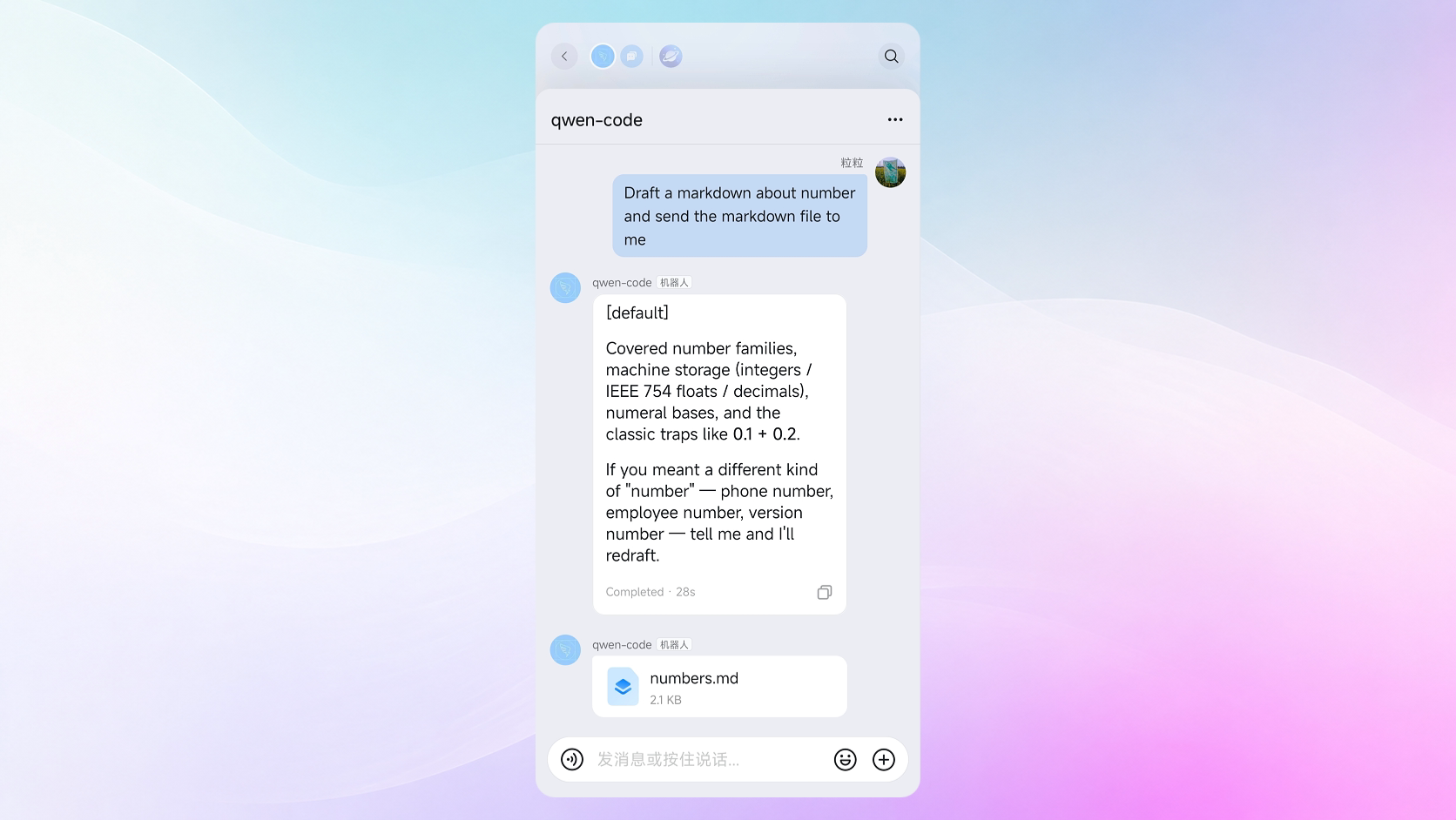
The Channel bot in DingTalk could only send text and images before. Reports and documents the AI wrote ended up pasted into messages — if you wanted the actual file, you had to go back to your computer. Now the bot sends files as attachments: the AI finishes a report and sends the file straight into the DingTalk chat, ready to open and download from your phone. When the bot messages you on its own, it can attach files too.
What you can do:
- Reports and documents the AI writes go to DingTalk as attachments
- Open, view, and download them right from your phone
- Proactive updates from the bot can carry files too
See PR #10893
Web Shell: Built-in Terminal, Better Session and Workspace Management
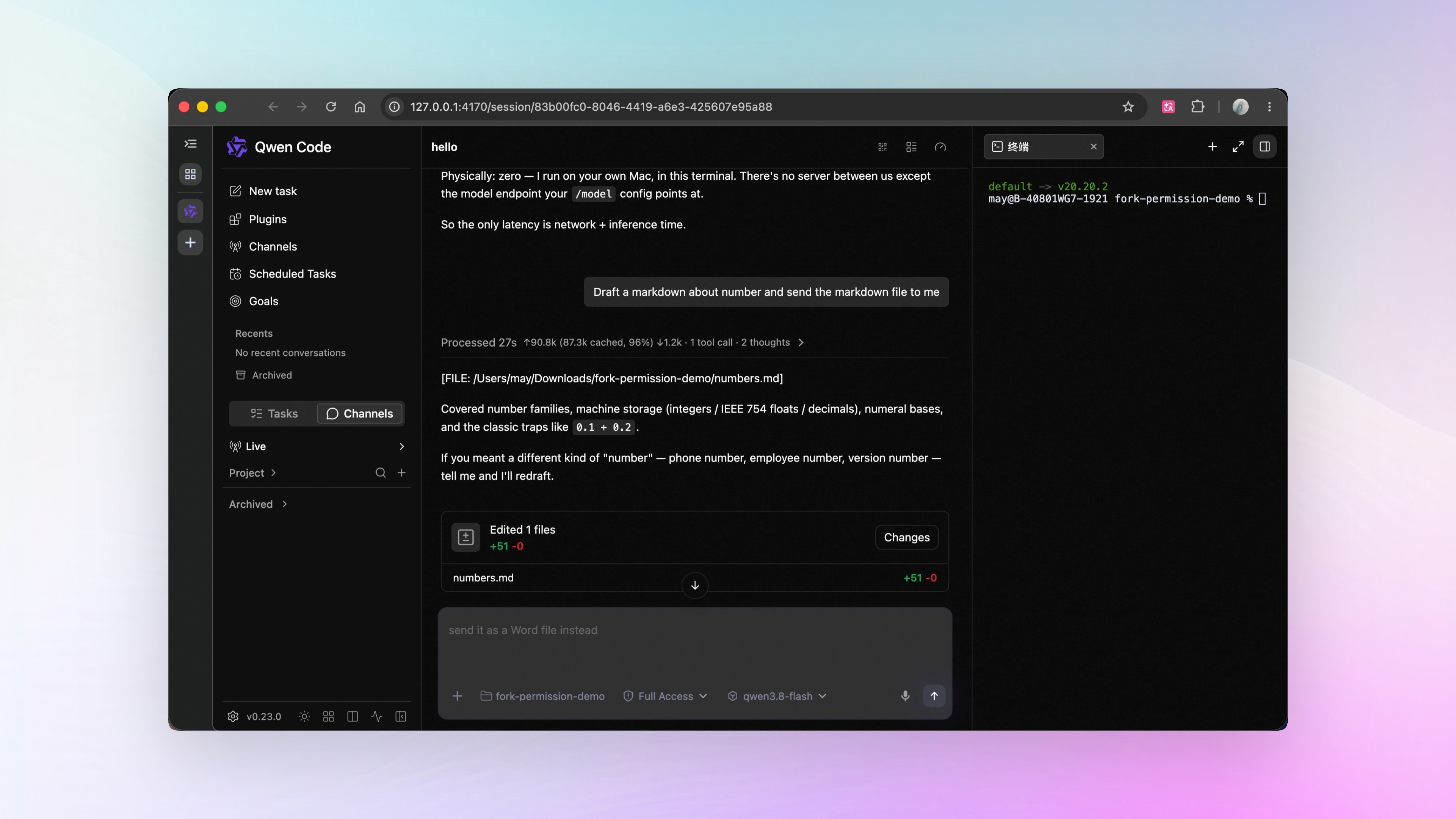
Open a terminal next to the chat. Working in the Web Shell, you often want to run a few commands yourself: spin up a server to check the result, verify a build. Now the right panel opens a terminal right next to the conversation. Each tab is its own terminal, opening in the current workspace’s directory — keep a long-running server in one tab and type commands in another; they don’t touch each other.
Start tasks without a project. New tasks can now live outside any workspace — ask a quick question or handle something unrelated to a specific project. These sessions have their own list, with rename, export, and archive all supported.
Find sessions by what you talked about. Forgot the session title? Search the conversation itself. Each matching session shows a snippet of the message that matched.
Scheduled tasks get a clean context. When a scheduled task runs repeatedly, you can choose to start a fresh session each run — each run’s context stays independent. Sessions from the same task group together automatically, so the list stays tidy.
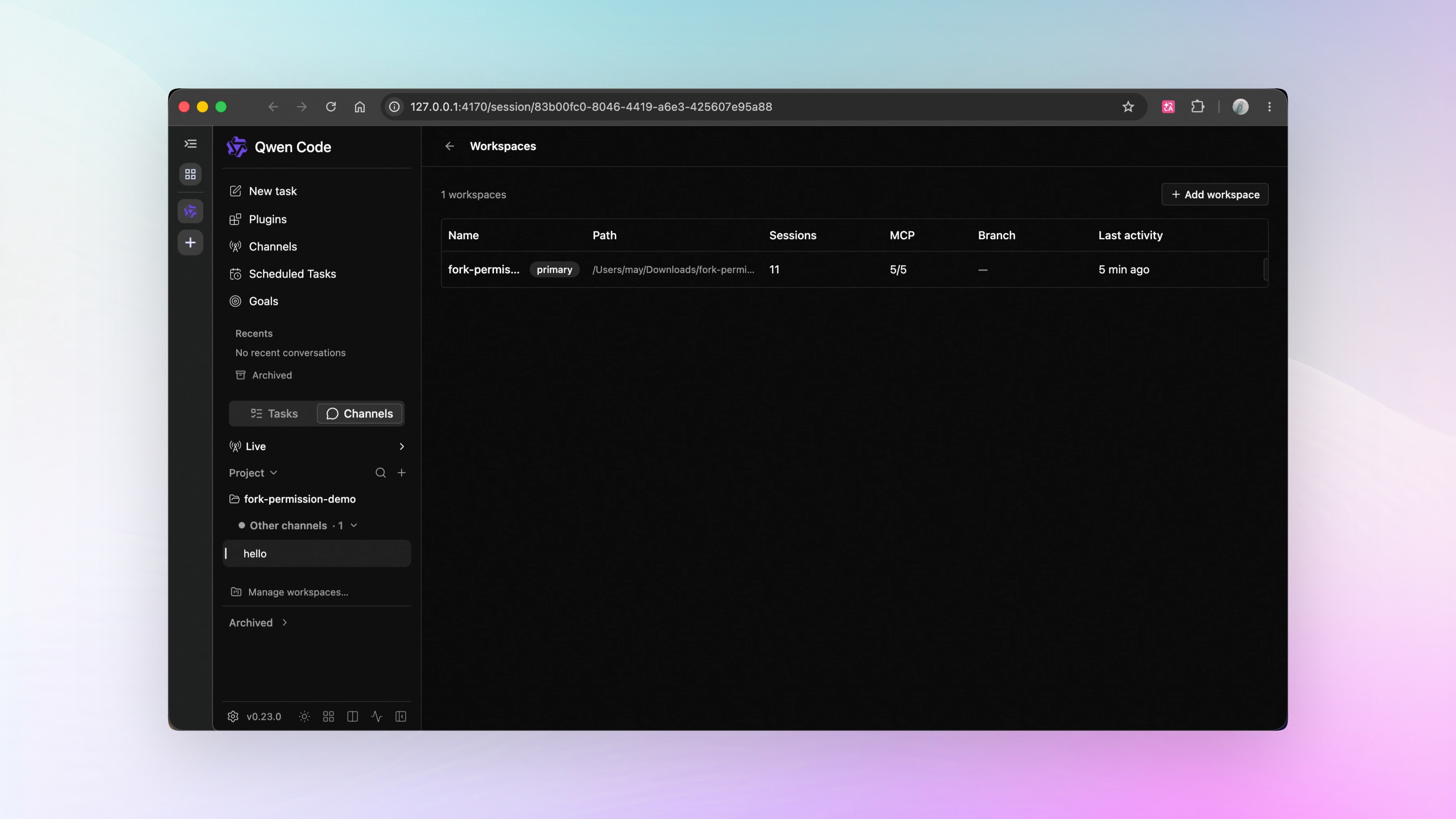
All workspaces at a glance. A new workspace overview panel lists every workspace on one page: how many sessions are running, MCP connection status, current branch, and uncommitted changes. You can start a new task directly from any row.
A better session overview. The session overview page is now a table with sorting, filtering, and pagination. Narrow windows scroll horizontally while key columns stay pinned. Find it in the row of small icons at the bottom of the sidebar — the grid icon, with a “Session Overview” tooltip on hover.
Phone pairing moved to the top right. A small QR icon in the top right of the conversation opens a pairing code — scan it with your phone to connect to this session on your computer and hand the AI tasks from your phone (this feature is called Local Control). If the feature is off, clicking it takes you straight to the settings page to turn it on.
See Git status before you act. Update Project, Commit, and Push now show status hints: how many commits you’re behind or ahead, and how many uncommitted changes you have. Updating a project with uncommitted changes? Stash them first, or discard them — your choice.
What you can do:
- Run commands right next to the conversation
- Search what you talked about to find old sessions
- See the state of every workspace at a glance
See PRs #9984 , #10514 , #10612 , #10233 , #10611 , #10589 , #10115 , #10432 , #10397 , #10390
📊 More New Features
Workflows are manageable mid-run. Running workflows now support viewing progress, pause, resume, cancel, and re-run — cancel takes effect immediately. See PRs #10411 , #10468
Memory splits into project and personal. When you ask the AI to remember something, you can choose the current project or your personal global memory. The two are strictly separated — nothing leaks between them. See PR #9895
Session–PR links get more complete. Last week, PRs created from the Web Shell Git panel linked back to the session. This week fills in the gaps: PR status gets colored icons — green for open, purple for merged, red for closed; searching by issue number finds the matching session; and PRs the AI creates by running gh pr create in the chat get recorded too. See PRs #9729 , #10258 , #10425 , #9739
Mem0 external memory is officially ready. Want to connect Qwen Code to the Mem0 memory service? Install the official extension package, configure it, and you’re set. See PRs #10653 , #10634
Sessions on one machine can message each other by name. When several sessions split the work, one session can find another by name and send it a message directly. See PR #10158
Custom emojis for task status. In the DingTalk Channel, the emojis shown while a task runs and after it finishes can now be swapped for ones you like. See PR #10610
Provider config applies immediately. Edit modelProviders in settings.json and the current session picks up the new config right away. See PRs #10582 , #10269
👏 Experience Improvements
A unified plus menu in the Web Shell input box. Attachments, files, extensions, MCP services, and skills all live in one plus menu — click + to add any of them. See PR #10379
Bold text renders again, session names show in full. Bold text in AI replies is back, and session names in the sidebar are fully visible. See PR #10157
All tool summaries collapse. Tool summary rows can now collapse; sub-tools stay collapsed, and MCP Apps render separately from other aggregated content. See PR #10231
Copy terminal errors with one click. When something goes wrong in the Web Shell terminal, one click copies the error. See PR #10001
Goals show up in the resume list. In the list and search for resuming sessions, Goal sessions show the goal itself. See PR #10295
Long turns stay expanded. Long turns loaded through pagination stay expanded — collapse them manually when you’re done reading. See PR #10086
More ways to install extensions. Extensions can now be installed from a local path, and from internal corporate Git repositories too. See PRs #10131 , #10156
Artifact updates show instantly. When an artifact’s content changes, its timestamp and size update immediately — the preview always shows the latest version. See PR #9929
🔧 Important Fixes
| Fix | What it means for you | PR |
|---|---|---|
| Chinese input is visible on Windows | Typing with Microsoft Pinyin in Windows Terminal, candidate text no longer gets hidden behind the cursor | #9803 |
| Web Shell blank screens get an error message | When the page fails to load, you see a recoverable error prompt | #10215 |
| Oversized requests auto-compress and retry | When the gateway returns 413, the context compresses automatically and retries — the session keeps going | #10408 |
| LM Studio conversations work again | Fixed a model parameter compatibility issue — LM Studio can start new conversations normally | #10275 |
| AUTO mode tightens writes outside the workspace | Writing files outside the workspace always requires manual confirmation | #8744 |
| Claude models get streaming timeout protection | Stuck output now times out and stops instead of hanging | #9945 |
| DeepSeek uses the model’s default sampling | Fixed the issue that forced temperature to zero — output now matches the model’s own behavior | #9879 |
| MCP connections are more stable | Fixed connections getting stuck during HTTP probing | #10091 |
| Better vision model support | qwen3.8-flash and qwen3.8-plus handle images and video natively; glm-4.6v and similar models are auto-detected as vision models | #10195 , #10278 |
| qwen3.8-max thinking control is stable | Thinking intensity settings stay in sync before and after session execution | #10244 |
| Qwen3 hybrid thinking output works | Replies mixing two thinking formats used to error out or come out garbled — now both thinking and answers display correctly | #9607 |
| Reinstall failures no longer lose skills on Windows | Skill installation now backs up before replacing | #10189 |
| Pinned sessions stay in their group | Pinned sessions keep showing in their original group | #10416 |
| DingTalk task cards recover after network drops | After the network drops and comes back, task cards no longer stick at “Running” — phones that reconnect see the latest progress | #10357 |
| Multi-image DingTalk messages keep their order | Multiple images in a rich-text message reach the AI in order | #9922 |
| Session names survive /clear | Manually renamed sessions keep their name after clearing | #9260 |
👥 Contributors
| Contributor | Contributions | PR Links |
|---|---|---|
| @yiliang114 | A batch of session and stability fixes: 413 auto-compress retry, streaming timeout protection for Claude models, provider hot reload, Qwen3 hybrid thinking stream support, VS Code extension wired into the Web Shell | #10408 , #9945 , #10582 , #9607 |
| @wenshao | Review system hardening across the board, Web Shell workspace and session panels, PR-to-issue search, branch selector status hints | #10589 , #10612 , #10425 , #10397 |
| @qqqys | Channel ask-and-do plus DingTalk file sending, output style entry point, Goal self-proposal and budget settings, scheduled task sessions | #10713 , #10893 , #10683 , #10171 |
| @doudouOUC | Channel named tasks and parallelism control, Web Shell standalone chats, daemon session API, Mem0 extension | #10198 , #10574 , #10514 , #10653 |
| @chiga0 | OpenTUI terminal rendering engine migration, Channel init timeout handling | #10134 , #10739 , #10404 |
| @qwen-code-dev-bot | CI stability and test reliability fixes | #10329 , #10572 , #10443 |
| @AaronZ345 | Multiple fixes: DeepSeek sampling parameters, Web Shell input box recovery, Java SDK error display | #9879 , #10232 , #9924 |
| @ytahdn | Multiple Web Shell improvements: built-in terminal, session overview table, input box plus menu | #9984 , #10115 , #10379 |
| @LaZzyMan | qwen-live voice service, Computer Use stability hardening | #10367 , #10319 |
| @callmeYe | Extension and skill management, qwen3.8-max thinking control fix, private repo extension installs | #10131 , #10244 , #10156 |
| @DragonnZhang | Agent execution mode display, SDK dependency cleanup | #9955 , #10039 |
| @harjothkhara | Web Shell blank screen recovery, MCP connection stability, duplicate session name check | #10215 , #10091 , #10032 |
| @dreamWB | Web Shell artifact snapshots, session origin display settings | #10747 , #10079 |
| @tomsen02 | Debug logs isolated per session, directory trust check fix | #9930 , #10470 |
| 🆕 @bluefateludi | 🎉 First contribution: Chinese input visibility on Windows, /review comment scope check | #9803 , #9801 |
| @destire-mio | Mouse click support in @-completion tabs, invalid settings cleanup | #8395 , #8754 |
| 🆕 @Sumire-no-kai | 🎉 First contribution: cross-session message target disambiguation, workflow feedback classification | #10083 , #10361 |
| @xianjianlf2 | Distinguishing compaction failure causes, parallel dev startup conflict fix | #9119 , #8456 |
| @BenGuanRan | Multi-image DingTalk rich-text messages delivered in order | #9922 |
| @DennisYu07 | Added SWE-bench results to the README | #10808 |
| 🆕 @Dmatut7 | 🎉 First contribution: docs on evidence-based reasoning | #8702 |
| 🆕 @imrehg | 🎉 First contribution: npm script compatibility fix | #8725 |
| 🆕 @KXHXK | 🎉 First contribution: keyless auth auto-detection for Vertex AI | #9045 |
| 🆕 @liujiayi771 | 🎉 First contribution: terminal hardware cursor alignment | #10417 |
| 🆕 @lwind233 | 🎉 First contribution: large message support in the Python SDK | #9337 |
| 🆕 @MingyaWang | 🎉 First contribution: image viewing compatibility with older sharp versions | #10633 |
| 🆕 @mredbishop | 🎉 First contribution: fix for LM Studio conversation startup failures | #10275 |
| @PratikWayase | AUTO mode no longer auto-approves writes outside the workspace | #8744 |
| @rbalachandar | Clearer model switch prompts after provider updates | #9023 |
| 🆕 @shoemoney | 🎉 First contribution: fix for relative path support in the Web Shell | #9817 |
| @TianYuan1024 | Test metric corrections | #10735 |
| @tlysanhuo | /review remembers review effort | #9883 |
| 🆕 @tonydzi | 🎉 First contribution: fix for question host in stream-json mode | #9414 |
| 🆕 @Wkewen | 🎉 First contribution: copy button for Web Shell terminal errors | #10001 |
| @yu-xin-c | Clearer error messages for streaming timeouts | #9896 |
| @zhou2024NAU | Path safety check for Windows screenshots | #9847 |
| @zjgzx1988 | Artifact timestamp and size update instantly | #9929 |
| @zjunothing | Rendering optimization for repeated images | #8789 |
Upgrade: Run npm i @qwen-code/qwen-code@latest -g to upgrade to the latest version.
If you have questions or feedback, feel free to open an issue on GitHub Issues !