Qwen Code Weekly: Desktop App Officially Launched, Session Workflow Shows Task Execution at a Glance, Sub-Agents Get Per-Task Permissions
Qwen Code shipped five stable releases this week — v0.21.2 through v0.21.6 — with 300+ PRs merged. And one big move: Qwen Code Desktop v0.1.0 is officially out.
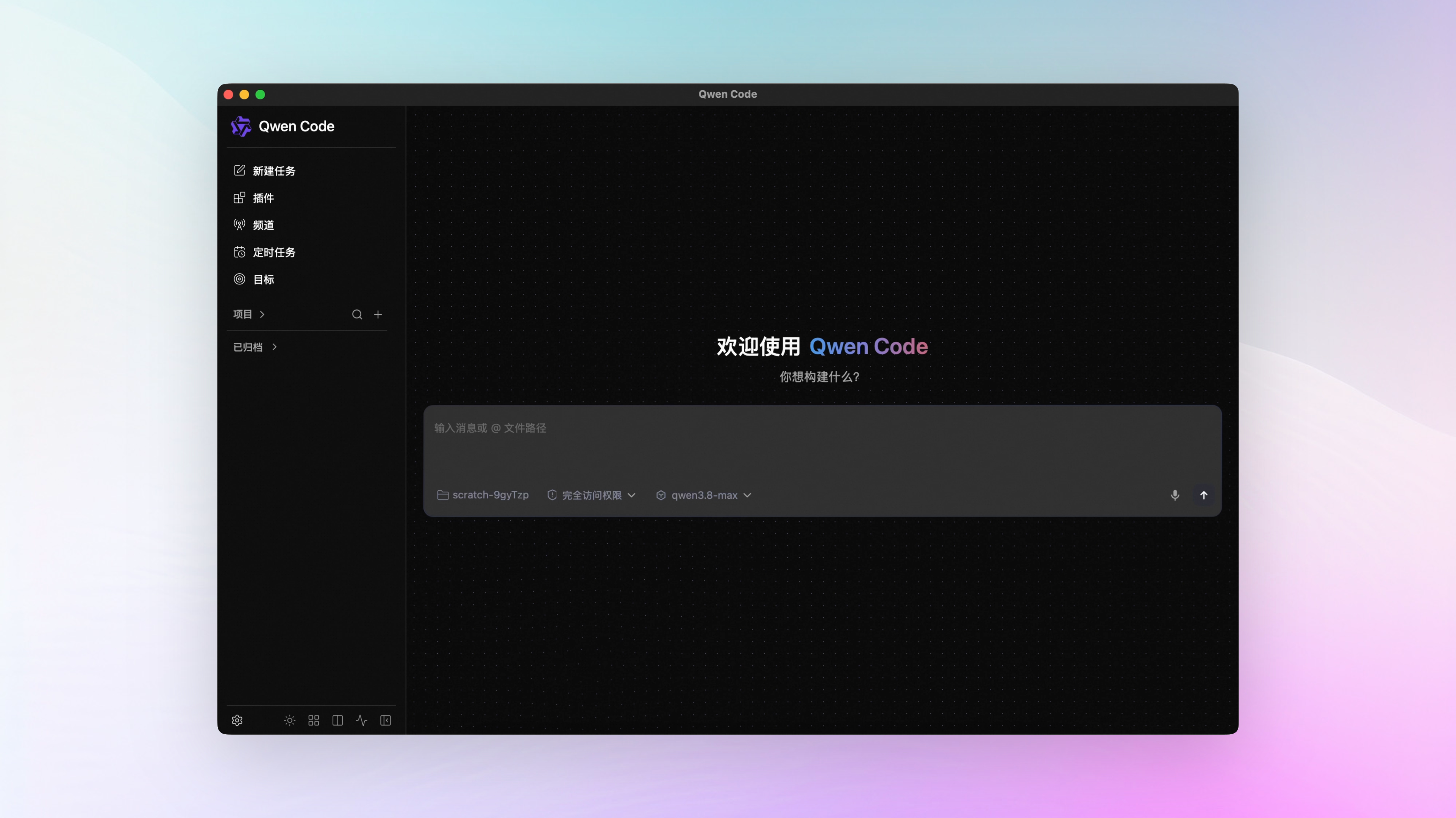
The desktop app is here. Last week the Web Shell got a major update; this week it turned into a standalone desktop app. Qwen Code Desktop v0.1.0 is out, with native installers for macOS, Windows, and Linux — download directly from GitHub Releases.
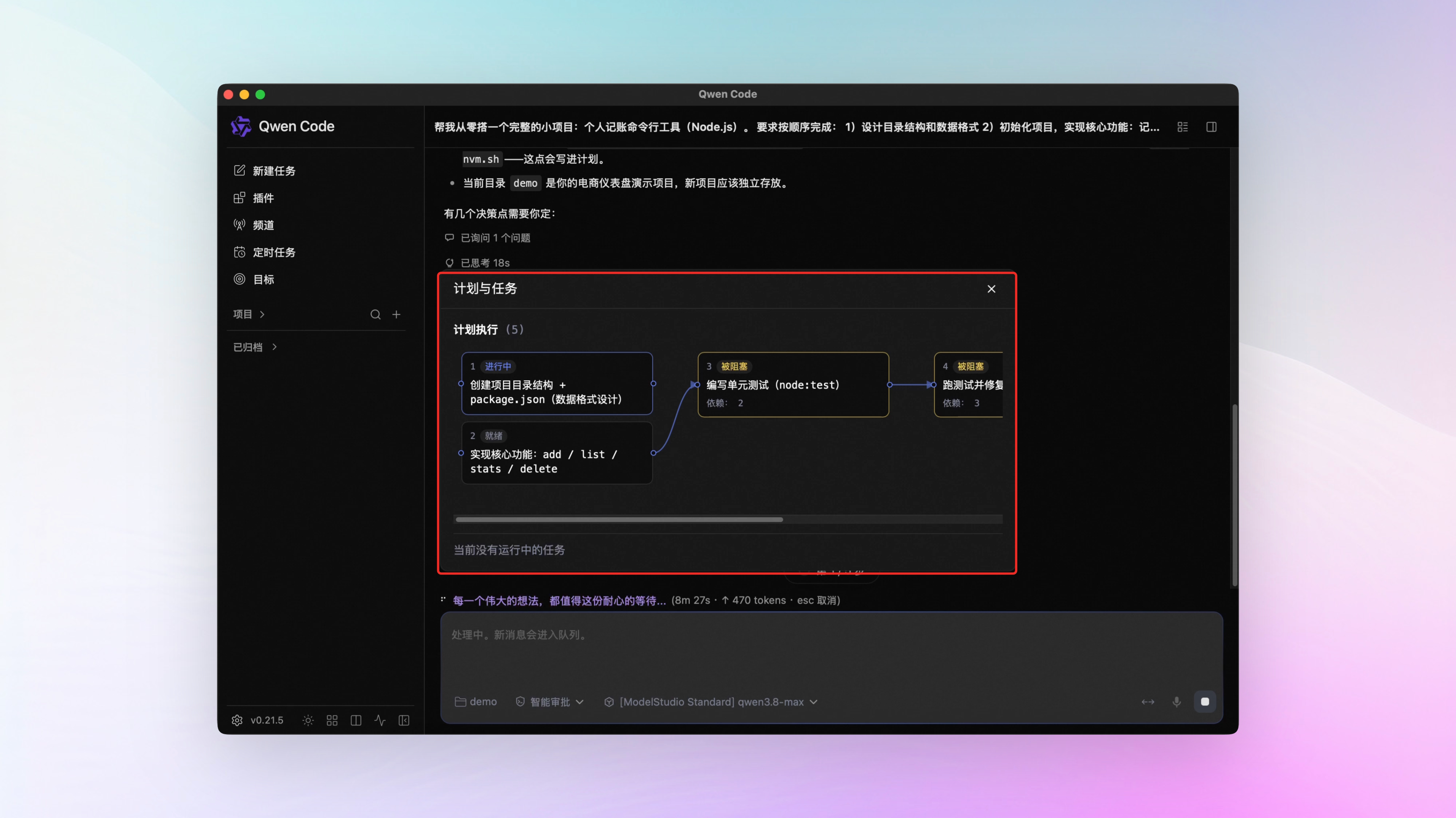
Task execution is now visible. The new Session Workflow view turns your plan and execution progress into a flowchart: how many steps there are, which one is running, which one is waiting, which subtask went to which AI — all at a glance. The AI shows you the chart before starting, and only starts when you approve.
Terminal experience and permission controls are filling in. AI-generated images now display directly in the terminal — no opening files yourself. Sub-Agents now get permissions matched to the job: read-only work gets read-only access, and frequently used permission sets can be saved as reusable templates. Long-session compaction can point at a cheaper model on its own, keeping costs in check.
✨ New Features
Qwen Code Desktop Officially Launched: Native Apps on All Three Major OSes
Previously Qwen Code’s desktop experience was split across two places: the Electron desktop app and the Web Shell in the browser. This week they merged: Qwen Code Desktop v0.1.0 is officially out, built on the Web Shell from last week’s big update. Installers for macOS, Windows, and Linux are all live — download directly from GitHub Releases .
macOS users on the existing Electron version don’t need to migrate manually: the new version includes a one-time migration walkthrough, and future updates stay automatic after the switch.
What you can do with this:
- Qwen Code Desktop has the same capabilities as the terminal version
- Consistent experience across all three major OSes
- Automatic update checks — no manual reinstalling for future versions
See PRs #8132 , #8392 , #8511 , #8518
Session Workflow: Plans, Subtasks, and Progress in One Flowchart
Once a complex task is running, which step the plan is on and what each subtask is doing — previously you had to dig through the conversation log and piece it together yourself.
The new Session Workflow view draws all of this as a flowchart: each step of the plan is a box on the chart, the order is connected with lines, and which step is running and which is stuck updates in real time. Subtasks the AI dispatched also hang off the chart — click one to see what it actually did. Before starting, the AI shows you the chart first; it starts only when you approve, otherwise it goes back to re-plan. After the task finishes, you can reopen the chart and look back — every step records who did it and what they did.
The feature is off by default. Set experimental.sessionWorkflow to true in settings to turn it on. Once enabled, two convenience features come with it: when a subtask hits an operation that needs your confirmation — running a command, editing a file — the request surfaces directly in the main UI, no digging into the subtask to find it. Extra-long tasks can be sent to run in the background while the main conversation keeps doing other things, and you’re notified when they’re done.
What you can do with this:
- See progress at a glance while complex tasks run — the chart tells you which step is stuck
- Confirm the plan before work starts, and run with more confidence
- Send long tasks to the background and keep the main conversation free
See PRs #7580 , #8391 , #8240 , #8303
display_image: AI-Generated Images Right in the Terminal
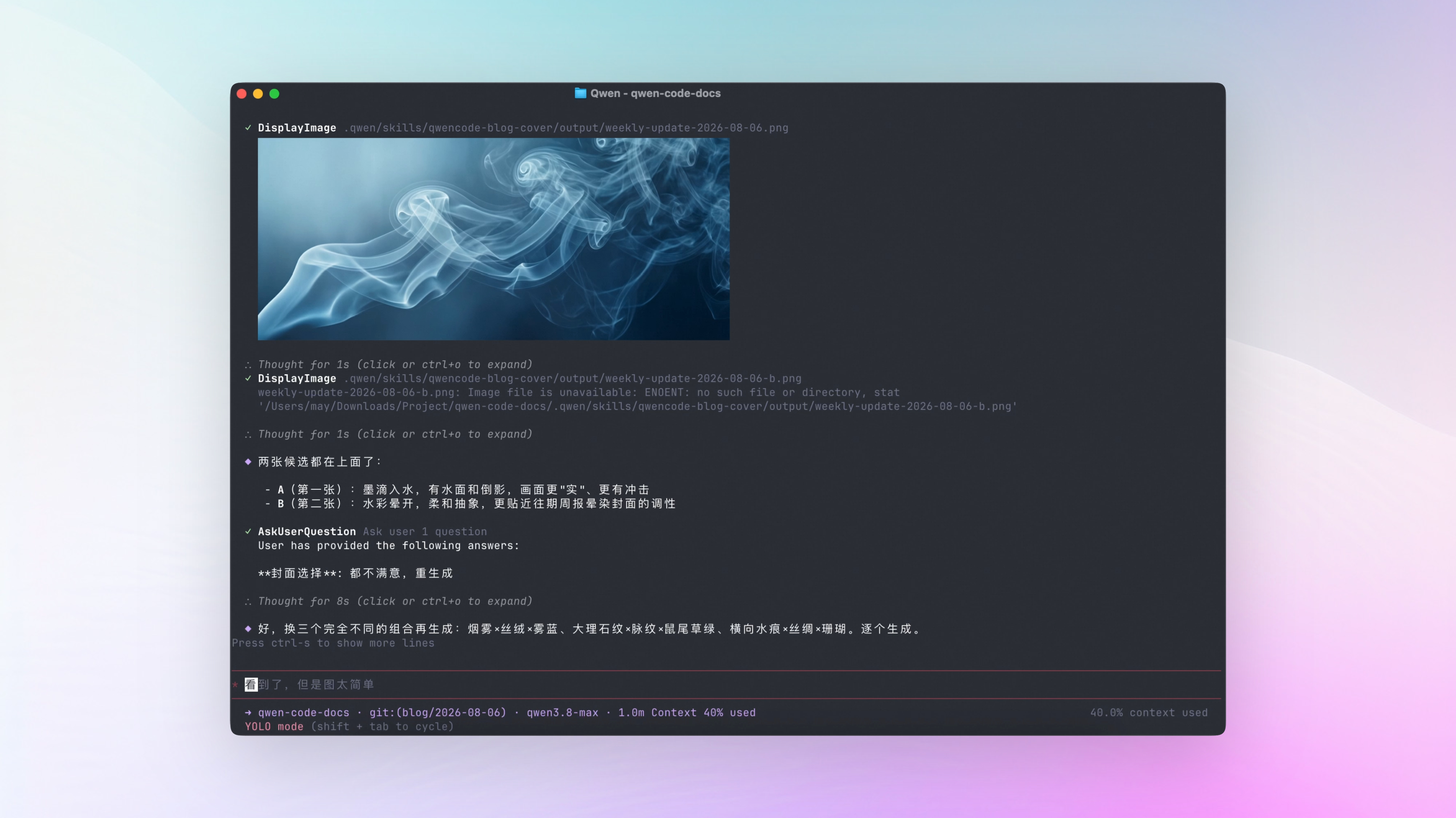
Previously when the AI generated an image, it handed you a file path and you had to open it yourself. Now it shows the image directly in the terminal — you see it the moment it’s done. That’s how this week’s cover was picked: the AI generated a few candidate images, they displayed right in the terminal, and we compared and picked on the spot — no opening files one by one. If the terminal doesn’t support displaying images, it tells you so explicitly.
What you can do with this:
- AI-generated images: see them the moment they’re done, no opening files yourself
- Charts the AI draws from data and screenshots of finished web pages also display directly
- Design mocks and screenshots already in the repo — have the AI pull them up and review them together
See PR #8217
Sub-Agent Permissions: Keys for Each Job, Parallel Tasks Stay Out of Each Other’s Way
When you hand Qwen Code a big task, it sometimes spins up a few “clones” (sub-Agents) to work in parallel — one reads code, another runs tests. Previously, no matter which clone it dispatched, it had the same full abilities as the original: reading files, editing files, running commands. If you only wanted it to “read the code and write a summary,” it could still edit files on the side — not reassuring.
Now you can scope permissions to the task:
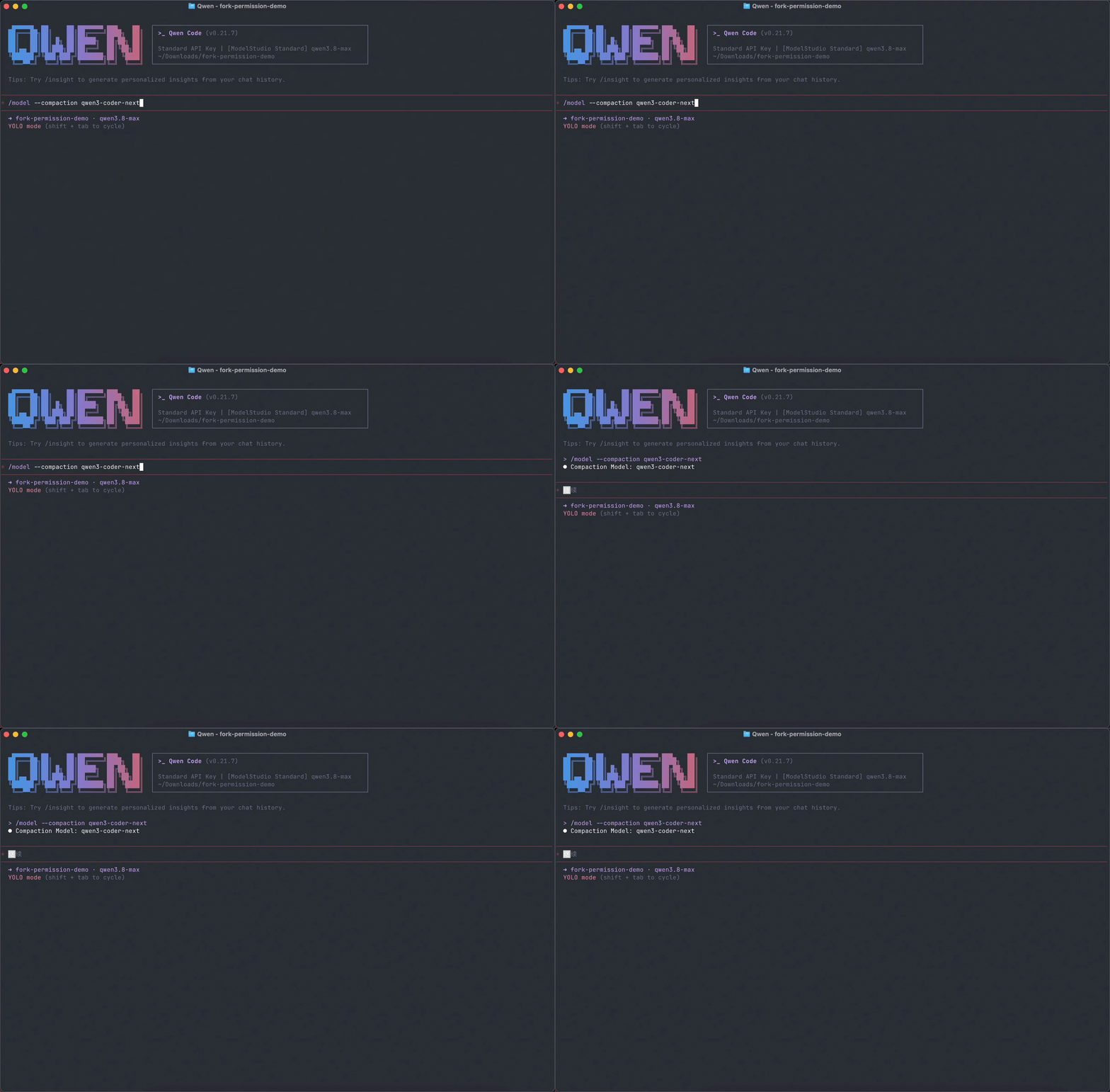
- Keys per job: when dispatching a clone, you can limit which tools it can use — one sentence is enough, e.g. “this job is read-only.” The restriction travels with the dispatch, and any attempt to change something gets rejected on the spot
- Permission templates: save frequently used permission sets as templates in the project’s
.qwen/fork-profiles/directory, and reuse them with a single parameter next time — no reconfiguring every run - Task instructions stay private: fixed a hole — previously when several clones worked in parallel, they could see each other’s task instructions. Now each sees only its own and focuses on its own work
What you can do with this:
- Read-only jobs get read-only permissions — no drive-by file edits
- Save common permission sets as templates and reuse them with one line
- Parallel clones each handle their own work without interfering with each other
Compaction Cost Control: Pick a Cheaper Model for Compaction
When a long session triggers automatic compaction, previously the only option was running the main model over the full context — expensive and slow.
Three improvements this week. First, /model --compaction can assign a dedicated model just for compaction: hand the “summarize this long conversation” step to a cheaper model while the main conversation keeps the good one — quality unaffected. Second, compaction with the main model now reuses previously cached content for faster responses; history with images is supported too. Third, on Claude-family models, you can set generationConfig.cacheRetention to "1h" — cache retention extends from the default 5 minutes to 1 hour, so sessions with long gaps no longer waste their cache every time.
What you can do with this:
- Hand compaction to a cheaper model — long sessions cost less
- Main-model compaction reuses the cache — faster responses
- Infrequent sessions no longer pay the expired-cache penalty every time
See PRs #7818 , #8339 , #8419 , #8048
Channel Ecosystem: GitLab Support, DingTalk Interactive Cards, Pairing Management
Last week the GitHub Channel went live. This week the Channel ecosystem keeps expanding.
GitLab is here. GitLab todos and comments @-mentioning the bot become inbound messages; which actions the AI handles is configurable, and anything already handled won’t be processed twice. See PR #7862
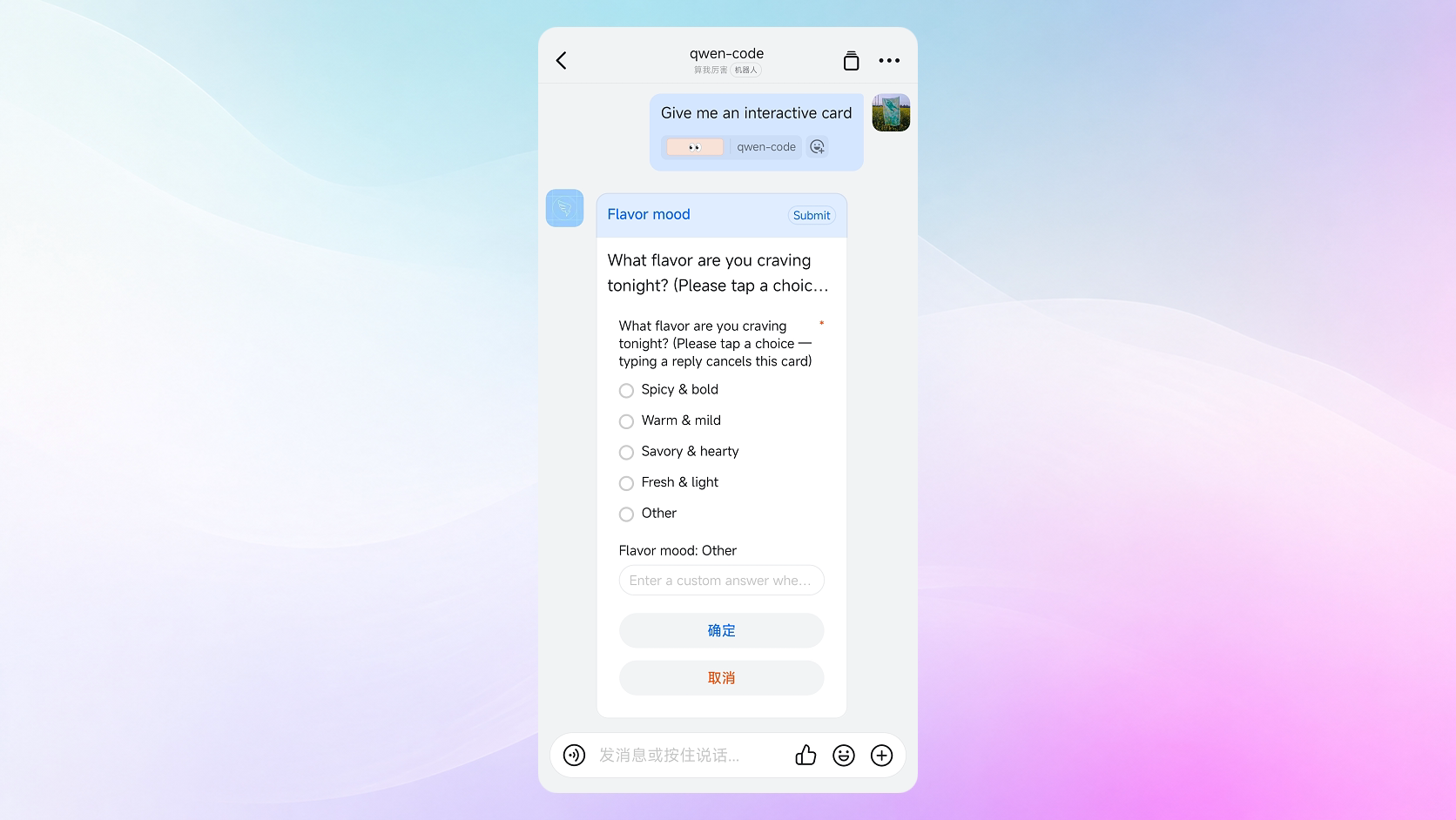
DingTalk got interactive cards. The DingTalk Channel supports interactive cards: the AI’s running status updates on the card in real time, and when it needs your input it pops up a structured question — no staring at a wall of text. Other platforms are unaffected. See PR #6930
The “who can command the AI” list is now viewable and revocable. When connecting a chat platform, you can enable pairing mode for security: a stranger’s first @ of the bot needs your approval before they can use it. But previously once approved, there was nowhere to see the list and no way to revoke — approve the wrong person, or someone leaves, and they still keep using your AI. Now the Channel editor shows who’s been approved and lets you revoke individuals, with each workspace keeping its own list. See PRs #8045 , #8081
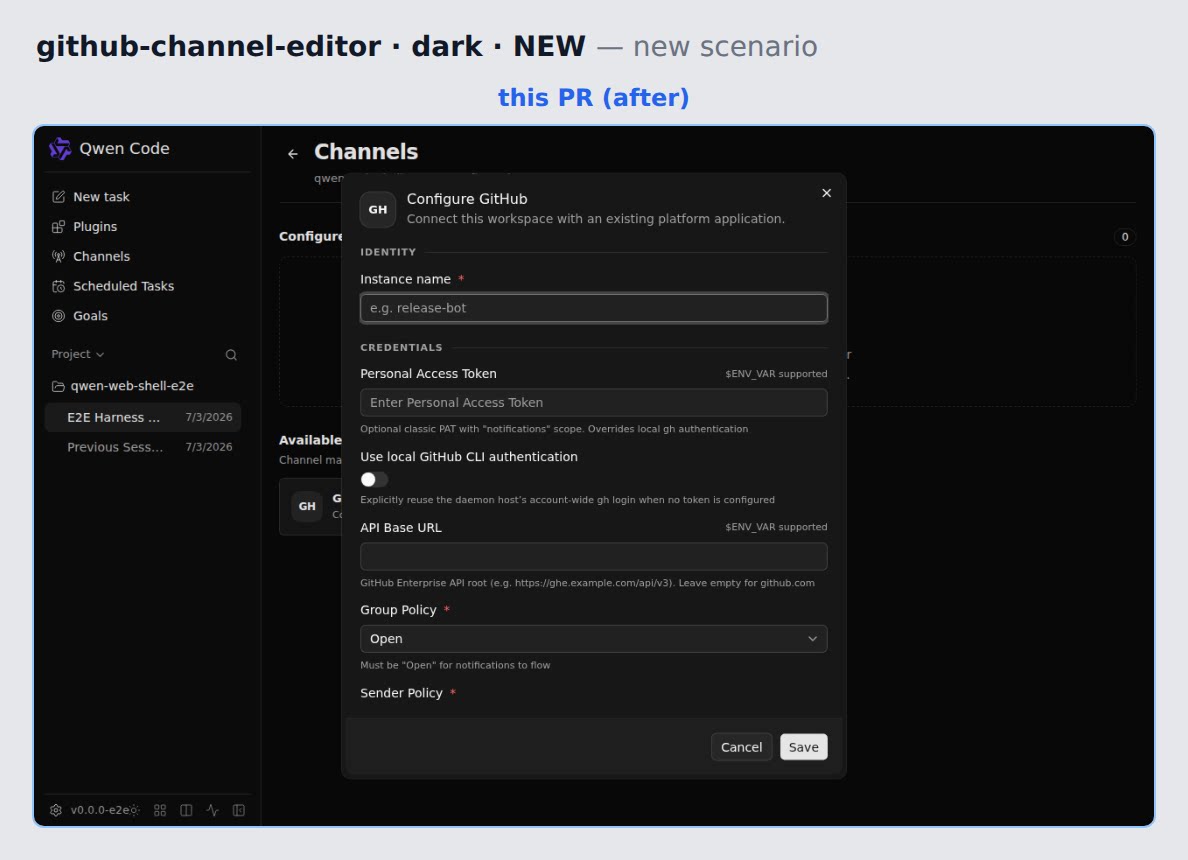
No more hand-editing config for GitHub/GitLab Channels. Previously, hooking the AI up to GitHub/GitLab meant opening the config file settings.json and writing by hand: credentials, which scopes to connect, who can use it — one wrong character and it wouldn’t take effect. Now the Web Shell has a dedicated management UI: fill in forms, pick options in the interface, save, and it takes effect — no touching config files. See PR #8310
GitHub Channel polish. If you’re already logged into gh locally, the GitHub Channel can reuse that login directly — no need to create a separate token. Reply behavior is also tightened: at most one final comment per event; while the AI is working, the triggering comment gets a temporary 👀 reaction, removed automatically when done. Interrupted tasks can resume after a restart. See PRs #8461 , #8033 , #8061 , #8306
📊 More New Features
Auto Recall: automatic context retrieval. Last week’s external corpus retrieval was “the AI checks on demand.” This week’s Auto Recall is “checks automatically on every question”: retrieval results are attached as references for the AI, and common sensitive information is filtered out automatically. Mutually exclusive with on-demand retrieval mode; admin-deployed. See PR #7877
Tool preload threshold. New tools.toolSearch.threshold setting: when you don’t have many tools, all of them are declared at session startup — no on-demand searching mid-conversation, faster responses. Set to 0 to restore the previous behavior. See PR #7922
/autofix supports local workspaces. Previously /autofix only ran in GitHub Actions. Now running it directly reviews and fixes your local changes: finds issues, applies minimal fixes, runs checks, re-reviews — until it’s clean or confirmed unfixable. Before running, it tells you checks happen inside a sandbox and asks you to confirm you trust the repo. See PR #8121
Structured review results view in Web Shell. After /review finishes, results get a dedicated view in the Web Shell: how many issues, where they are, how to fix them, and the evidence — all at a glance, with severity filtering and the full report one click away. See PR #8402
Qwen 3.8 reasoning effort actually works. On qwen3.8-max family models, the five levels of /effort now actually control how deep the model thinks — previously only one level worked. See PR #8472
Goal v3 lands in the CLI. The /goal command and interactive mode now run on the same runtime — state cards and lifecycle commands aligned on both sides, same experience. See PRs #8005 , #8324
Hide skills by tier. New skills.disabledLevels setting hides entire tiers of skills by source — useful when your skills get too numerous and messy. See PR #8057
Lifecycle management for auto-generated skills. Skills auto-generated by /learn and friends now track usage: unused for 30 days marks them expired, 90 days archives them automatically — they no longer pile up forever. See PR #7846
memory.agentMaxTurns. A unified cap on the memory Agent’s turns; 0 means unlimited. See PR #8171
/summary supports a custom path. /summary now takes a path argument and saves the project summary where you specify — parent directories created automatically. See PR #8116
Daemon capacity and status. The per-workspace session limit went from 20 to 32, so running many sessions in parallel is less likely to hit the ceiling. /daemon/status shows memory usage so you know how much headroom is left. The sub-session concurrency limit is also configurable. See PRs #8235 , #8245 , #8341
Chrome extension alpha. The Chrome extension alpha filled in the onboarding flow, runtime diagnostics, and automated acceptance checks in a real Chrome environment. See PR #6739
👏 Experience Improvements
Status checks work mid-stream. While the model is still outputting, read-only commands like /status, /settings, /help now run immediately — no waiting for the turn to end. In the Web Shell, /stats, /about, /context also run mid-turn; previously these were silently swallowed. See PRs #8130 , #8496
Long tool output no longer truncated. Command output and long thinking content previously hard-truncated past 500 characters. Now they collapse by default into an expandable full view, and exported sessions show the full text too. See PR #8251
Turns stay expanded while background Agents run. Previously the moment the main AI went idle, the Web Shell marked the turn complete and collapsed it — even if background sub-Agents were still running, with updates popping out moments later and the state bouncing back and forth. Now as long as any sub-Agent is active, the turn stays expanded. See PR #8413
Thinking blocks stop jittering; transcript goes inline. Streaming thinking blocks have stable heights now — no more jumping around. The full-screen transcript overlay was replaced with a Ctrl+O inline toggle. See PR #8077
New shortcuts. Pasting clipboard images on macOS gains Option+V; @ completion category switching gains Ctrl+Tab / Ctrl+Shift+Tab, dodging conflicts with the terminal’s own shortcuts. See PRs #8120 , #8074
Search: faster and steadier. File search is faster; failed searches now retry automatically instead of misreporting “not finished searching” as “no matches.” See PRs #8253 , #7888
Table and dialog details. Closing a cell dialog in Markdown enhanced tables no longer jitters the page; scroll events in the instant a dialog opens no longer scroll the background by accident. See PRs #8407 , #8089
Ctrl+Shift+C goes back to copy. Previously Ctrl+Shift+C triggered exit or screen-clear actions; now it’s back to its real job — terminal copy. See PR #8011
Session detail menu. The session detail menu no longer overflows in narrow layouts, and a keyboard-accessible “copy full session ID” action was added. See PR #8127
🔧 Important Fixes
| Fix | What it means for you | PR |
|---|---|---|
| DashScope Qwen 3.8 parameter conflict | qwen3.8-max no longer errors on parameter conflicts; the “no thinking” setting actually takes effect | #8488 , #8536 |
| Claude 4.6+/5.x request issues | Fixed request errors and missing thinking content on new Claude models | #8040 , #8164 , #8163 , #8165 , #8166 |
| Goal mode infinite retry | When Goal mode can’t find more evidence, it stops and waits for you instead of auto-continuing forever | #8430 |
| MCP disconnect replay safety | After an MCP connection drops, operations that shouldn’t repeat aren’t auto-replayed — no side effects | #8387 |
| Pasting sensitive config on Windows | Pasting sensitive config like API keys in Windows terminals is no longer ignored | #8342 |
| Line ending detection | Files with Windows line endings are no longer silently rewritten | #8383 |
| Long reply disconnect recovery | Long replies interrupted by network drops can now resume — no starting over | #7896 |
| CJK output limit overflow | Chinese, Japanese, and Korean output no longer unexpectedly exceeds the limit and triggers API errors | #7963 |
| Firefox text selection | Web Shell message content gets visible selection highlighting back in Firefox | #8417 |
| Links in conversations open the browser | Previously links in conversations did nothing on click; now one click opens the browser | #8198 |
| Crash errors are now visible | Previously some crashes produced no error information; now errors show up in the terminal, making it easier to report issues | #8088 |
| send_message Anthropic compatibility | The tool Agents use to message each other works again on Anthropic models | #7989 |
| Daemon lock file anomalies | The daemon no longer crashes outright on lock file anomalies | #8442 |
👥 Contributors
| Contributor | Contributions | PR Links |
|---|---|---|
| @wenshao | /review and /verify enhancements across the board, Web Shell review view, autofix round control, session limit bump, GitHub Channel login reuse, Qwen 3.8 parameter fix | #8215 , #8402 , #8461 , #8488 |
| @yiliang114 | Desktop packaging/release and legacy migration, Session Workflow view and toggle, /autofix local support, GitHub Channel reply consolidation, Chrome extension alpha | #8132 , #8392 , #7580 , #8121 , #8033 |
| @qqqys | Goal v3 full suite (including the infinite retry fix), Channel pairing approval management, subtask approval surfacing and background execution | #8005 , #8045 , #8240 , #8430 |
| @doudouOUC | Auto Recall automatic retrieval, paginated reads for large files, MCP disconnect replay safety, line ending detection fix, cache optimization | #7877 , #8002 , #8387 , #8464 |
| @ytahdn | Web Shell improvements across the board (task panel, theme visuals, table controls, history pagination, artifact downloads, mobile input) | #7929 , #8098 , #8234 , #8230 |
| @qwen-code-dev-bot | Link clicks and right-click menus restored, Option+V image paste, Ctrl+Tab completion switching, release script hardening | #8198 , #8120 , #8074 , #8037 |
| @DragonnZhang | display_image in-terminal image rendering, compaction cache reuse, read-only commands during streaming, Qwen 3.8 effort, tool preload threshold | #8217 , #8339 , #8130 , #8472 |
| @chiga0 | A batch of terminal experience fixes (cursor, shortcuts, window changes, thinking block height), crash error visibility | #8077 , #8088 , #8032 , #8125 |
| @chinesepowered | Directory listing display distinctions, Feishu code block sizing, memory unit display, and other details | #7868 , #7850 , #7871 , #7864 |
| @netbrah | Anthropic 1-hour cache retention, a batch of Claude request fixes, send_message compatibility | #8048 , #8040 , #8164 , #7989 |
| @destire-mio | Sub-Agent tool allowlist and permission templates, long output collapsed view | #8066 , #8148 , #7714 , #8251 |
| @OrbitZore | GitLab Channel adapter, GitHub/GitLab Channel UI-based management | #7862 , #8119 , #8310 |
| @LaZzyMan | macOS signing release pipeline fix | #8574 , #8564 |
| @xurik | hooks enhancements (private network toggle, session deletion event, session source field) | #7968 , #8059 , #8155 |
| @zhangxy-zju | Web Shell streaming charts, skill tier hiding | #7916 , #8057 |
| @water-in-stone | Search failure retry and result differentiation | #7888 , #8304 |
| @ZijianZhang989 | repo-hygiene skill and weekly check process, Agent View runtime foundation | #7908 , #7799 |
| @carffuca | Turns stay expanded while background Agents run, table dialog scroll fix | #8413 , #8407 |
| @Aleks-0 | /model —compaction dedicated compaction model | #7818 |
| @BenGuanRan | DingTalk interactive cards | #6930 |
| @harjothkhara | Sub-Agent instruction isolation fix | #8344 |
| @samuelhsin | Customizable action slots in split-view headers | #7808 |
| @dreamWB | Session detail menu overflow fix and copy session ID | #8127 |
| @dexhunter | File search speedup | #8253 |
| @kagura-agent | Dialog scroll wheel misfire fix | #8089 |
| @han-dreamer | Silenced transient errors in background task polling | #7923 |
| @ComplexSimply | Streaming retry during thinking-only phases | #7938 |
| @zjunothing | GitHub Channel allowlist config error guidance | #8055 |
| @zjgzx1988 | Hook context source marking | #7956 |
| @C0d3N1nja97342 | Firefox text selection highlighting | #8417 |
| @Eric-GoodBoy-Tech | QQ Bot group message sender display | #8233 |
| @DennisYu07 | SWE-bench standalone CI pipeline | #7656 |
| @PratikWayase | Session history pagination regression test | #7907 |
| 🆕 @tomatotomata | 🎉 First contribution: memory Agent turn limit setting | #8171 |
| 🆕 @LHMQ878 | 🎉 First contribution: long reply disconnect recovery | #7896 |
| 🆕 @xianjianlf2 | 🎉 First contribution: GitHub Channel notification filtering | #8031 |
| 🆕 @zambalee | 🎉 First contribution: CJK output limit overflow fix | #7963 |
| 🆕 @babyblueviper1 | 🎉 First contribution: PreToolUse hook external verdict service example | #8202 |
| 🆕 @Wchoi189 | 🎉 First contribution: startup fix for symlinked directories | #8309 |
Upgrade: Run npm i @qwen-code/qwen-code@latest -g to upgrade to the latest version.
If you have questions or feedback, feel free to open an issue on GitHub Issues !