Qwen Code Weekly: New Flagship Qwen4-Max Is Available, Parallel Sessions Work in Their Own Worktrees, Task Results Go Straight to Feishu/WeCom/DingTalk Groups
Qwen Code shipped three stable releases this week — v0.27.3 through v0.28.0.
New flagship Qwen4-Max is available. Qwen’s new flagship model, wired into the latest Qwen Code.
New sessions work in their own copy by default. Run several sessions on one project in parallel — each edits its own worktree, and the branch and files in your hands stay untouched.
Task results go straight to Feishu, WeCom, and DingTalk groups. Add a custom bot to the group, paste its webhook URL into Web Shell, and notifications and scheduled-task results land in the group.
✨ New Features
New Flagship Qwen4-Max Is Available
Qwen4-Max is Qwen’s new-generation flagship model. The official release went live on November 16; it handles text, images, and video, and targets complex reasoning, coding, and agent tasks.
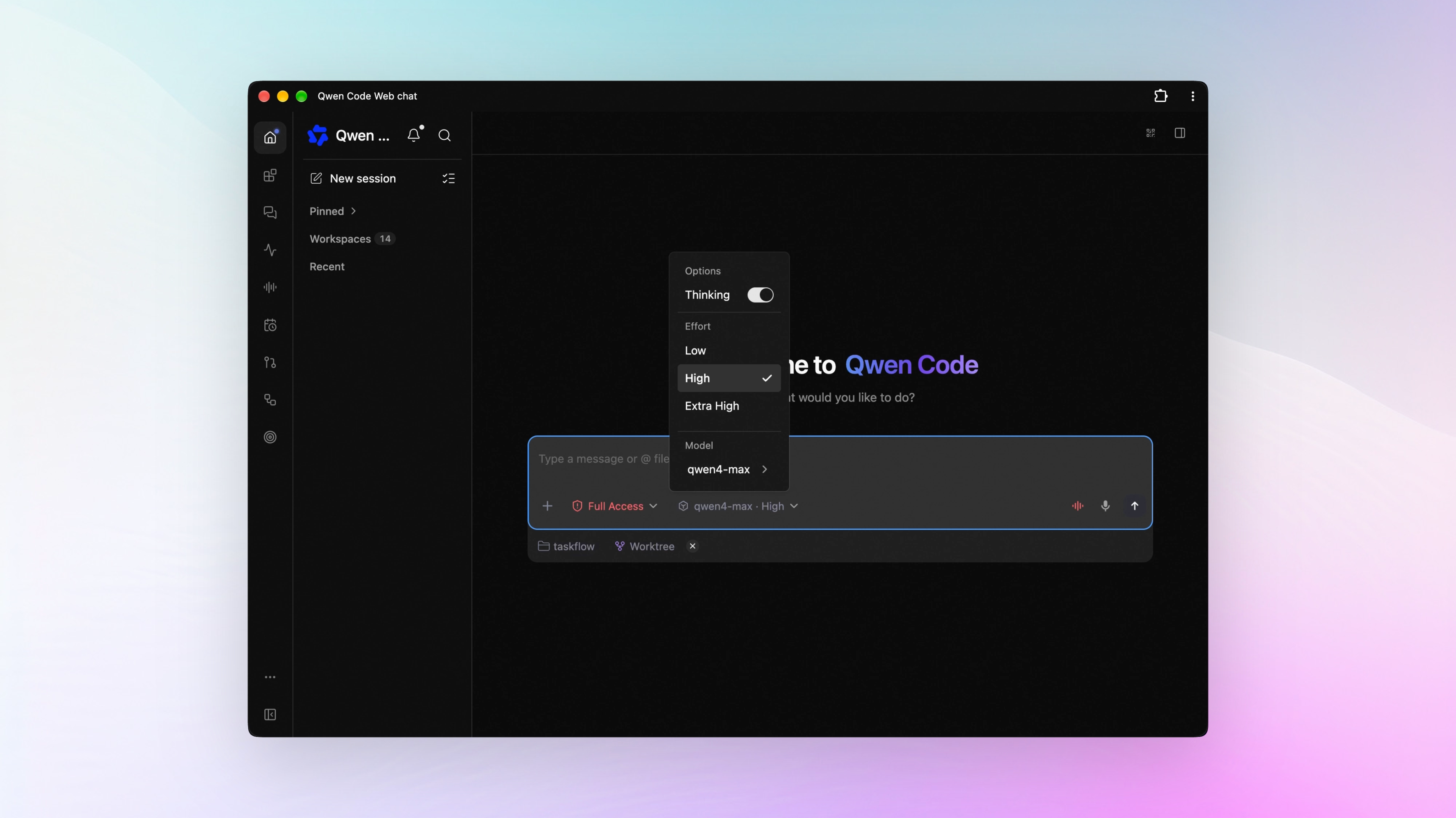
Qwen Code completed the integration this week. Qwen4-Max is available whether you connect through Model Studio (Bailian), QwenCloud, a Qwen subscription, or another channel. Thinking depth comes in three tiers — low, high, and xhigh — defaulting to high, and you can turn thinking off.
Send images and video straight into the conversation for it to understand. The Model Studio (Bailian) and QwenCloud channels add two token-saving settings: cache retention can extend from the default 5 minutes to 1 hour, and image detail can be turned down.
What you can do:
- Attach a design screenshot and have it build the page
- Send a screen recording and have it lay out the bug’s reproduction steps
- Raise the thinking effort when a test failure is hard to pin down
See PR #17513
New Sessions Run in Their Own Worktree by Default
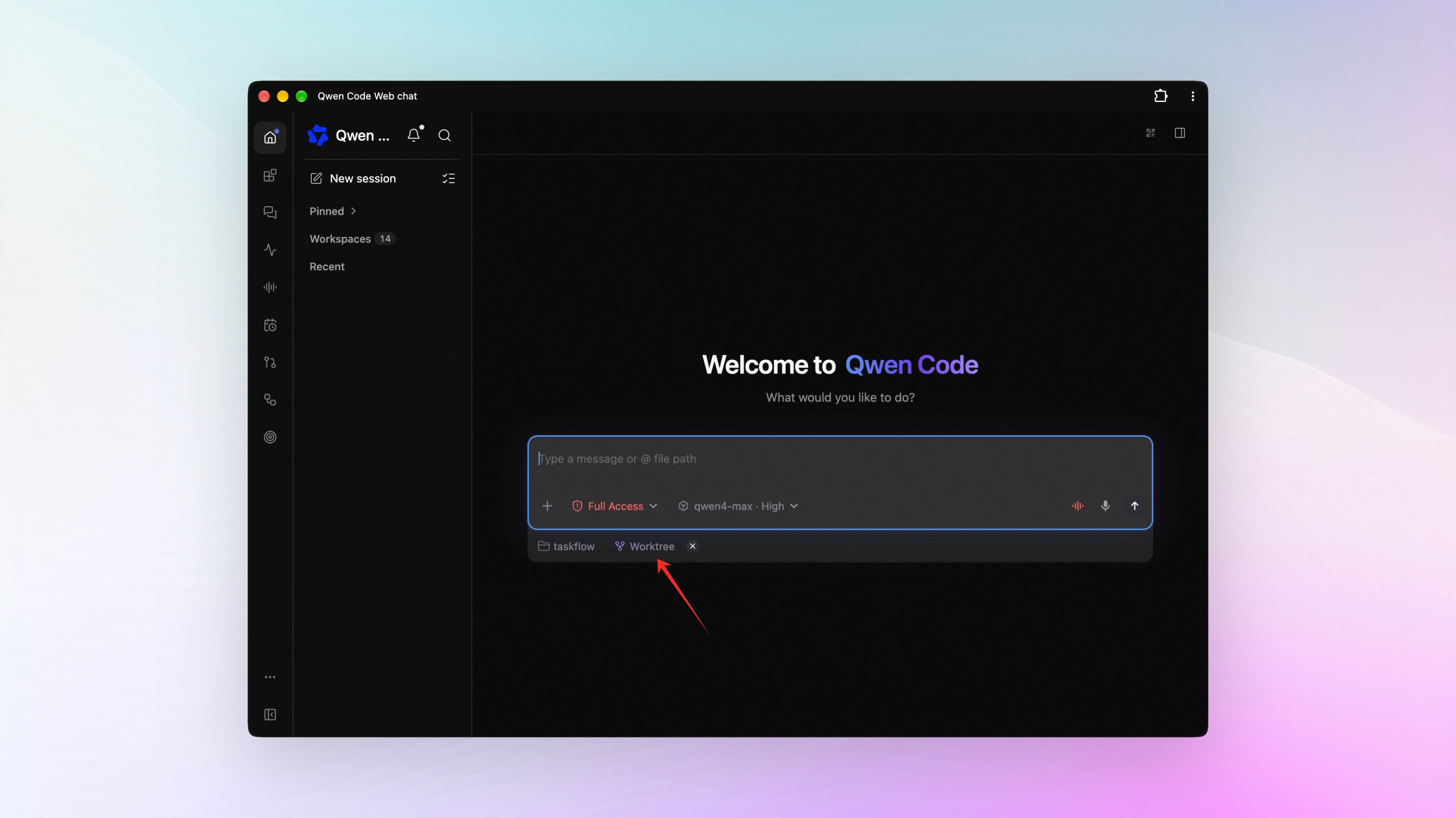
New Web Shell sessions in a trusted Git workspace work in their own worktree by default. A worktree is another working copy of the same repository: commit history is shared, files are separate. Run several sessions on one project in parallel — each edits its own copy, nothing overwrites anything else, and the files you’re editing stay untouched.
When the work is done, collect the results two ways: click “Create branch here” in the branch menu to turn it into a regular branch, or click “Hand off to local” to bring the changes back to your original directory.
Prefer the current branch? Set worktree.defaultForNewSessions to false and new sessions work there directly.
What you can do:
- Open a session per feature and work on several at once — no overwrites
- Keep coding locally while the AI edits its own copy — the two never collide
- Try two refactoring approaches in two sessions and compare them
See PR #17228
Send Task Results Straight to Feishu, WeCom, and DingTalk Groups
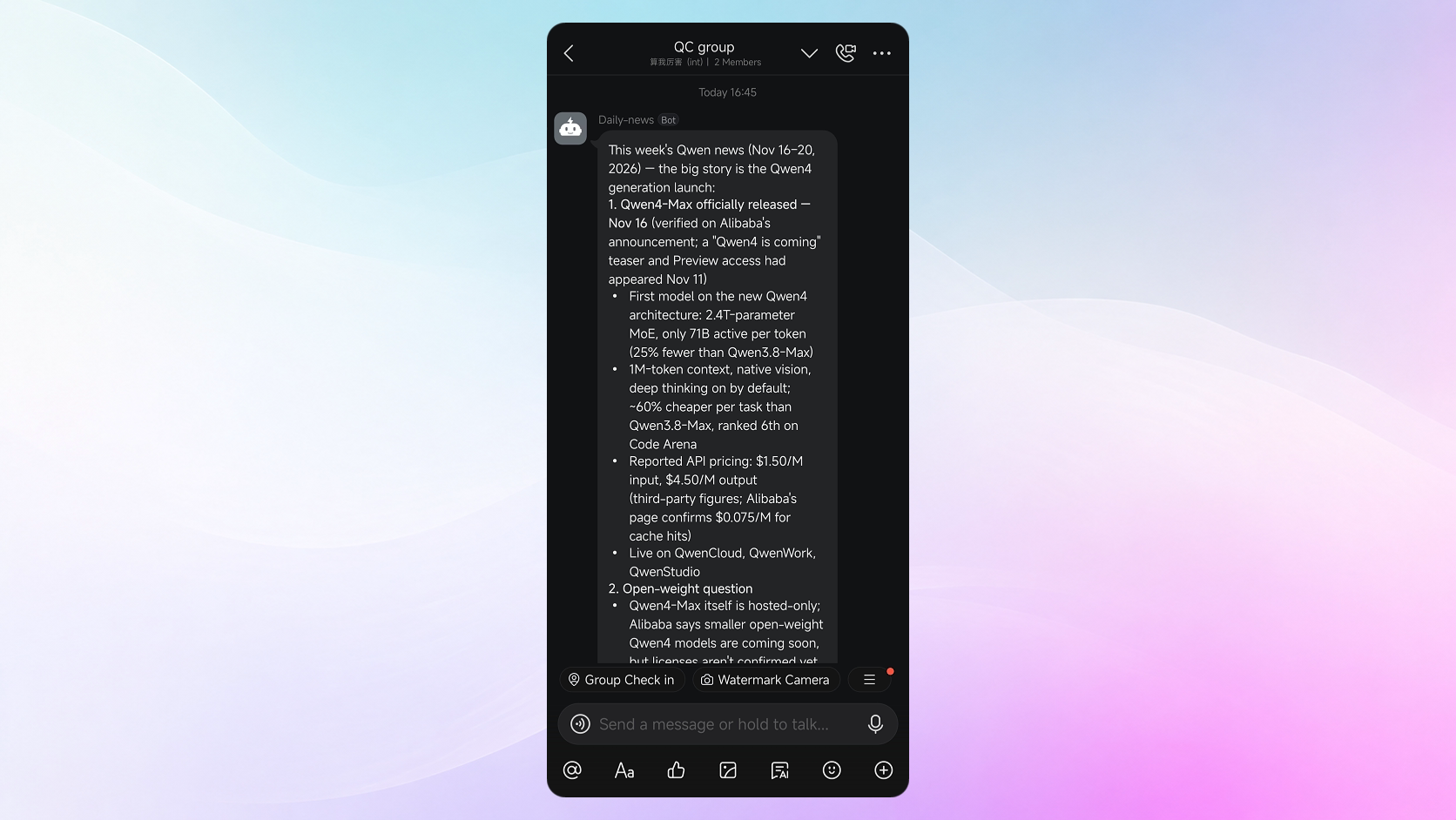
Feishu, WeCom, and DingTalk each gain a Webhook (send only) connection type. Add a custom bot to the group, paste its webhook URL into channel management in Web Shell, and notifications, task results, and scheduled-task results land in the group as Markdown messages.
This connection sends one way — it does not receive group messages. To chat with the AI in a group, use the platform’s existing bot connection type.
What you can do:
- Schedule a task to summarize yesterday’s merged PRs at 9 every morning — the result posts to your Feishu project group automatically
- Have the AI run regression tests every night and post the results to a WeCom group — read them as you start work
- Set a completion notification on a long task — it posts to the DingTalk group when done, so teammates see the progress too
See PR #16804 , #17013 , #17224
Web Shell: Review Changes Before Delivery, Watch Background Tasks Run
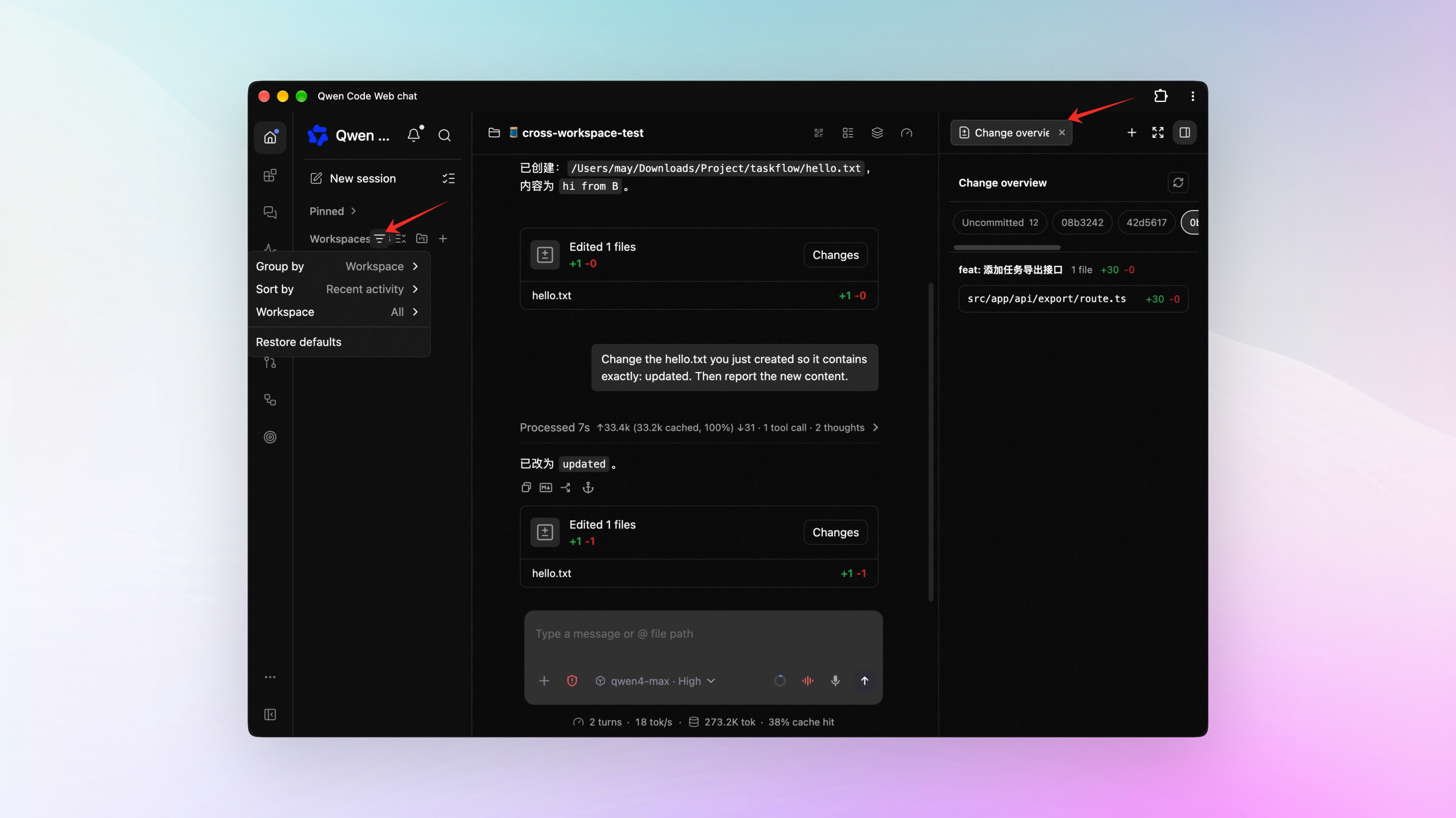
A Change Overview shows how much a session changed. When the work is done and you’re ready to deliver, the right-side panel’s new Change Overview lists files and added/deleted lines in three groups: uncommitted changes, each bound PR, and the remaining commits. See PR #17378
Click a badge to open a background task. Small badges sit above the input box — one each for running workflows, shells, monitors, and background agents. Click one to jump to its execution view. See PR #16813
Filter sidebar sessions by workspace and date. The sidebar filters by workspace, and sessions group by activity date — narrow the range first, then find the session. See PR #17244 , #17447
Other improvements. Each reply shows how many hooks fired, how many were blocked, and how long they took (#17015 , #17327 ); the Russian interface translation is complete (#17414 ); session search results are clearer, with up/down keyboard selection (#16779 ).
📊 More New Features
Sessions can hand work to another workspace. With Web Shell managing several workspaces, a session can delegate a task to another workspace, run it under that workspace’s instructions and settings, and bring the result back — you can keep asking follow-ups. The first delegation needs your confirmation. See PR #17454 , #17484
Bind a PR by hand, and offline comments merge into one summary. When auto-binding misses a PR, type /pr <number or link> to bind it — a Bind PR button also sits in the Web Shell session overview and the sidebar menu. If the service was down for a while, comments that piled up on bound PRs arrive as a single merged summary when it starts again. See PR #16877 , #17199
The /memory panel edits settings. In the terminal’s /memory panel, toggle auto-save and periodic cleanup directly, and open user-level and project-level memory files for editing. See PR #17213
The Goals page shows goals from every workspace. With several workspaces registered, goals from all trusted workspaces gather on one page, sorted by time, each card labeled with its workspace. When you create a goal, pick which workspace it goes into. See PR #17230
Mods plugins can rewrite thinking content. A plugin can rewrite expanded thinking blocks the same way it rewrites reply text in the terminal — say, translating the thinking into Chinese. Both terminal UIs support it. See PR #16873 , #17443
Web Shell works over plain HTTP. Open Web Shell from another computer at http://<computer-IP>:<port> and the terminal tab, web preview, and local commands all work. See PR #17196
GitLab channels can be set up in Web Shell. The repository whitelist supports multi-level project paths like group/subgroup/project. See PR #16845
👏 Experience Improvements
Compaction keeps the latest full operation intact. When a long conversation triggers compaction, the most recent operation and its result stay verbatim; only earlier history gets summarized. See PR #17141
Stash or discard uncommitted changes without leaving the page. When a branch switch hits uncommitted changes, choose to stash or discard them right there and continue. See PR #17364
Goal card states read at a glance. Running shows blue; waiting on you shows amber. Goals with limits get progress bars for turns, tokens, and time, and long goal text in a session collapses to one line. See PR #17349 , #17133
The usage dashboard opens faster. It lives on the Web Shell status page. See PR #17239
Selection popups highlight the current tier. The thinking-depth popup shows at a glance which tier is selected; the model list and the execution-mode picker do the same. See PR #16622
Session renames take effect immediately. Confirm, and the new title shows right away. See PR #17006
🔧 Important Fixes
| Fix | What it means for you | PR |
|---|---|---|
| Auto mode treated “looks related” as “you agreed” and auto-approved dangerous operations | Deleting results, discarding changes, and rewriting shared history now pass only on your explicit request; under auto-edit, permissions.ask rules apply to subagents too; git commit --amend opens a dialog for your approval; Full Access shows red both in the approval panel and after selection | #16858 , #16932 , #16075 , #16874 , #17100 |
| Edit’s recovery matching broke syntax on non-ASCII text and escapes | Recovery matching works and leaves escape sequences intact | #17096 , #17152 |
| An unconfirmed message from another session locked the input box | The input box stays editable, and that message can be retried or discarded | #17140 |
| Buffered output was lost when a command process ended | The output is kept | #17112 |
| The execution approval dialog showed commands incompletely | The full command is kept | #17361 |
| AUTO mode looked up links as local files | HTTP(S) links no longer trigger file lookups, and the network-lookup delay on Windows is gone | #17127 |
| WeChat QR sign-in aborted when QR generation was slow | Sign-in uses a longer timeout, so login completes even when the QR code takes 30 seconds to generate | #16838 |
| Grep didn’t recognize ripgrep regex syntax | Native ripgrep syntax works directly | #14315 |
| The CLI crashed on startup in Docker/Podman | The sandbox home directory is created automatically, so startup works even without $HOME | #16878 |
| The process lingered after /quit | The exit command completes cleanly | #17148 |
| Voice input sent before dictation finished | Dictation finishes first, then the message sends | #17331 |
| GitHub channel replies queued after rate limiting retried only at startup | Retries also run in the background while the channel is running | #16839 |
| Subagent context usage was measured against the main session’s window | It’s measured against the subagent’s own model window, so the percentage is accurate | #13614 |
| /effort listed tiers the current model doesn’t support | Only tiers the current model supports are shown | #17425 |
👥 Contributors
| Contributor | Contributions | PR Links |
|---|---|---|
| 🆕 @Afloat16 | 🎉 First contribution: Java SDK error correlation and transcription performance, SDK timeout and reconnect fixes, CLI task selection, todo snapshots, auth dialogs, shell output retention, and other hardening | #17103 , #17106 , #17107 , #17109 , #17110 , #17111 , #17112 , #17113 , #17115 , #17118 , #17121 , #17122 , #17124 , #17125 , #17126 |
| @2SinceJuly | Agent loop switch supports force-off, lazy-fetch tests for the managed runtime | #17048 , #16492 |
| @521Peter | Docs for the Skill endpoint that updates workspace settings by name | #16833 |
| @dakjdakd | Grep supports native ripgrep regex syntax | #14315 |
| @MohammedAlkindi | Acceptance tests for managed hook descriptions and status messages | #17393 |
| @now-ing | Cleanup of remaining CVE audit issues in dependencies | #10985 |
| @Shizoqua | Subagent context usage measured against its own model window | #13614 |
| @tonydzi | Leader delivery and final-state characterization tests | #14855 |
| @yanyukang2003-ux | AUTO mode judges by explicit user authorization | #16858 |
| 🆕 @0xvincent | 🎉 First contribution: Qwen Code 1.0 Preview entry added to the README | #16872 |
| 🆕 @EminBudak | 🎉 First contribution: Wiro AI integration docs | #16850 |
| 🆕 @LubabaKhalid | 🎉 First contribution: vulnerable dependencies updated | #13169 |
| 🆕 @pranavshankar1221 | 🎉 First contribution: current tier highlighted in selection popups | #16622 |
Upgrade: Run npm i @qwen-code/qwen-code@latest -g to upgrade to the latest version.
If you have questions or feedback, feel free to open an issue on GitHub Issues !