Qwen Code Weekly: /advisor Gives an Independent Second Opinion, One Command Shows Every Session Running on Your Machine, Interrupted Reviews Resume Where They Left Off
Qwen Code shipped three stable releases this week — v0.21.12 through v0.21.14 — with 140+ PRs merged.
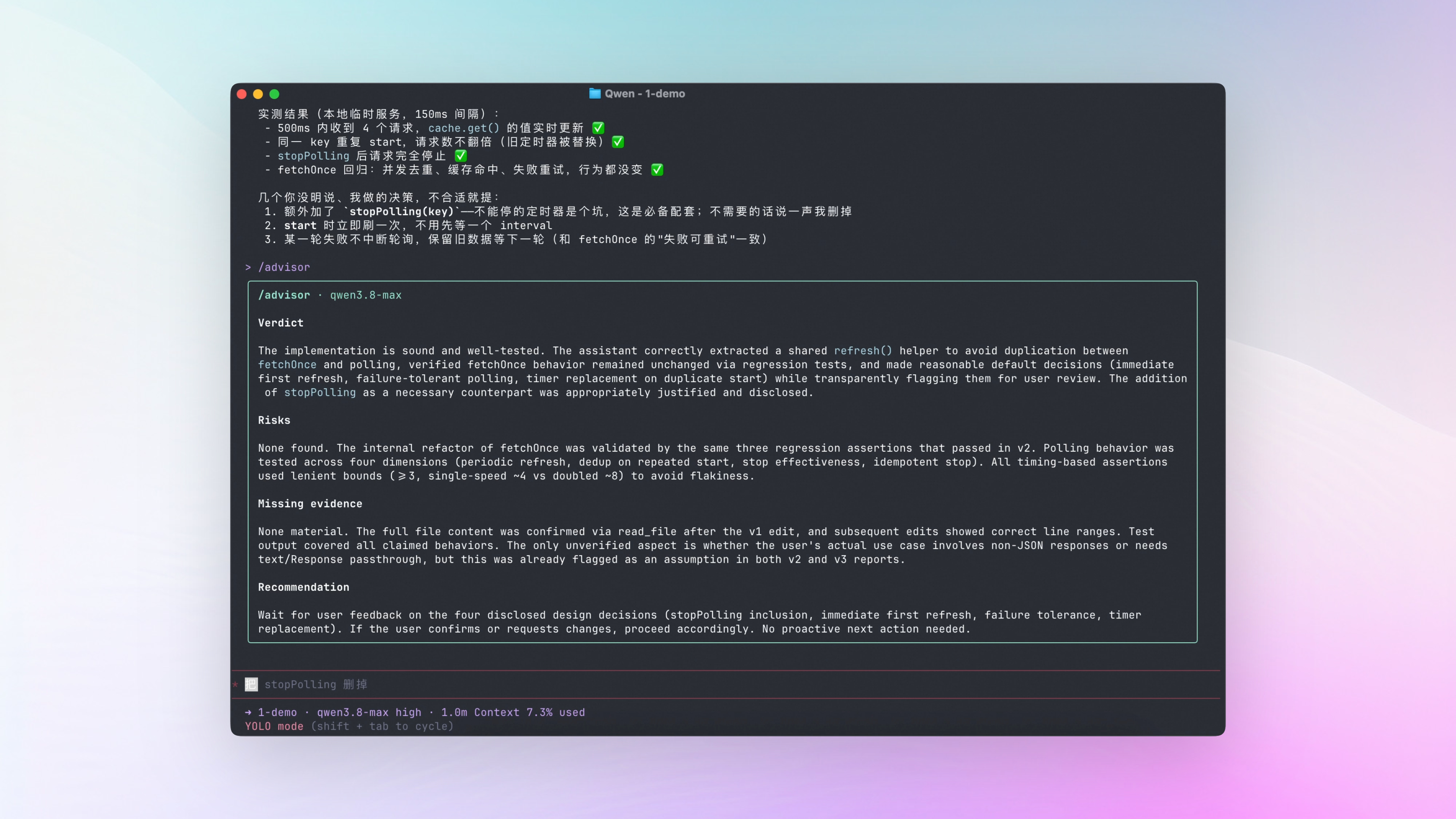
An independent second opinion. /advisor runs an independent review of your current conversation and returns four things: conclusions, risks, missing evidence, and recommendations. Read-only throughout — your main conversation stays untouched.
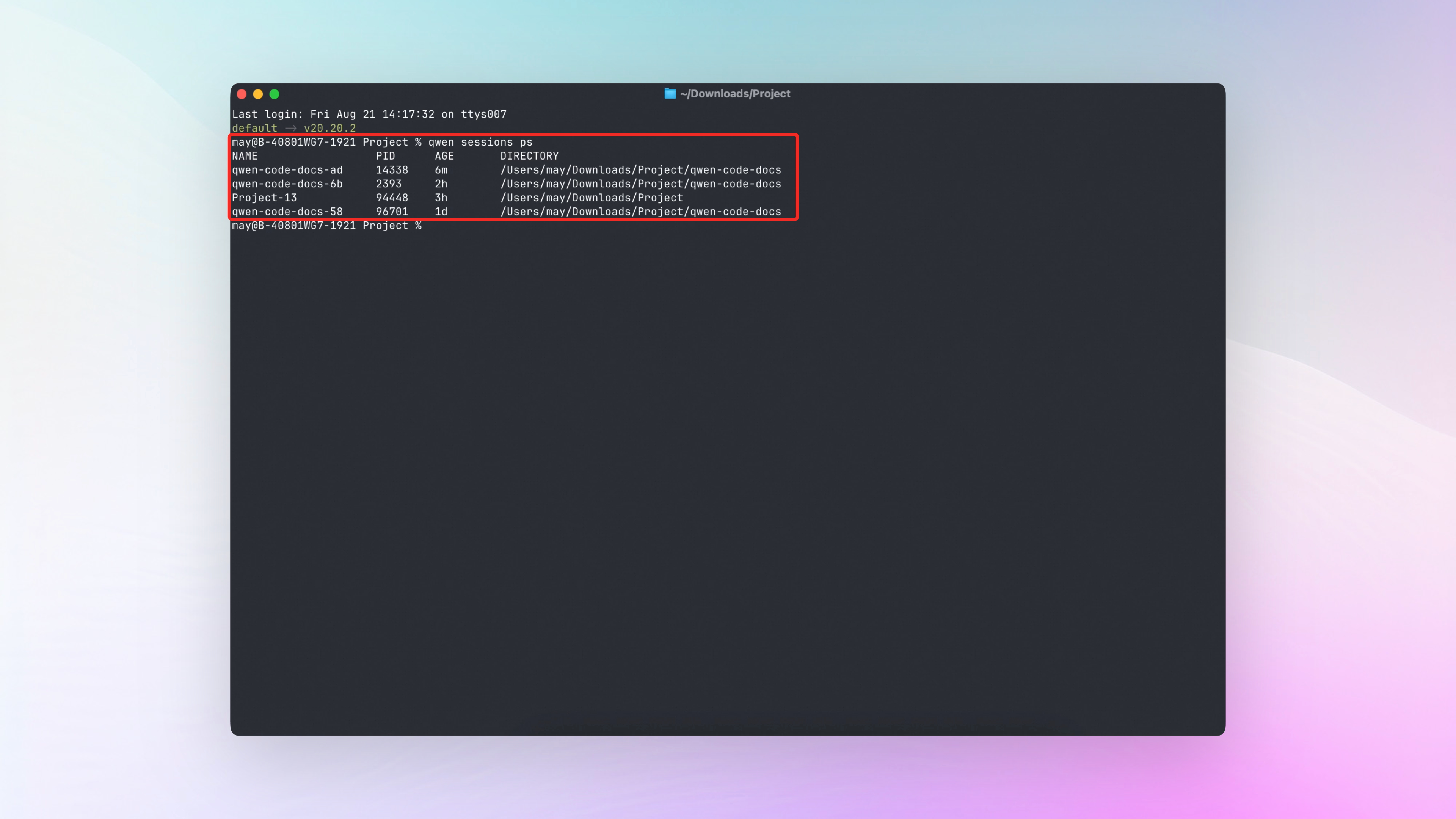
One command shows what’s running. The new qwen sessions ps command lists every session running on your machine: which directory it’s in, how long it’s been running, and its process ID.
Interrupted reviews don’t start over. Resume an interrupted PR review with --resume — if the state checks out, it picks up where it left off.
✨ New Features
/advisor: An Independent Model Reviews Your Current Conversation
Long conversations tend to get stuck in one line of thinking, and the blind spots hiding in your own context are hard to spot. /advisor brings in an independent second opinion: a read-only side session reads through the entire context and returns four things — conclusions, risks, missing evidence, and recommendations. The second opinion is strictly read-only: it doesn’t touch the main conversation or execute anything, and the conversation continues unaffected once the review is done.
You can ask with a specific concern in mind — /advisor is this approach secure, for example. The advisorModel setting points it at a dedicated review model; leave it unset and it uses the current model.
See PR #7567
qwen sessions ps: One Command Shows Every Session Running on Your Machine
With several Qwen Code sessions open at once, it’s easy to lose track of which is which. The new qwen sessions ps command lists every interactive session currently running on your machine, one per line: session name, process ID, uptime, and working directory. Add --json to get JSON output for scripting.
Everything on the list is genuinely running: close a session and it disappears from the list immediately.
See PR #8969
Review: Interrupted PR Reviews Resume, Comments Rewritten in Plain Language
/review picked up several practical improvements this week.
Interrupted reviews resume from where they stopped. Reviewing a big PR used to mean starting over if it got interrupted halfway. Now qwen review fetch-pr takes --resume: it checks the state on disk first — the previous review report, the worktree, and the diff all unchanged, and the PR not updated — and if everything checks out, it picks up where it left off. If anything doesn’t match, it starts over automatically.
Review comments read like a person wrote them. When /review reviews a PR and posts comments, they used to sound heavily templated. Now they’re rewritten in natural review language: what the problem is, when it will bite, and how to fix it. For comments posted to the PR — whether to include severity markers and signatures, how deep to check, and whether to post at all — all configurable in settings.
Script reviews consider where they run. For shell scripts and CI configs, the “works on this machine, breaks anywhere else” class of bugs is hard to catch. The review now figures out which environments these files actually run in and checks against those environments’ specifics.
See PRs #9092 , #9027 , #8994 , #9263
Web Shell File Transfer: Drag Local Files Straight into the Conversation
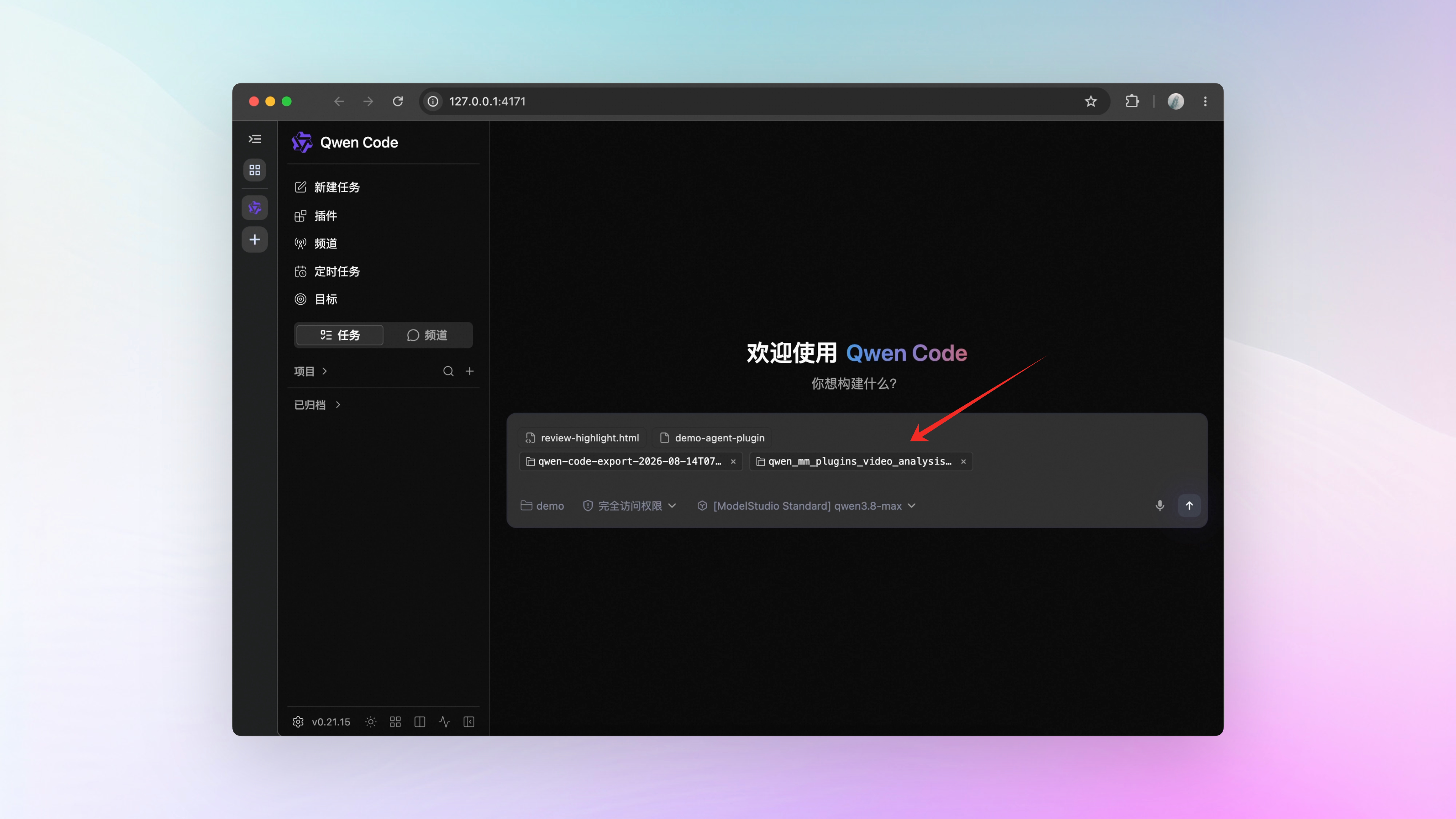
Once a remote connection token is configured (QWEN_SERVER_TOKEN or --token), drag a file into the Web Shell input box or paste it in, and it goes straight to Qwen Code: any file lands in its workspace and the conversation picks up a reference to it automatically, ready for the AI to use. Text files can even have their content attached directly to the conversation, so the AI can read them on the spot without opening the file.
You can also specify which folder uploads land in — the folder is created automatically if it doesn’t exist. Without a token configured, dragging or pasting files into the conversation isn’t supported yet.
📊 More New Features
Workflow agents pin to a directory. Inside a workflow, agent({workingDir}) pins an agent to a specific directory, free from the default directory scope. See PR #8972
Release notes get bilingual summaries. Release notes are no longer a raw dump of the PR list: they’re grouped by feature theme, each group gets a plain-language summary, a Chinese version is included, and before/after screenshots attached to PRs come along too. See PR #9216
External knowledge bases get a unified spec. Vendors running retrieval services can build Qwen Code plugins to the spec, and once plugged in, the AI can search their corpora. What’s searchable is determined by the plugins you install — the AI only searches within that scope. See PR #9068
👏 Experience Improvements
Channel management gets a full management page. Channel management in the Web Shell now uses the same full-page layout as scheduled tasks: who can use each channel, approval or allowlist, how sessions are split, and which workspace it binds to — all configured on one page. See PR #8848
WeChat’s ‘typing’ indicator stays alive through long tasks. WeChat’s typing status expires on its own, so during long tasks the indicator used to disappear mid-run — like the connection dropped. Now it refreshes every 4 seconds while the task runs and only goes away when the task finishes. See PR #9358
Compact mode shows AI thinking. Compact mode in the Web Shell (Ctrl+O) used to hide thinking content entirely. Now, while the model thinks, the summary shows “thinking”; once thinking finishes, it collapses into the tool summary — click to expand and read it. See PR #9148
Switch sessions with the sidebar collapsed. With the Web Shell sidebar collapsed, hovering the project icon opens the full session browser. States waiting on you — pending approvals, questions, finished items waiting to be handled — are color-coded on the icon. See PR #9311
Image previews survive a refresh. Images sent in the Web Shell — whether still queued or already injected mid-task — keep their previews after a page refresh; multiple images don’t get merged or lost. See PR #9310
Submit questions even when disconnected. The Web Shell input box is now decoupled from connection state: when the stream drops, you can still submit questions — the input box no longer locks up. See PR #9323
Expand/collapse all in exported HTML. The conversation HTML exported by /export now has Expand all / Collapse all buttons at the top — toggle every thinking block and tool output in one click. See PR #9367
Large sessions resume faster. The daemon now resumes sessions lazily — it only reads the records needed to rebuild state, with a noticeable speedup for large sessions. See PR #9055
Background shells no longer cleaned up by mistake. Background shells now count as active tasks, so shells aren’t auto-cleaned while their task is active. See PR #9042
🔧 Important Fixes
| Fix | What it means for you | PR |
|---|---|---|
| Model git commands can’t touch other worktrees | Git commands issued by the model are blocked when they try to modify repos outside the current session’s directory | #8687 |
| Shell line-continuation tricks no longer bypass detection | Commands split across lines with continuation characters or written with substitution syntax are still recognized by command detection | #8590 |
| Inline references can’t bypass approval | Inline references to files can no longer bypass the approval-tier check | #9020 |
| Desktop sidebar jitter fixed | The project list in the desktop sidebar no longer jitters when a scrollbar appears | #9073 |
| External links open on desktop | External links in Markdown and artifacts — including OAuth links — now open in the system browser instead of being silently swallowed | #9069 , #9111 |
| No more terminal window on Windows startup | The runtime terminal window that flashed on Windows startup is now hidden | #9064 |
| Desktop upgrade migration covers Windows/Linux | The one-time migration from the old Electron desktop app to the new version now extends to Windows and Linux, with user data preserved | #9079 |
| Unsupported images no longer crash sessions | Unsupported image formats like HEIC and TIFF are skipped with a text notice instead of crashing the session | #9295 |
| Sub-Agent panel errors stay contained | Render errors in a single agent tab are now caught instead of taking down the whole session | #9292 |
| Memory growth capped in long sessions | Caches like string-width now have a size cap and evict old entries when full — memory no longer grows without bound in long sessions | #9185 |
| Compaction output sized to remaining context | The cap on compaction output is now computed from the remaining context window instead of a fixed value | #9109 |
| Sessions survive a blocked close | When closing a session is held up by active work, queued tasks get 8 seconds to wind down instead of being cut off outright | #9134 |
| Memory recall steadier | When memory recall times out, deterministic candidates fill in as a fallback so recall never comes back empty | #8716 |
| Team tasks dispatched to the right owner | Manually assigned Agent Team tasks now route correctly to their assignee | #9289 |
| Cache sharing default corrected | enableCacheSharing was wrongly off by default; it’s now correctly on by default | #9233 |
| Shell output truncation threshold honored | tools.truncateToolOutputThreshold is no longer ignored in favor of a fixed character count | #9014 |
👥 Contributors
| Contributor | Contributions | PR Links |
|---|---|---|
| @wenshao | Review and autofix hardening across the board: interrupted review resume, plain-language comments, script execution-environment review, bilingual release notes | #9092 , #9027 , #9263 , #9216 |
| @yiliang114 | /advisor second opinion, spam-comment cleanup, a batch of desktop and session stability fixes | #7567 , #9266 , #9295 , #9185 , #9289 |
| @doudouOUC | Web Shell text attachments, external corpus integration spec, session runtime boundaries, daemon resource caps and selective resume | #9180 , #9068 , #9181 , #9055 |
| @ytahdn | Web Shell direct workspace file upload, sidebar session management, durable image references in sessions, input and queue stability | #8874 , #9311 , #9310 , #9407 |
| @qqqys | qwen sessions ps, workflow agent directory pinning, Channel management page rework, review thread pagination fix | #8969 , #8972 , #8848 , #9390 |
| @qwen-code-dev-bot | Release pipeline retries, integration test fixture fixes | #9082 , #9161 , #9162 |
| @callmeYe | Batch skill enable/disable per workspace, disabled skills excluded from context usage | #9139 , #9346 |
| @samuelhsin | Split-screen @-mention config sync, skill toggle event metadata | #9052 , #9051 |
| @BenGuanRan | Daemon turn-status polling endpoint | #9080 |
| @carffuca | Web Shell footer action timing | #8787 |
| @cxruan | Shell output truncation threshold setting honored | #9014 |
| @DennisYu07 | Release evaluation task orchestration | #9120 |
| @ZijianZhang989 | Compaction output capped by remaining context | #9109 |
| @zjgzx1988 | Artifact path validation and normalization | #9142 |
| 🆕 @MichaelYochpaz | 🎉 First contribution: Windows installer checksum verification fix | #9112 |
Upgrade: Run npm i @qwen-code/qwen-code@latest -g to upgrade to the latest version.
If you have questions or feedback, feel free to open an issue on GitHub Issues !