Qwen Code Weekly: Look Back on Workflow Runs, Pair Plan With YOLO, Multitask in Group Chat
Qwen Code shipped two stable releases this week — v0.23.1 and v0.23.2 — with 300+ PRs merged.
Workflows have a page of their own. In the Web Shell you can see how far each run got, how many agents it spawned, and how many tokens it spent.
Three things make the Web Shell easier to live in. One click shows what fills your context, history gets a navigation bar, and Plan and YOLO can be on at the same time.
Channel tasks can have names. Push several things forward at once in DingTalk, give each one a name, switch whenever you like, and let each edit files in its own workspace.
✨ New Features
Workflows Get Their Own Page
Last week workflows learned pause, resume, and cancel — through terminal commands. This week the Web Shell gets a built page for them.
Open Workflows in the sidebar, or type /workflows in the conversation. The page has three tabs: Saved, Running, and History. Every run shows its stage progress, the agents it spawned, the approvals it’s waiting on, and the tokens it spent. Click into a saved workflow to read its description, when to use it, the script path, and the source.
What you can do:
- See how far a workflow got and how many agents it spawned, right on the page
- Stop it halfway, or re-run it from the start
- Open a saved workflow and read its script and description
See PR #10594

Web Shell: See What Fills Your Context, and Run Plan Together With YOLO
One click shows what fills your context. A new icon in the conversation header opens a Context Usage tab: how much of the window is used, how much is left, and how much the system prompt, built-in tools, MCP tools, memory files, skills, and messages each take. Every item expands to show its content.
History gets a navigation bar. The left edge of the conversation now carries a tick-mark scrub bar. Hover a tick to see that turn’s prompt, click to jump there.
Plan is no longer a permission mode. It moved out of the permission menu into its own switch, so it combines with Default, Auto Edit, Auto, or YOLO — previously choosing Plan ruled YOLO out. It turns itself off once you approve the plan. All /plan commands work.
A browser notification when a task finishes. Under UI in settings there’s a new “Browser Task Notifications” switch. Turn it on and grant permission, and when the page sits in the background or loses focus you’ll get a browser notification once the conversation you’re watching finishes or fails. Off by default, and notifications carry no chat content or directory paths.
Background agents show they’re still working. A background agent’s card icon carries a subtle pulsing mark, and a foreground agent’s collapsed row shows how long it’s been running and which sub-tool it’s on.
What you can do:
- Click the icon in the conversation header to see what fills your context
- Click a tick on the left bar to jump to any earlier turn
- Turn on Plan and YOLO at the same time
See PRs #11177 , #11208 , #11054 , #11423 , #11398 , #10939

Channel: Several Tasks at Once in One Group, Each in Its Own Workspace
The Channel bot is the Qwen Code bot you pair by QR code into DingTalk, Feishu, and other chat tools. Until now the bot in a group did one thing at a time: you wanted it watching a PR and building a feature on the side, but both had to squeeze into one conversation and kept interrupting each other. Channel now has named tasks, so several things run at once.
Open several tasks in one group chat. /session new <name> creates a task — up to 8 per person per group, each with its own session and history. /session use <name> switches anytime, and you can create or switch to others while a task runs. /session cancel <name> stops the one you name. Every reply carries a source tag: the task name in direct messages, “who · which task” in groups. Want to ask something unrelated halfway through? Send /btw <question> and the main task keeps running.
Each task works in its own plot. Add --worktree when you create a task and it works in its own directory and branch, so several tasks edit files without colliding. /clear, /new, and /reset only start a new conversation — the files and branches stay, and tasks survive a bot restart. Delete the whole session and the workspace and branch it created go with it; if uncommitted changes are still inside, everything stays as it is.
Before you start, turn on sessionScope: "user" and multiSession: true for that Channel in settings.
What you can do:
- Review a PR and write a new feature at the same time, each with its own history
- Add
--worktreeso file edits never collide - Interject with another question while a task runs — the main task keeps going
See PRs #10198 , #10420 , #10574 , #10712 , #10713 , #10643 , #11015 , #11308 , #11309

DingTalk: Approve Permissions on a Card, Watch Progress Through Status Emojis
Permission prompts are interactive cards now. When the AI needs approval for an operation, DingTalk delivers a native interactive card — tap a button: allow once, deny, or allow permanently.
Status emojis follow the work. While the AI is busy, your message keeps the 👀 and adds a status tag for the current step: 🤔 thinking, 📖 reading, 🔎 searching, 🖥️ executing, 🛠️ editing, 🗑️ deleting, 🌐 fetching, and more. When it finishes, only the final emoji stays.
Background agent replies are signed. When several background agents run in parallel, every reply starts with Agent · name, so you can tell who’s talking. Too many messages? Turn on aggregateBackgroundAgentResponses to collapse them into one summary per turn.
What you can do:
- Tap a card when the AI asks for permission
- Glance at the emoji to know which step the AI is on
- Tell agents apart when several speak at once
See PRs #10457 , #10504 , #10899

Qwen Code on a Server Can Now Edit the Project on Your Computer
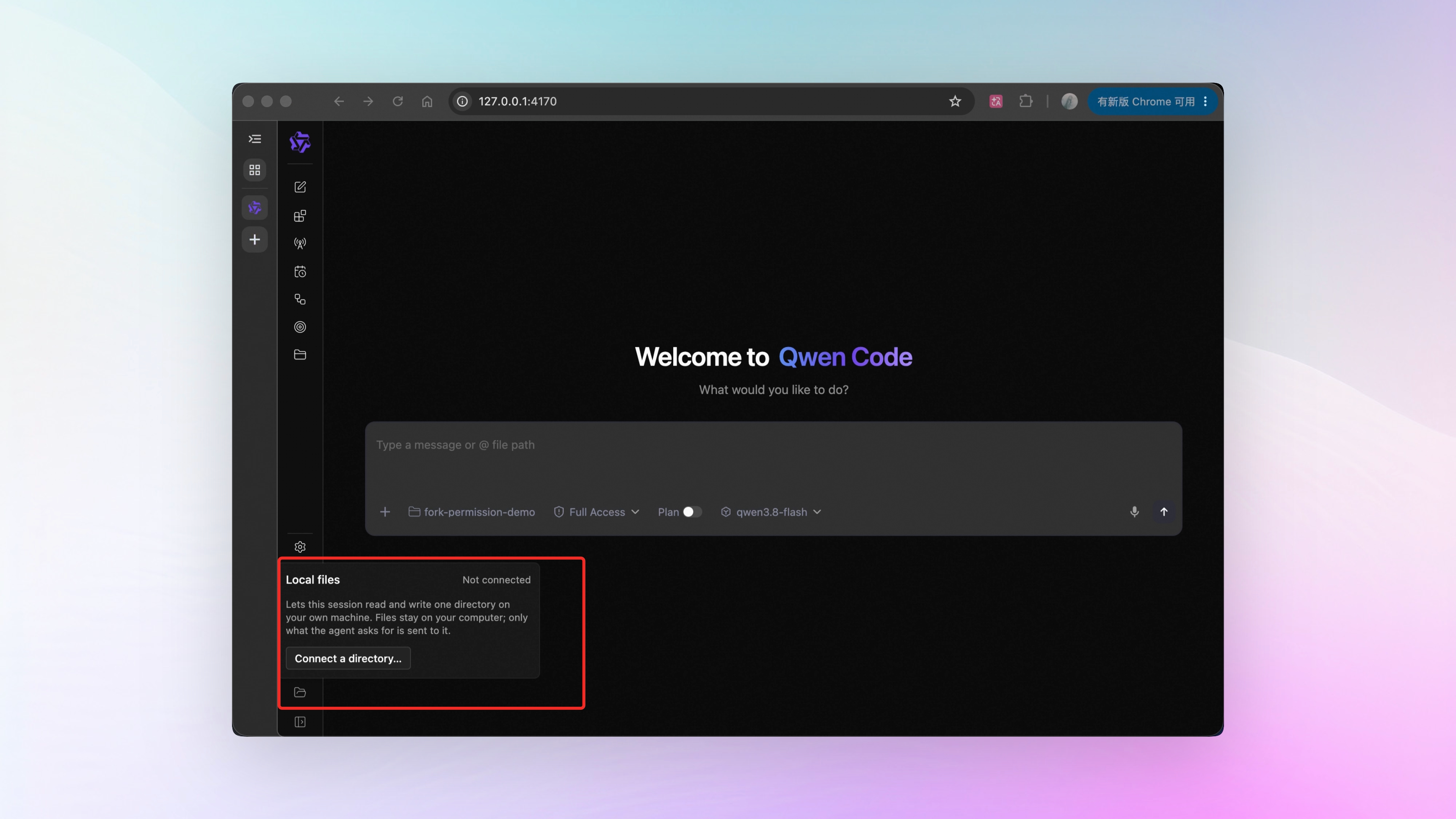
Plenty of people run Qwen Code on a cloud server and drive it from the browser on their own laptop. The catch: the AI only sees files on that server. Your laptop project is out of reach, so the routine was upload the files, let it edit, download them back.
Now you pick a folder on your own computer in the browser and hand it to the current session. That session can then list, read, search, and write files inside it, with every path resolved against the folder you chose. The bottom of the sidebar shows which folder is connected and how many tools it provides.
The folder is exposed to that one session only. Close the tab, drop the connection, or end the session and access is withdrawn.
What you can do:
- Run the server in the cloud and let it edit the project on your computer
- Hand over a folder instead of uploading files and downloading results
- Give it project A today and project B tomorrow — it only sees what you handed over now
See PR #10962
📊 More New Features
Write your own output styles. Last week the four built-in output styles became pickable. This week you can define your own: drop a Markdown file in ~/.qwen/output-styles/ for a global style, or in the project’s .qwen/output-styles/ for a project style. The body of the file is that style’s prompt. See PR #10761
Built-in web search turns itself on. With a Bailian Standard API Key or Token Plan, web_search is available automatically now, and the cost lands on the account you’re using. Coding Plan still needs you to name a Bailian provider config by hand. See PRs #11348 , #11450
Conversations export to HTML. /export html in CLI, Web, and VS Code runs through one pipeline now. The exported file supports full-text search, selection, copy, and print. Opening it needs a network connection. See PR #10076
See what a Goal has spent. Goals carry a token budget that stops and hands control back when it runs out — but the spend was invisible. The terminal footer, the status card, and the Web Shell all show used vs. limit now, and the numbers stay after the Goal stops. A Goal that produces nothing judgeable for three turns in a row pauses itself; your messages interrupting it don’t count as idle turns. See PRs #11248 , #11254 , #11239 , #11257
Two more Channel config options. Groups get noisy, so a Channel can set messagePrefix: only messages starting with that prefix wake the bot. instructions pins a standing requirement to one Channel — reply tone, which kinds of questions to route to whom. Every Channel type supports both. See PRs #10817 , #11082
More models take thinking-effort settings. GPT-6 Astra supports five levels from low to max, defaulting to medium; GPT-5 models use the levels each of them supports. deepseek-v4-pro is in too, with high and max. See PRs #11295 , #10999
Two more review perspectives. When a change touches instruction files such as SKILL.md or QWEN.md, one agent actually runs the revised instructions and looks for gaps between what the text promises and what happens. The other deliberately avoids the topics the PR description calls out and reads the whole change on its own. See PR #10221
One-command install for the local code search tool. Say “install zvec-grep for me” or run /zvec-grep-install, and it installs zvec-grep and wires it into Qwen Code. It’s a local code search tool that puts keyword and semantic search together. See PR #10723
The to-do list tool is opt-in now. On multi-step work the AI builds its own task list and ticks items off — that list in the UI is the todo_write tool. It’s out of the default tool set; set tools.todoWrite.enabled to true in settings and restart if you want it. See PR #10645
One command gives you a QR code, even with a manual host. Binding --hostname by hand used to mean configuring the token and allowed origins yourself, and the service refused to start if anything was missing. Now qwen serve --hostname 0.0.0.0 is enough — scan the QR code in the terminal with your phone and you’re straight into a signed-in Web Shell. See PR #11172
Several server instances can run at once. Multiple Qwen Code service instances can run on the same machine; when they conflict, the Web Shell gives you a retry prompt. See PRs #10924 , #11207
Mem0 memory is readable and writable. With Mem0 connected, Qwen Code can write and delete memories. An admin-deployed Mem0 can also enable auto-recall, attaching the most relevant records to every question. See PRs #11311 , #11337 , #11246 , #11397
👏 Experience Improvements
Links in the terminal are clickable. A single click opens links in the output. Right click brings up a menu to open the link, copy its address, or copy the selection. See PR #10979
Tool call arguments inline. Turn on ui.showToolCallArgs in settings and each tool call takes its own line, with the arguments actually passed shown beneath it as one line of JSON. Off by default. See PR #10565
ACP editors can see what sub-agents are doing. While a sub-agent runs, what it’s working on shows live on the parent tool card — which tool it’s on, which permission it’s waiting for. See PR #8729
Token Plan setup is documented. Endpoint, region, environment variable names, and a settings.json example are all there. See PRs #10980 , #10993
🔧 Important Fixes
| Fix | What it means for you | PR |
|---|---|---|
| Keystrokes aren’t eaten before startup finishes | Until config initialization completes, the input box no longer swallows what you type, and startup progress shows as usual | #11000 |
| Slash commands run exactly what you typed | Enter runs your text verbatim — completion suggestions no longer swap out your command behind your back | #10929 , #10987 , #10986 |
| Command output shows up | Slash command results, /clear feedback, and anything you type while the model is still running used to stay out of the conversation | #10947 |
| Chinese IME candidates stay visible in tmux | Candidate text is no longer covered by the grey block at the cursor | #10998 |
| Slash commands work after @-ing the bot | In a group, @bot followed by /btw and similar used to be treated as plain text | #10930 |
| DingTalk conversations stop interfering with each other | Direct messages and each group run on their own track and can be handled in parallel | #10952 |
| Manual retry after AUTO mode blocks an action | Once AUTO mode blocks an operation, retrying it with the same arguments goes through a manual confirmation — no need to switch modes | #11025 |
| Text wins on paste | When the clipboard holds text plus an image or file, the Web Shell uses the text | #11334 |
| Terminal selections are visible in the light theme | The selection used to be translucent white and blended into a light-theme terminal background | #11445 |
| Scrolling back no longer jumps around | Scrolling up through history stays put even when rendering lags | #11366 , #11430 |
| No push offers when your branch is behind | The Push button is disabled when the branch is behind upstream, and ahead/behind counts read correctly | #10754 |
| Rate-limit errors retry automatically | On Anthropic-compatible endpoints, a rate limit no longer aborts the run — it retries on its own | #11216 |
| The mobile shortcut bar works | The shortcut row used to be empty on touch screens; history navigation, cursor movement, and exiting shell mode all work now | #11454 |
| Argument-free tools work on OpenAI-compatible providers | With strict-schema providers such as llama.cpp, tools that take no arguments are no longer rejected | #11431 , #10080 |
👥 Contributors
| Contributor | Contributions | PR Links |
|---|---|---|
| @yiliang114 | A big batch across Web Shell and stability: legacy web frontend retired, slash commands submitted verbatim, input protection during startup, OpenAI and Cerebras compatibility fixes, high-severity sharp vulnerability upgraded, Channel standing-instructions field | #9812 , #10929 , #11000 , #11082 , #11431 , #11435 |
| @qqqys | Goal budget display and idle pause, visual workflow management, custom output styles, cross-session message reliability, manual retry in AUTO mode, web search on by default, Channel message-prefix filtering, background agent reply aggregation switch | #11248 , #11239 , #10594 , #10761 , #10809 , #10817 , #10899 , #11025 , #11348 |
| @doudouOUC | Channel named tasks and Worktree isolation, session turn navigation, daemon concurrency and session write leases, Mem0 memory read/write/delete, browser task notifications | #10643 , #11015 , #11054 , #11208 , #10924 , #11311 , #11398 |
| @wenshao | Browser folder connected to the session, context usage tab, split-screen navigation, thinking effort for GPT-5 and GPT-6, two new review perspectives, one-command pairing QR code when binding a host by hand | #10962 , #11177 , #11250 , #11172 , #11295 , #10221 |
| @qwen-code-dev-bot | CI and test stability fixes | #10855 , #11046 , #11391 |
| @ytahdn | A batch of Web Shell improvements and fixes: Plan separated from execution permissions, skills managed per workspace, custom artifact icons, terminal selection in the light theme, mobile shortcuts | #11423 , #10697 , #11247 , #11445 , #11454 |
| @chiga0 | Terminal rendering engine wrap-up, single-click links and right-click menu in the terminal, command output display fix | #11152 , #10979 , #10947 |
| 🆕 @now-ing | 🎉 First contribution: Token Plan configuration docs, tmux Chinese IME candidate window fix | #10980 , #10998 |
| @BenGuanRan | DingTalk interactive permission cards, lifecycle status emojis, Channel pidfile guard against PID reuse | #10457 , #10504 , #10687 |
| @DragonnZhang | To-do list tool made opt-in, automatic retry on rate-limit errors | #10645 , #11216 |
| @AaronZ345 | Per-workspace session isolation fix, docs additions | #10273 , #9860 |
| @callmeYe | Configurable model thinking capability, decoupled extension activation refresh | #10999 , #10991 |
| @LaZzyMan | Computer Use auto-observation diff stabilization | #11293 , #11299 |
| @TianYuan1024 | Inline tool call arguments, skill hooks registration fix | #10565 , #11068 |
| @tomsen02 | Session management settings resolved per request, runtime root directory pinning refactor | #10095 , #10988 |
| 🆕 @XIQIXIQIXIQI | 🎉 First contribution: configurable download URL, session replay keeps its identity | #11150 , #11062 |
| @yu-xin-c | Recall floor for low-effort review, Goal budget-exhausted card label | #9912 , #10553 |
| @zjunothing | ACP session title updates, image cache performance | #8782 , #10626 |
| 🆕 @aniruddhaadak80 | 🎉 First contribution: stop instructions added to tool cancellation messages | #10180 |
| @destire-mio | Surfaces the reason a question was cancelled | #9070 |
| 🆕 @dvd233 | 🎉 First contribution: branch-creation rollback no longer drops commits made by hooks | #11300 |
| 🆕 @GCGH159 | 🎉 First contribution: explicit error when a cross-session message names two targets | #10090 |
| @he-yufeng | Per-task budget split for scheduled task E2E tests | #11085 |
| 🆕 @JonathanOrr | 🎉 First contribution: full path added to file edit results | #8607 |
| 🆕 @LizunovSergey | 🎉 First contribution: select-all range fix in the cell value popover | #10857 |
| @PratikWayase | Sub-agent execution progress visible to ACP clients | #8729 |
| 🆕 @rootkiller6788 | 🎉 First contribution: Goal readiness check changed to async rejection | #10647 |
| 🆕 @Theater-ahyeon | 🎉 First contribution: corrected the key hint text for Web Shell follow-up suggestions | #10851 |
| 🆕 @w9lsky | 🎉 First contribution: session resources directory API | #10837 |
| @water-in-stone | Conversations exported as HTML | #10076 |
| 🆕 @zhourrr | 🎉 First contribution: built-in zvec-grep install skill | #10723 |
Upgrade: Run npm i @qwen-code/qwen-code@latest -g to upgrade to the latest version.
If you have questions or feedback, feel free to open an issue on GitHub Issues !