Qwen Code Weekly: @ Claude Code or Codex as Teammates, One Page Connects Several Qwen Code Projects, Name an MCP Server to Drop at Startup
Qwen Code shipped two stable releases this week — v0.25.1 and v0.25.2 — with 371 PRs merged.
Agent Collaboration: @ Claude Code or Codex into the conversation as a teammate. Its answer lands in the conversation you’re in. You can also send the work to another machine.
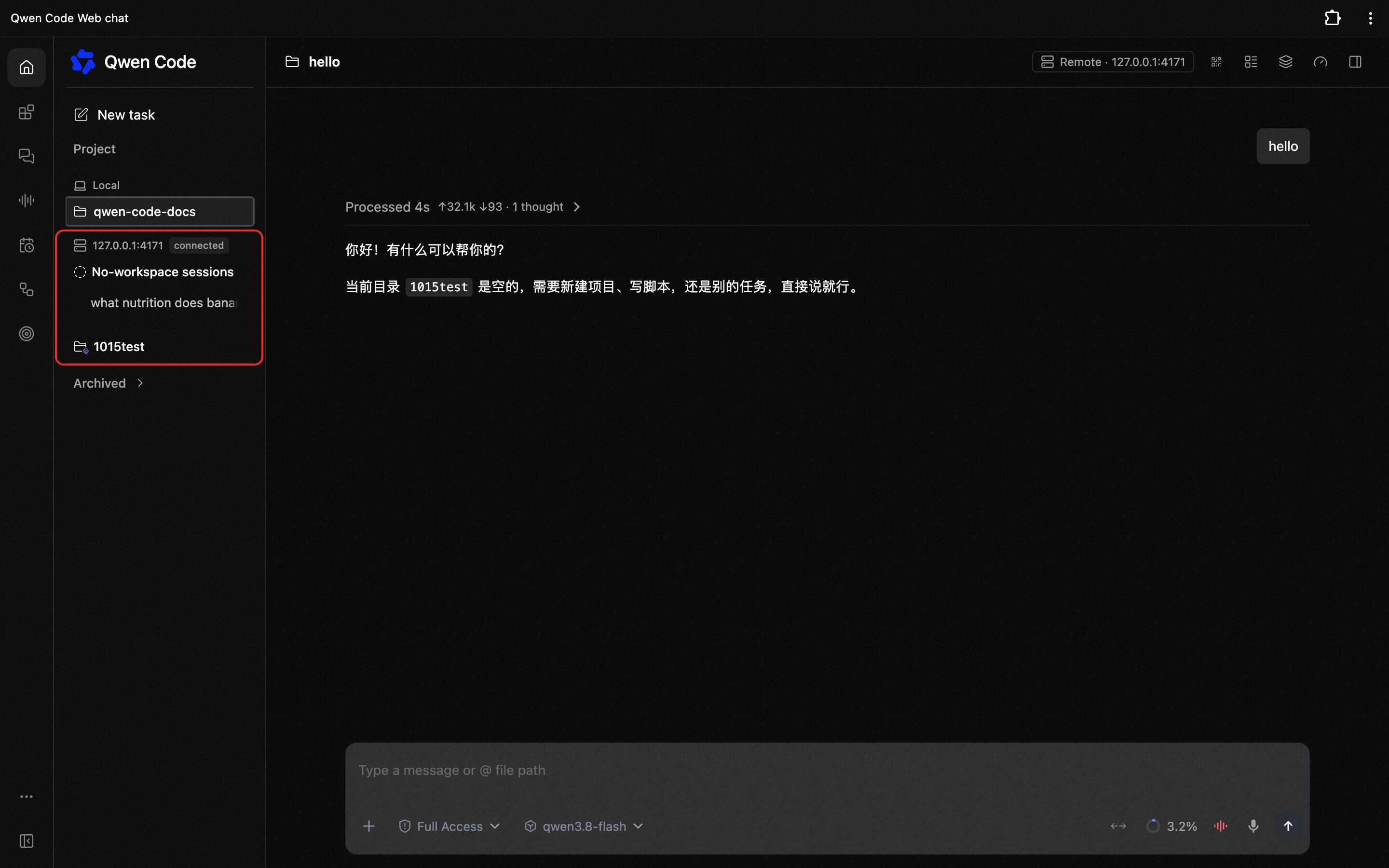
Every Qwen Code you have open stays connected in one page. Each one gets its own group in the sidebar, listing the sessions and workspaces it actually has right now. Switching between them happens inside the page.
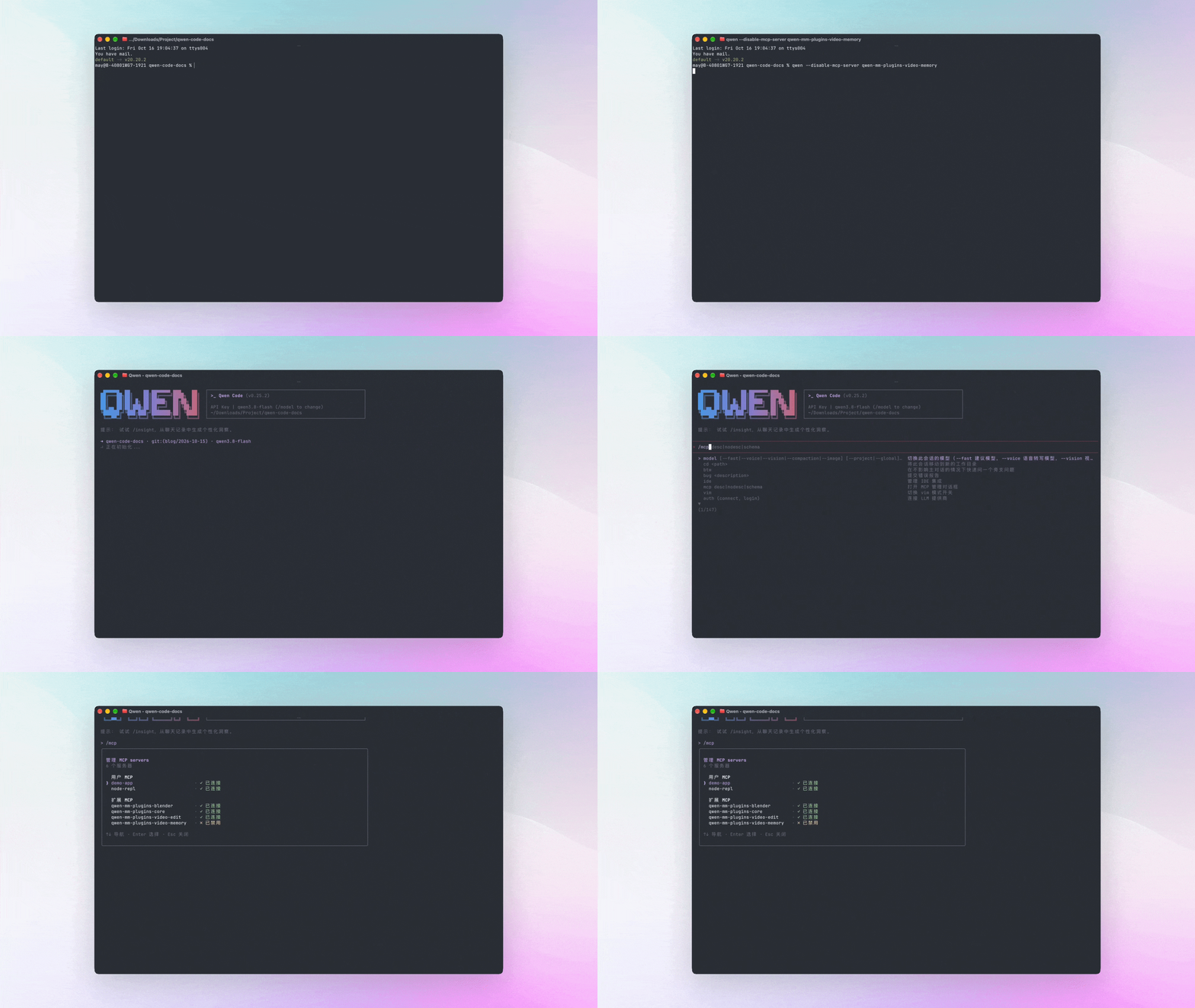
Don’t want an MCP server this time? Name it at startup. qwen --disable-mcp-server <name> affects that run only and leaves your settings file untouched.
✨ New Features
Agent Collaboration: @ Claude Code or Codex into the Conversation as a Teammate
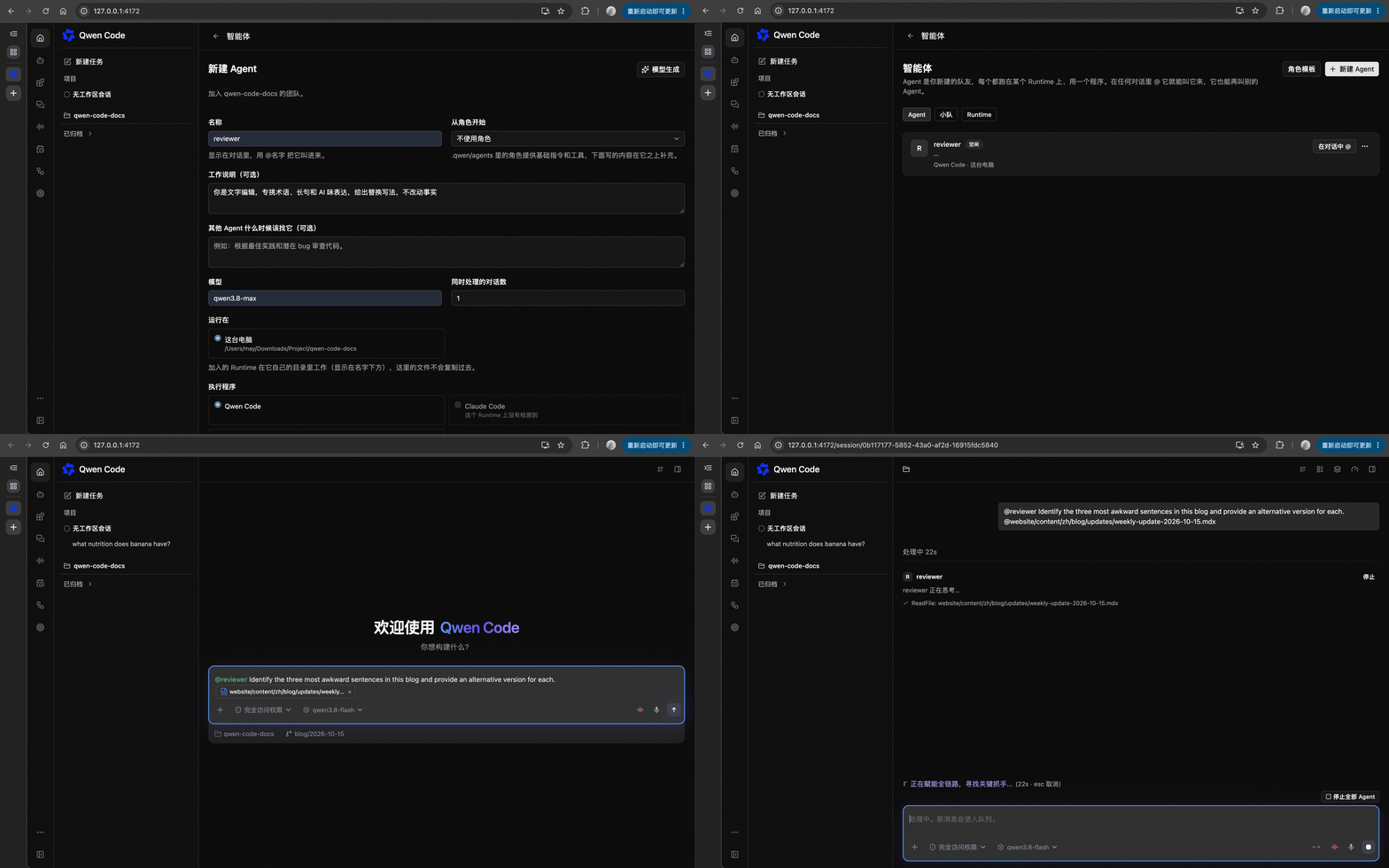
Sometimes you want one job split and run in parallel — it edits the code while another program checks the work. Before, @ an Agent and it opened a separate thread, copied over your last few messages, and threw you to that new page. The main conversation never got its answer.
Now when you @ it, it answers in the conversation you’re in: with a name, the step it’s on, the tools it used, and the token cost. Commands still pop up for your approval. The Agent doesn’t have to be Qwen Code — if you have Claude Code or Codex installed, @ it in and put it to work. See PR #13467
It can also work on another machine. Run the Qwen Code server there, add it as a teammate, and hand the heavy jobs to that box; after that machine reboots, it reconnects on its own. You can @ a whole team too: the leader splits the work and assigns it, and the members report back to the leader. See PR #13583
Here’s how it divides work with sub-agents. A sub-agent runs one small job for it and reports only to it. An @ teammate talks in front of you, can be another vendor’s program, and can sit on another machine.
This is experimental and off by default: turn on Enable Agent Collaboration in settings, then restart. Build the teammate first — create one on the Agents page in the left sidebar. After that, @ its name in any conversation to call it in.
What you can do:
- Have it edit code while you @ another Agent to review it — both lines stay legible in one conversation
- Hand builds and test runs to another machine and keep working here
- Put programs from different vendors on one team, each taking the part it’s good at
Every Qwen Code You’ve Open, Connected in One Page
Some people have a laptop, a box dedicated to builds, and another one holding a long job. Some run a single machine with a separate Qwen Code Web Shell per project, because they don’t want jobs tangling together. Before, a browser page knew about only one of them. Looking at another meant reloading the whole page — a flash, and whatever you’d half-typed was gone.
Now all the ones you’ve saved stay connected at once. Each Qwen Code gets its own group in the sidebar, listing the sessions and workspaces it has right now; when you pick a workspace in the composer, the directories stay sorted by group too. Switching to another group happens inside the page. See PRs #13739 , #13677
The machine being connected to has to let your page in first: start qwen serve with --allow-origin and the address you see in the browser bar.
What you can do:
- A long build runs on that other box while you watch how far it’s got from your own machine
- Open one per project on a single machine — the jobs stay separate and one page shows them all
- Move from the laptop to the desktop and keep assigning work
Drop an MCP Server by Naming It at Startup
Anyone using MCP servers has hit this: one service misbehaves today, tools throw errors or startup gets slow, and all you want is to leave it out this once. Before, the only option was the all-or-nothing switch — turning off the servers from settings along with your local config.
Now you can name it at startup:
qwen --disable-mcp-server githubTo drop several, repeat the flag or write --disable-mcp-server github,postgres. It applies to this startup only; your config file stays untouched. See PR #14003
What you can do:
- Suspect a service — leave it out for one run and see whether the problem goes with it
- Startup dragged down by one service — skip it this time
- Same codebase, one run on the database and one on the web, each carrying only its own servers
Web Shell: Click a Project File to Read It, Land a Follow-up Right Away, Get Pinged When It Needs You
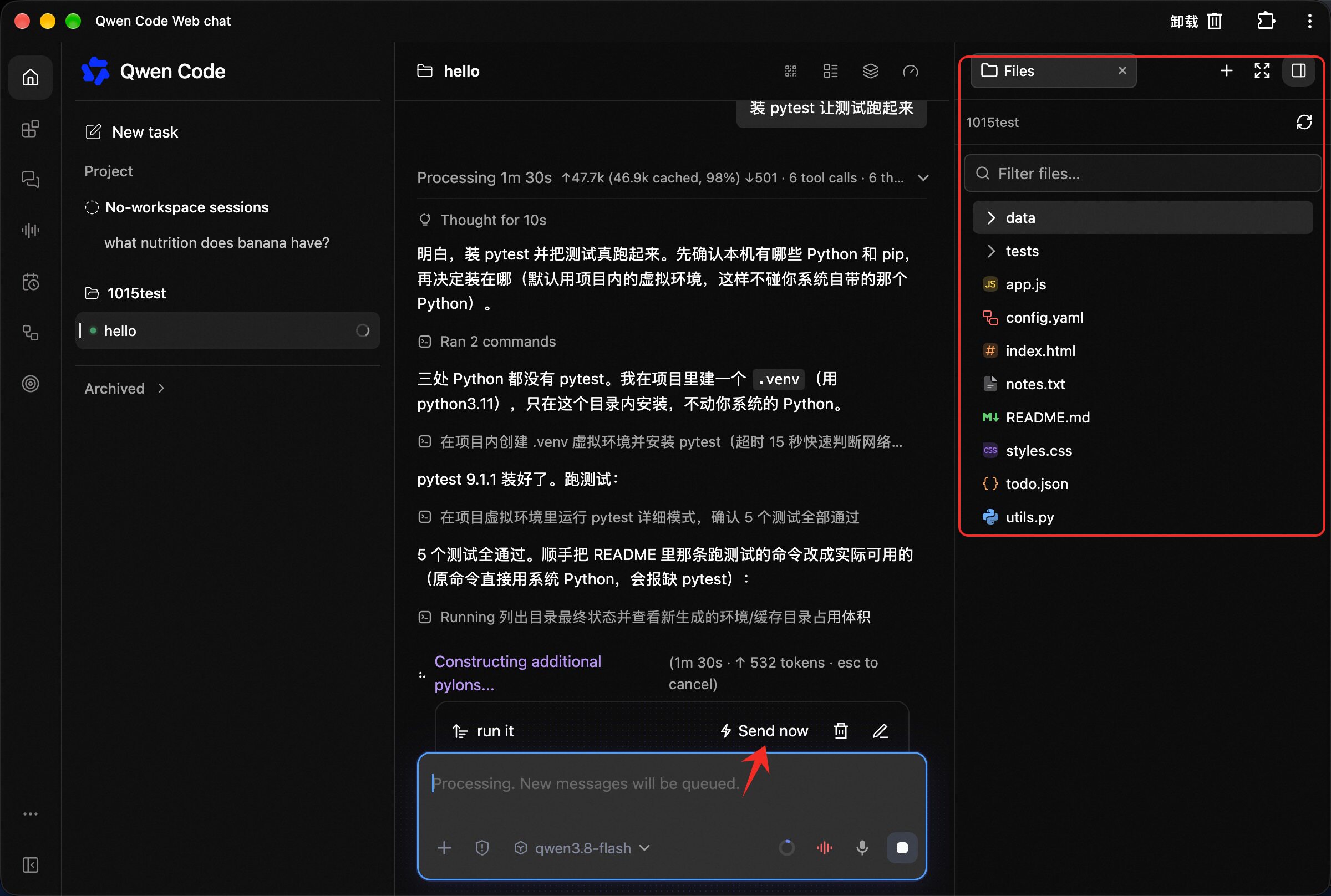
Browse your project’s files in the right panel. The whole workspace directory tree sits there. Click a file and its contents open beside it: Markdown, web pages, images, and Excel all read directly. You can also copy the path, download, or reference it. See PRs #13878 , #13664
Drag a local file in and it uploads. It goes to whichever folder you drop it on. Same in the desktop version. See PRs #14145 , #14053
A queued message can jump the line, and a cancelled one goes back to the composer. Anything you send while it’s answering waits in a queue. Hit Send now to insert it immediately. Press stop before it has output anything, and your message returns to the composer so you can fix it and resend. See PRs #13681 , #13488
It sends a notification when it stops and waits for you. Two cases: it needs you to approve an action, or it asked you something and needs an answer. Both went silent before. Now, as long as the page is in the background, you get a notification, and one click takes you back to that session. See PR #13832
A sub-agent or background task running lights a pulsing dot on the list-style icon at the top of the chat. You see it without opening the panel. See PR #14048
📊 More New Features
Keep looking without giving you a result? It gets reminded to conclude. Once read-only actions — reading files, searching code — pass a certain count, the next round hands it a reminder: use what it already found, push what you asked for one step further, or say where it’s stuck. If the job was to scope things out, state the conclusion and what’s still open. See PR #13601
An interface that comes with an MCP server needs your go-ahead before it posts into the conversation. Some MCP servers give you more than tools — they put a clickable panel in the conversation. When that panel wants to send a message for you, Qwen Code lays out the full content, where it came from, and which conversation it’s headed to. Nothing goes out until you confirm. See PR #13958
Click an agent’s node to see what it did in a workflow. Click an agent on the workflow card in the conversation, on the Tasks page, or on the workflow page, and the right panel opens its run: the prompt it was given, the tools it called, what it’s outputting, and the step it’s on. See PR #14175
The check that runs before it acts can change the arguments for that run. A hook you configure in settings is exactly this check: it fires before a tool gets used. New arguments handed back by that check are re-validated, then go through permissions and confirmation again, before anything actually runs. See PR #13442
A side question can open in another workspace. While the main task is answering, /btw side creates its own conversation in a secondary workspace, so it doesn’t mix into the main thread. See PR #13468
Commands shipped inside Claude-format plugins actually run now. These commands are code, not a prompt for the model. Typing one used to amount to saying something to the model; now the plugin runs it locally and returns the result, spending no tokens. Turn on experimental.mods in settings and trust the workspace — and it only takes effect in one-shot usage like qwen -p '…', not the interactive UI or Web Shell yet. Only part of the Mod interface is implemented, so a ready-made command isn’t guaranteed to run. See PRs #13843 , #13890 , #13915 , #13950
👏 Experience Improvements
On the new-task page, the files panel, terminal, and web preview work before you say a word. The top is a slim toolbar now. Each workspace remembers this layout on its own, so a refresh or a session switch doesn’t lose it. When you send your first message, the tabs, their order, the panel widths, and Fullscreen all carry over to the session that gets created. See PR #14159
The Trajectory tab searches, filters, and pages back through history. Search a tool name, a model name, or any text in the records and it jumps there. Show only one kind of record, or only failures or only successes. Load older records a stretch at a time, and you come back to the newest one — search and stats cover only the stretch you’ve loaded. A mid-run disconnect and reconnect keeps where you stood, what you selected, your filters, and your scroll position. See PRs #13264 , #13716 , #13952
Select part of an answer and choose how it copies. Drag over some text and the menu offers two: plain text, or Markdown with the formatting it was written in — headings, lists, code, and tables come along. See PR #13833
Context usage opens in the right panel on one click, instead of stacking cards in the conversation. Clicking the ring on the composer used to drop a Context Usage card into the conversation, and the details on that card dropped another. Both open in the right panel now, one per session. Want it in the conversation? Type /context. See PR #14086
A wide, long table can go fullscreen. Click Fullscreen on the table and it fills the window. Esc or the exit button brings you back; your sort, filters, column settings, and the row you’d read to are all still there. See PR #13589
Delete a queued message right there, before it goes out. That works for a message whose attachment is still uploading, and the temporary file gets cleaned up with it. See PR #13594
Collapse a turn and the finished background results go into the fold with it. Background task output cards and their completion notifications fold away together. See PR #13825
Voice-input prompts come in Chinese, and an error can be dismissed. Errors and messages like “no audio detected” follow the interface language. Click close in the top-right of the prompt and the mic returns to ready — try again straight away. See PR #13938
Want an independent copy? Selecting Worktree settles it. Click it in the Git dialog and it’s chosen, the menu closes. Only when you send your first message does it name and create that copy, following the session-creation flow; change your mind any time before that. See PR #13607
Icons now match the current brand mark. Changed: the Web Shell’s browser tab icon, the sidebar logo, browser notification icons, and the desktop version’s splash image and app icons. See PR #14052
🔧 Important Fixes
| Fix | What it means for you | PR |
|---|---|---|
| Reopening a long session no longer shows a blank page | The longer the session, the likelier a whole white screen on reopen. Now only the part on screen actually gets drawn, placeholders hold the off-screen positions, and the scrollbar still matches the entire session; one message that won’t render collapses to a single line instead of taking the interface down with it | #13669 |
| Up and down arrows browse what you said again | With an empty composer, the up arrow should page through history. The last few versions spent it scrolling the screen instead — the opposite of what you expected. It’s back to history. Want arrows to scroll the screen? Turn that behavior on separately in settings | #14016 |
| The composer cursor no longer looks gone | It kept blinking, and during the dark half you assumed it had vanished. Now it’s pinned as a solid block | #13693 |
| Configs with an invisible byte-order mark now load | Editors on Windows write one invisible marker at the front of the file. MCP configs, configs imported from Claude, custom commands, and LSP configs all failed to parse. They all read normally now | #13596 , #13711 , #13945 , #13946 |
| Instruction files from directories above the repo stay out | QWEN.md and AGENTS.md up top came along in every request with each repo below them. The upward search now stops at the Git root, and nested instruction files inside the repo still load | #13381 |
| WeChat Channel QR login produces a code again | The request that generates the login QR was missing a required header, so WeChat said the API version had to be upgraded and login never landed. The header is there now | #13482 |
| Installing an extension no longer hangs on a credential prompt you can’t answer | When an extension repo wanted authentication and wasn’t configured, startup stopped at Username for 'https://github.com': — you couldn’t type into it or get past it. It errors out immediately now | #13454 |
| On Windows, a hook no longer minimizes your terminal | Commands written the enterprise-control way shrank the whole terminal window, once per tool call, and on managed machines you couldn’t remove it. Hooks now run in their own hidden window | #13670 |
| A local model over context compacts first, then continues | When the prompt passed the real context ceiling of a local llama.cpp server, the session sat on the same error with no way out. It now recognizes that error, and works out how much to compact from the ceiling the server reports | #13421 , #13788 |
| Artifact cards show the filename, and survive a reconnect | A file recorded into the session displayed the title the model made up, which didn’t match the name on disk; a brief disconnect also wiped cards that had already appeared. Modified files can be downloaded now too | #13672 , #13714 , #13718 |
/workflows shows finished results and failures | After a run, that view carried only status, duration, agent count, and tokens — no output, and no sign of which subtask died. Output, reported failures, and dead agents are all listed now | #13646 |
| Browser Use says plainly that Windows isn’t supported | Before, it told you to install something you can’t install. Now it states it’s unsupported and that you need macOS or Linux. When it can’t reach the host, you’re not left waiting | #13675 , #13699 |
| An MCP server that starts on demand brings its own tools | Some servers come up when a resource is read. They served that one read but never discovered their tools, so the server looked like it had none. Discovery now runs once more | #13806 , #13828 |
| One MCP server’s permission no longer leaks to another | An allow rule written for one server could, through a matching name, let another server through too. It’s judged by the server’s original registered identity now | #12531 |
| A destructive command blocked again and again comes to you | In auto mode, when the same kind of command is blocked three times running, or twenty times across the session, it goes to a confirmation that needs your own yes | #13636 |
| Editing a file no longer eats the blank line next to it | Editing by approximate position deleted the adjacent blank line and got line boundaries wrong. Matching is whole-line now | #13484 |
| @ file references with Chinese or emoji no longer drop characters | Typing @ to reference a file cut the path mid-way when it held Chinese or emoji, losing the rest of the characters | #13866 |
| Retired built-in models are no longer listed in settings | The model couldn’t be used anymore but stayed in the list, and picking it bought you nothing. It’s tucked away now; sessions already running it still see which model they’re on | #13971 |
| Turning off auto-update really means no install | Asked to update in non-interactive usage, it went around that switch and checked and installed on its own. Both paths honor the setting now | #13665 |
| A leftover thinking marker at the end of an answer is gone | An empty closing tag hung at the end of the body | #13600 |
| A tool call written inside an argument isn’t executed | Text shaped like a call, sitting inside an argument value, was dispatched as a real call. In the other direction, a string written entirely as a function call stayed put in the answer text | #13515 , #13437 |
| Conversations in the VS Code extension stop crowding storage | Conversation content lived in the extension’s global record, and a pile of them hit the capacity limit. Each conversation is stored as its own file now | #14285 |
| A failed start reports an error instead of just exiting | When a child process that should have been spawned didn’t come up, the command line exited silently and you saw nothing | #13077 |
| After you approve, it follows the matching action | You answered one question and the interface jumped to a different action. It now lands on the one that question belongs to | #13609 |
| The runtime bundled in the Linux desktop package stays intact | The AppImage build had its own bundled runtime replaced, so the install wouldn’t start | #13695 |
👥 Contributors
| Contributor | Contributions | PR Links |
|---|---|---|
| @wenshao | Send now on queued messages, a cancelled message returned to the composer, fullscreen tables, side questions in a secondary workspace, Worktree selection taking effect directly, and full record and restore for the managed runtime | #13681 , #13488 , #13589 , #13468 , #13607 , #13265 |
| @yiliang114 | @ a teammate into the conversation (across programs, across machines, as a team), several Qwen Code instances connected in one page, one sidebar group per instance, naming an MCP server to leave out at startup, the wrap-up reminder after read-only searching, WeChat login QR, hooks running in a hidden window on Windows, destructive commands escalated to a human after repeated blocks, MCP permissions judged by original server identity, leftover thinking markers cleaned up, and Browser Use errors and waiting closed out | #13467 , #13583 , #13739 , #13677 , #14003 , #13601 , #13482 , #13670 , #13636 , #12531 |
| 🆕 @dakjdakd | 🎉 First contribution: @ file references keeping the whole path when it holds Chinese or emoji, Python finding the command it should use on Windows, and connections created after a release and destroy | #13866 , #13862 , #13864 |
| @doudouOUC | One full read holding to the same already-open file, file permissions preserved when saving settings, and session lifecycle and persistence closed out for the managed runtime | #13776 , #13293 , #13750 , #14069 |
| @qqqys | Commands from Mods plugins made executable, TypeScript typing and config validation, hooks rewriting arguments with re-validation, Trajectory search, filters, and older windows, workflow details listing output and failures, clicking an agent in a workflow, and MCP App messages reviewed before submission | #13843 , #13890 , #13442 , #13264 , #13716 , #14175 , #13958 , #13646 |
| @ytahdn | Workspace file browsing and preview in the Web Shell, drag-into-the-file-tree upload, read-only Excel preview, notifications when waiting for approval or an answer, copying a selection from an answer as written, background results folding with the turn, and localized voice-input prompts | #13878 , #14145 , #13664 , #13832 , #13833 , #13825 , #13938 |
| @Bug-killer-prog | Invisible byte-order marks in MCP configs and imported configs, the same marks in TOML command conversion, pasting in vim mode on Windows, and retired built-in models tucked out of settings | #13596 , #13711 , #13975 , #13198 , #13971 |
| @chiga0 | Drawing only the on-screen portion when reopening a long session, up and down arrows back to input history, the composer cursor pinned solid, and dialog position aligned with completion truncation | #13669 , #14016 , #13693 , #12559 |
| 🆕 @GoldArowana | 🎉 First contribution: adjacent blank lines preserved when editing files, long record reads stopped by budget, monitor startup failures reported as tool errors, and code fences recognized only on paired lines | #13484 , #13486 , #13460 , #13331 |
| @pomelo-nwu | The context ring opening in the right panel, the desktop version catching files dragged in from the system, and icons switched to the current brand mark | #14086 , #14053 , #14052 |
| @jabrailkhalil | Text preserved in Feishu messages, and files that failed to write cleaned up | #13337 , #13147 |
| @Shizoqua | TOML custom commands and .lsp.json readable with a byte-order mark, and each MCP tool’s figure in the /context details adding up to the total line | #13945 , #13946 , #13390 |
| @zjgzx1988 | Artifact cards named by filename, locally published files not left as long-term copies, and artifact descriptions moved out of the tool description | #13672 , #12395 , #14206 |
| 🆕 @zonemeen | 🎉 First contribution: port conflicts in container tests fixed, and cleanup of the images used by checks closed out | #13569 , #13686 |
| 🆕 @fengyue-xve | 🎉 First contribution: updates in non-interactive usage also honoring the auto-update switch, and the turn’s tool results owned by one place | #13665 , #13666 |
| 🆕 @LUOSENGWA | 🎉 First contribution: a troubleshooting entry for connections reset on certain networks, and the docs for pending prompt events completed | #13235 , #13281 |
| 🆕 @agammann | 🎉 First contribution: the upward search for instruction files stopping at the Git root | #13381 |
| @Andrea-Bruno | Concurrency caps for foreground sub-agents, set per model | #12461 |
| 🆕 @beibeihk | 🎉 First contribution: memory index entries skipped whole when over budget, with the complete entries behind them still available in order | #13315 |
| @callmeYe | Extension directories loaded in parallel in bounded batches | #13379 |
| 🆕 @drakeo338 | 🎉 First contribution: an error instead of a silent exit when a child process won’t start | #13077 |
| 🆕 @hahahahahayesyeseys | 🎉 First contribution: the Linux desktop package keeping its bundled runtime | #13695 |
| 🆕 @Jay0130-a | 🎉 First contribution: desktop release notes anchored to the previous desktop release | #13960 |
| 🆕 @jayfeng7 | 🎉 First contribution: tests added for a turn reclaimed before it wraps up | #13257 |
| 🆕 @loglapa | 🎉 First contribution: the size bound on history responses pinned down | #14111 |
| 🆕 @MohammedAlkindi | 🎉 First contribution: a slash command accounting for its own dispatch | #12960 |
| 🆕 @pulkitchowdry | 🎉 First contribution: SerpApi added to the web search service list | #13104 |
| @shenyankm | The editor side declaring only the dynamic-registration capabilities it supports | #13494 |
| 🆕 @shpaker | 🎉 First contribution: the desktop “latest” release notes pointing at the current version | #13900 |
| @sxh313 | Plain-text tool previews no longer carrying terminal control characters | #12751 |
| @tonydzi | The Linux desktop release leg locking a system library floor | #13616 |
| 🆕 @yanyukang2003-ux | 🎉 First contribution: comma-separated tool lists in mcp add split apart | #12985 |
| 🆕 @Zhangchenhao-111 | 🎉 First contribution: the meaning of an empty tool list spelled out in each language SDK | #13949 |
| 🆕 @ZedingZhang | 🎉 First contribution: a 404 for a tool publish receipt that can’t be found | #13602 |
| @qwen-code-dev-bot | Flaky failures in automated checks retried, disk reclaim and a gate in the release step, and the npm package size cap raised | #13512 , #13481 , #14066 |
Upgrade: Run npm i @qwen-code/qwen-code@latest -g to upgrade to the latest version.
If you have questions or feedback, feel free to open an issue on GitHub Issues !